5
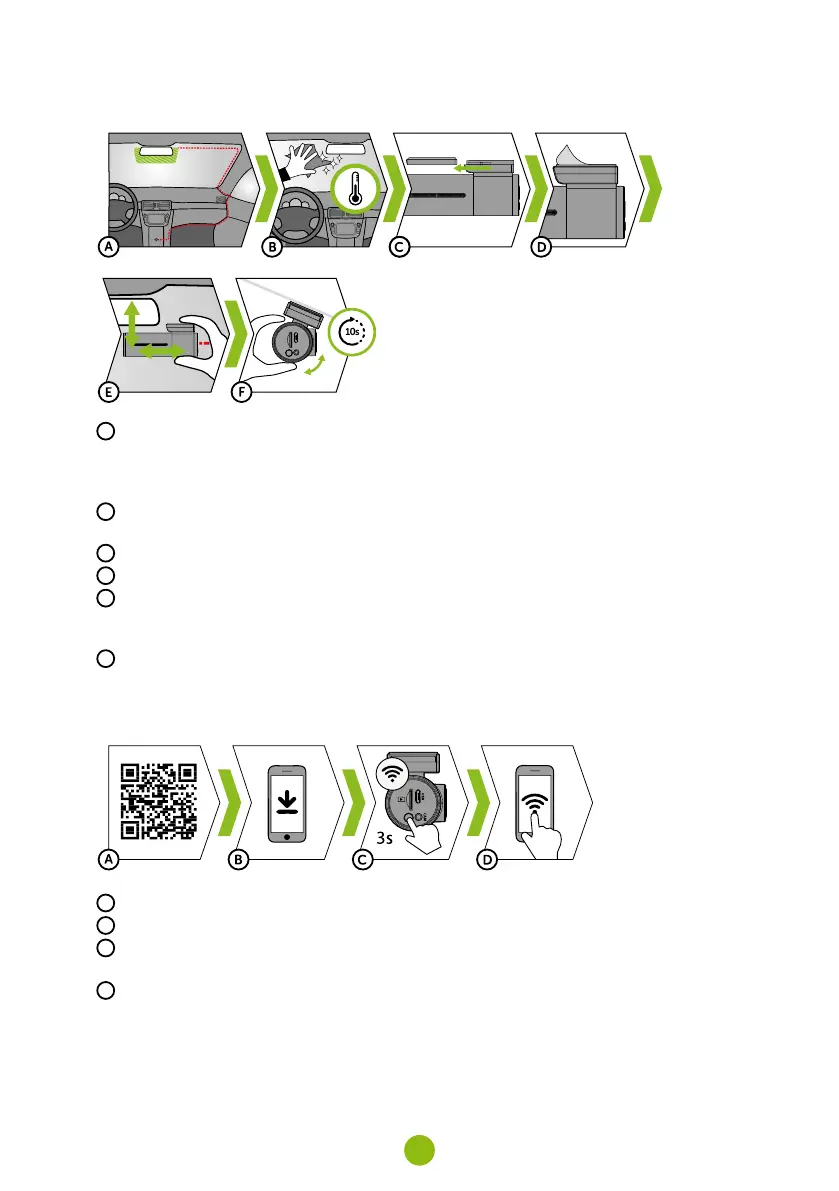
5. PLACEMENT ON GLASS / SAFETY PRECAUTIONS
A
The ideal place to mount your camera is the space between the windscreen and the rear-view mirror
so as not to obstruct the driver‘s view.
›
When installing, make sure that the cable does not interfere with the active safety features in the
car (airbag).
B
Make sure that the glass is clean and dry at the attachment point.
›
The ideal bonding temperature is 20°C – 40°C.
C
Slide the camera into the mount.
D
Remove the film from 3M adhesive pad on the camera holder.
E
Press the 3M adhesive pad onto the glass and hold it for a while.
›
You can attach the electrostatic sticker between the 3M sticker and the windshield for easier
removal of the holder.
F
Connect to the mobile app and use the video preview to point the camera so that part of the bonnet
can be seen.
6. WIFI APPLICATION
A
Scan the QR code or enter the URL truecam.com/h7/app.
B
Install the app on your smart device.
C
Turn on WiFi on the camera by holding the WiFi button (3s) on the camera -> the camera will sound
when the WiFi turns on.
D
On your smart device connect to the WiFi network with the camera‘s name, enter the password
(factory default is 12345678), launch the application and connect to the camera.



 To Next Page