6
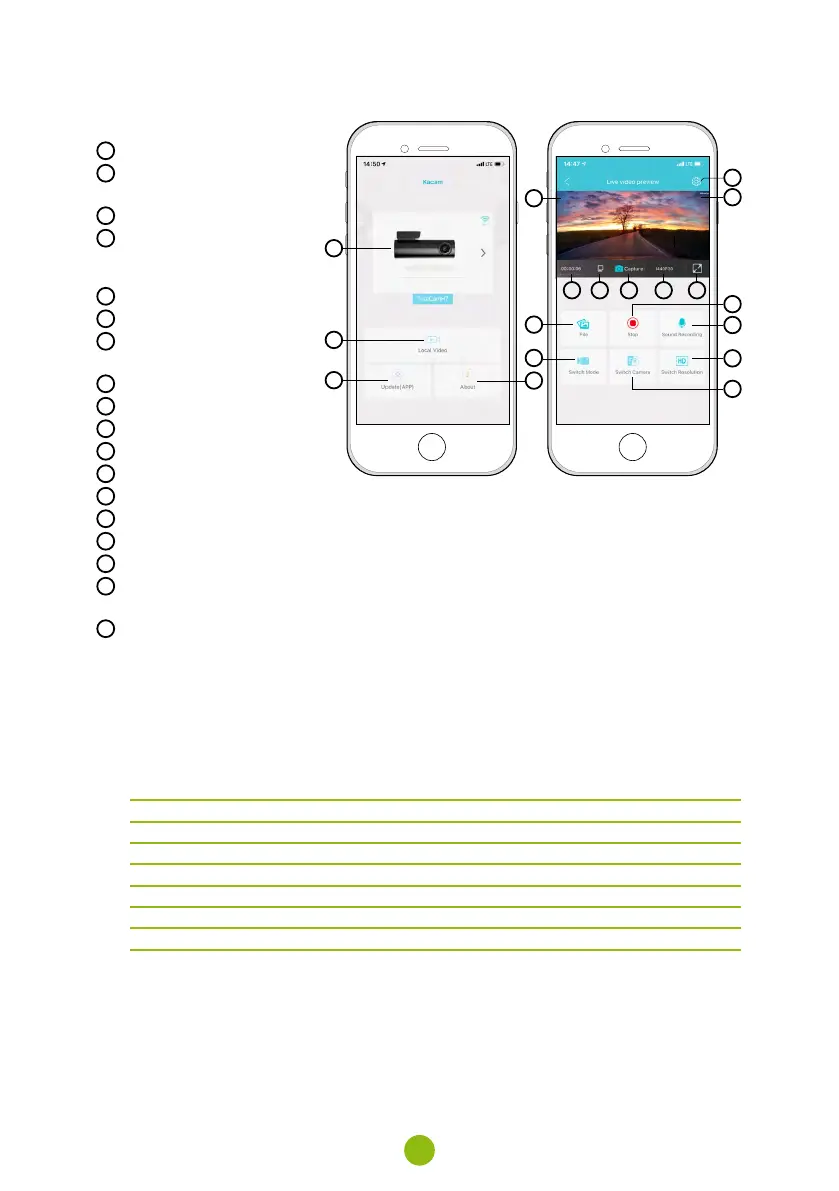
APP CONTROLS:
WITHOUT CONNECTION
E
Connect the dashcam
F
Files downloaded to smart
device
G
Update app
H
App info
WITH CONNECTION
I
Disconnect the camera
J
Camera settings (see chapter 8)
K
F = front camera preview
R = rear camera preview
L
Video recording time
M
MicroSD card status
N
Take a photo
O
Resolution settings
P
Switch to full screen mode
Q
Files on the camera
R
Start/stop recording
S
Enable/disable audio recording
T
Change mode (inactive)
U
Switch between front/rear
camera preview
V
Change resolution
E
Q
T
I
L M N O P
F
G
H
V
S
J
R
U
K
L M N O P
7. SPEED CAMERA REPORTING
›
Built-in GPS module records speed, GPS coordinates and alerts you to fixed speed cameras and
red light cameras.
›
The database contains more than 40,000 fixed speed cameras across Europe.
›
The audio alert can be set to voice or tone.
›
The language of the voice alert works according to the following table:
Mobile app language Camera language Voice alert language
EN EN EN
DE DE DE
CZ CZ CZ
SK SK CZ
PL PL PL
HU HU EN
TONE ALERTS:
›
Approaching speed camera – distinct beep.
›
At the location of the speed camera and beginning/end of average speed measurement – short
beep.



 To Next Page