7
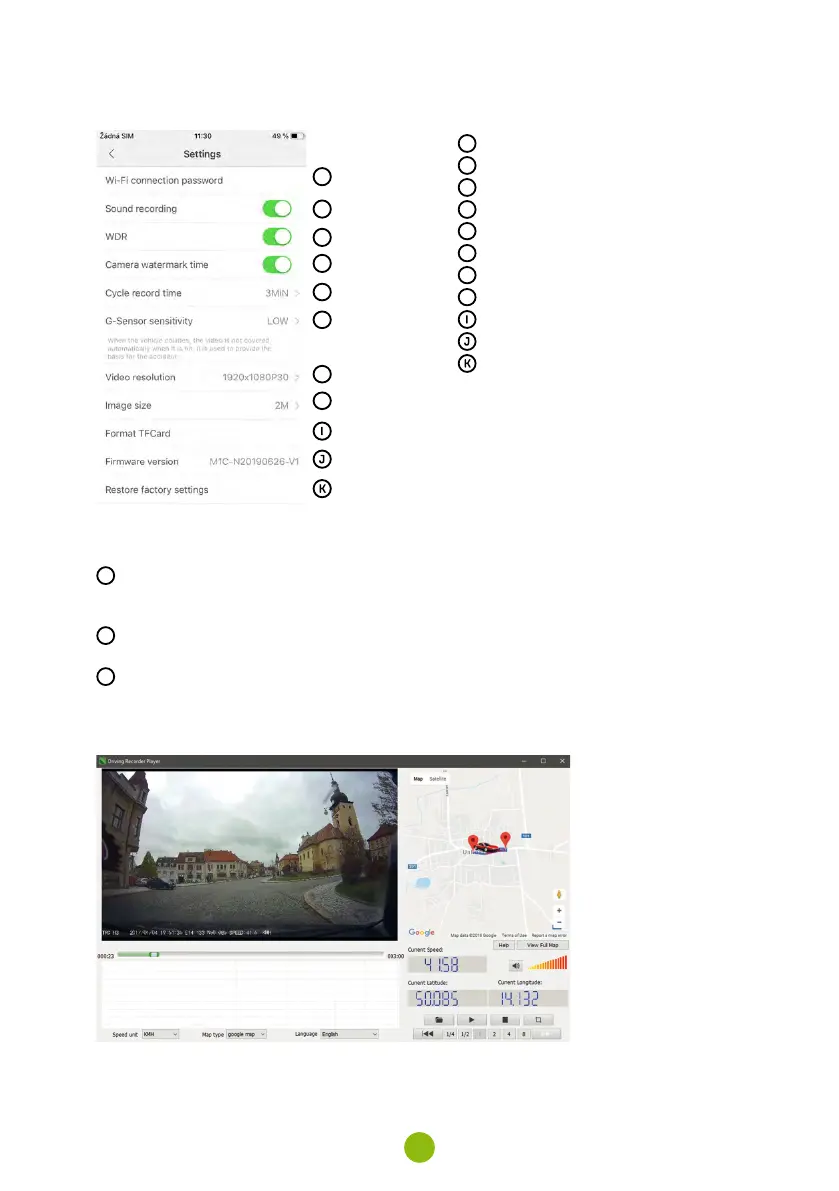
camera settinGs in antscam aPP
A
B
C
D
E
F
G
H
A
WiFi password
B
Record audio
C
WDR (wide dynamic range)
D
Date stamp
E
Loop recording
F
G-sensor sensitivity
G
Video resolution
H
Photo resolution
Format memory card
Firmware version
Default settings
9. recordinG onto a Pc
A
Remove the Micro SD card when the camera is off and insert it into the computer
›
Depending on the computer equipment, either directly, using a Micro SD/SD adapter or a Micro
SD/USB adapter (included)
B
Open the removable disk folder and play a file
›
Any regular video player can be used
C
Use a special player to play videos, including data, from the optional GPS module
›
At the same time as the video, you can view the speed travelled, the GPS coordinates and direc-
tions on the map
›
The app is available at http://truecam.com/download/M5W_player.zip



 To Next Page