Support: 855-473-7449 or 408-943-4100 Email: support@ixsystems.com
Page 7
3.1 Installing Memory
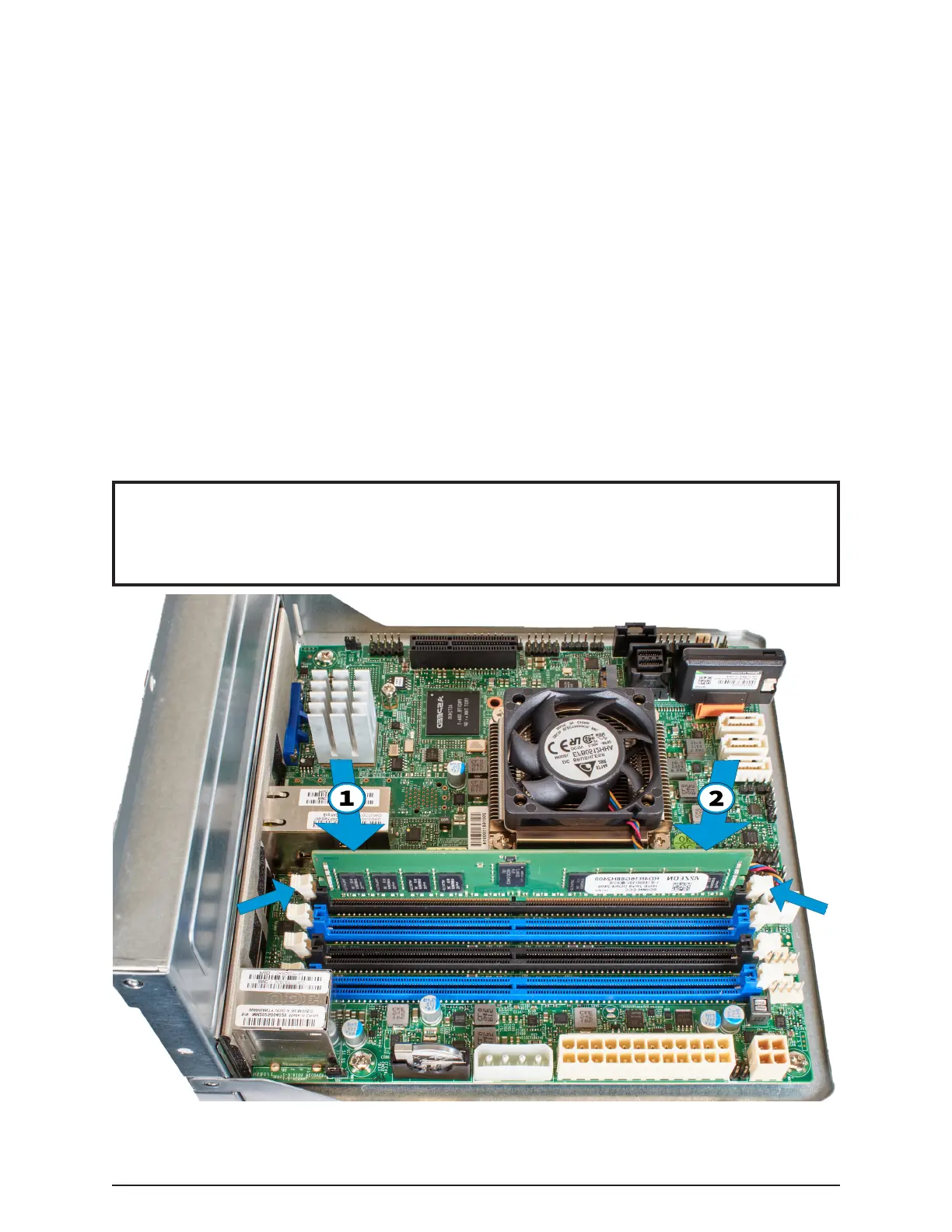
Memory is installed as same-capacity pairs in the matching color slots. Systems
typically have memory already installed in the blue sockets, with the black slots
reserved for additional memory.
Touch the metal chassis to discharge any static, then open the plastic package con-
taining a memory module. Avoid touching the gold edge connector on the module.
Line up the notch in the bottom of the memory module with the key in the socket.
The notch is oset to one end. If the notch does not line up with the key built into
the socket, ip the memory module around end-to-end.
Gently guide the module into the slot, pressing down on one end of the module
until the hinged latch swings in, locking into place. Press down on the other end
until that latch also locks into place. Repeat this process for each memory module
to install.
Prepare the motherboard by pushing down on the memory latches to open them.
These latches re-close as the memory is pushed into the motherboard slot, secur-
ing the memory in module in place.
Note
This image shows the motherboard with all of the obstructing cables removed. If
you have to remove any cables to better access the memory slots, be sure to re-
add them when nished installing the memory modules.


 To Next Page