Accessing the filter chamber
-Always power off the purifier by pressing the Power Button and unplugging the power
cord.
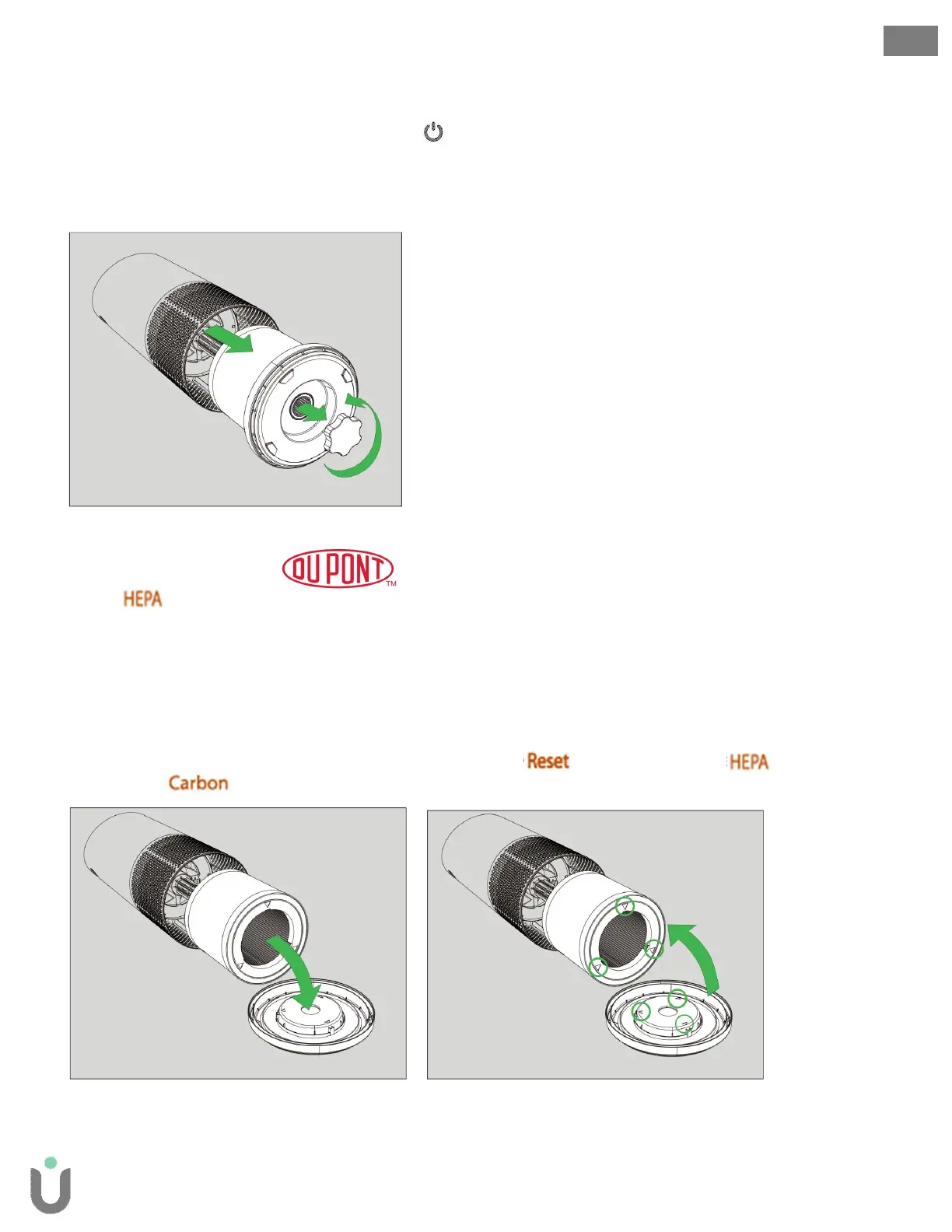
-Gently place the unit on its side so that the filter chamber cover and knob are exposed.
-Turn the knob counter-clockwise and remove (Fig A).
-Gently remove the filter chamber cover and the 360° HEPA filter drum that is attached (Fig. B).
11
ENG
Filter Change and Maintenance
Replacing the 360° HEPA filter drum
1. The indicator will glow red when it is time to change the entire HEPA drum filter.
2. Gently pull the HEPA drum filter away from its place secured to the filter chamber cover (Fig. C).
3. Your replacement HEPA filter will include all layers: Washable Prefilter, Carbon, and HEPA.
4. Use the directional arrows to align the replacement HEPA drum and secure it onto the filter chamber
cover (Fig. D).
5. Gently replace the filter drum and filter cover into the filter chamber and onto the threading (Fig. E).
6. Turn the knob clockwise until the knob and filter chamber cover are securely tightened (Fig. F).
7. After plugging-in and powering-on the purifier, hold the button until the red indicator
turns off. (If the indicator is also Red, you’ll need to reset that as well).
Fig. A Fig. B
Fig. C Fig. D


 To Next Page