Control Panel
Power Button
Fan Speed Settings
Select fan speed or AUTO mode.
In AUTO mode, purifier automatically adjusts fan speed based on air quality readings from SensorPod.
(AUTO mode only available when purifier is paired with SensorPod and receiving signal.)
Dimmer Mode
Display illumination turns off – for use while sleeping.
Simply press the button again to bring back all display features.
(Purifier will continue operating at fan speed or AUTO mode as selected by user.)
Timer Mode
Purifier will automatically turn off after 2, 4, 8, or 12 hours.
To cancel this countdown, simply cycle by pressing button until no timer setting is displayed.
UV Mode
UV lamp within the purifier’s filter chamber is on when symbol is white.
symbol will glow red when it is time to replace the UV lamp. See pages 7-8 for instructions.
Filter and UV Indicator Reset
HEPA, Carbon, and UV indicators glow red when it is time for each to be replaced. See pages 7-8 for instructions.
When 1 indicator is on, simply hold Reset button for 3 seconds to reset that indicator.
When 2+ indicators are on, press the Reset button to select the correct indicator (selected indicator will blink)
before holding 3 seconds to reset that indicator.
8
ENG
The revolutionary remote SensorPod evaluates the condition of your air by measuring both small (PM2.5) and
larger (PM10) particulate matter. It calculates the overall air quality using a proprietary algorithm that is
reactive to genuine increases in pollutants without overreacting to someone entering the room or settling into
the couch.
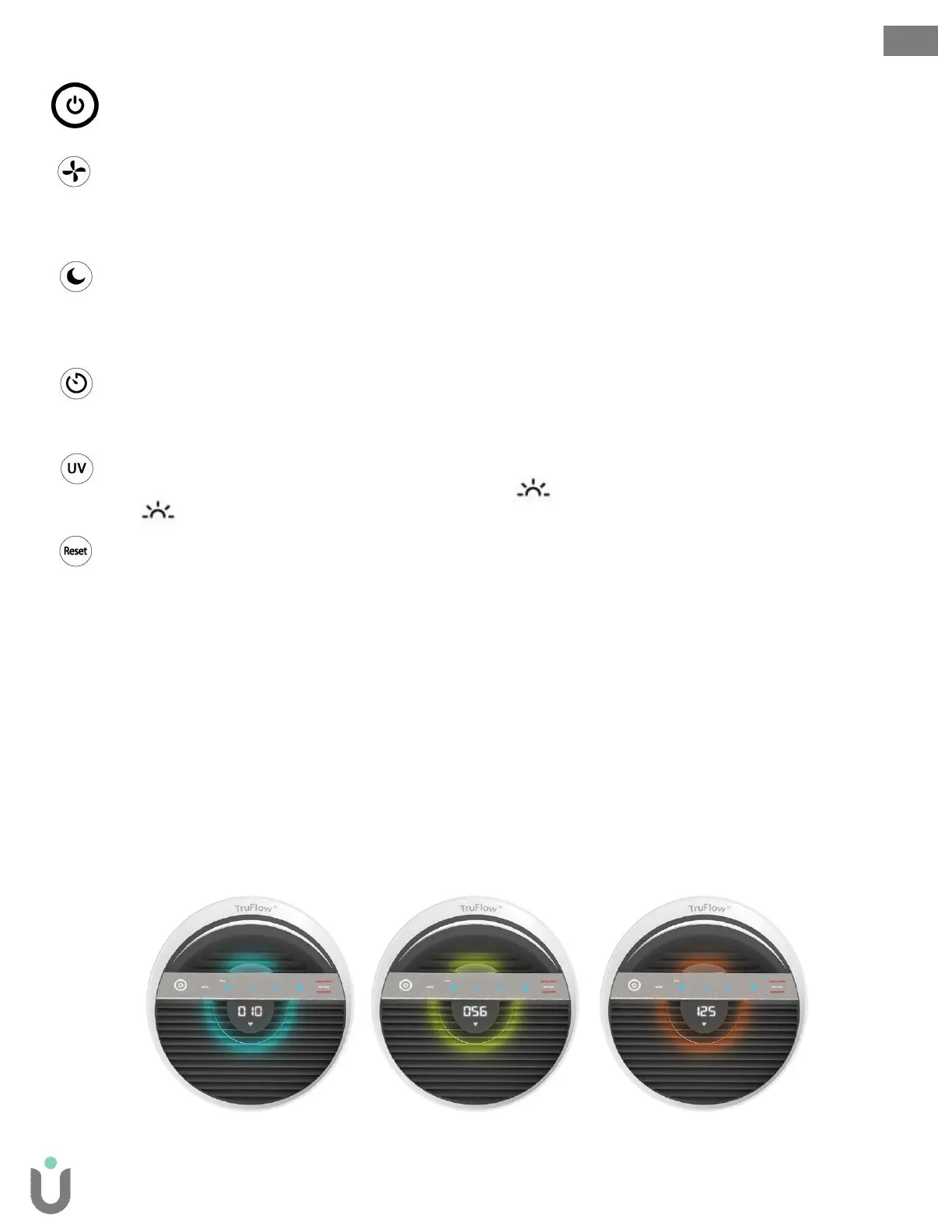
An illuminated ring on the purifier’s control panel communicates your air quality levels with color, while a
numeric value provides greater detail.
Good Air Quality
0 - 50
Moderate Air Quality
51 - 100
Poor Air Quality
101 - 500
Real-time air quality feedback
TruSens utilizes the Air Quality Index (1-500) created by the U.S. Environmental Protection Agency
(EPA).


 To Next Page