EasyManua.ls Logo

TSI Incorporated DUSTTRAK DRX 8533 - User Manual

TSI Incorporated DUSTTRAK DRX 8533
85 pages
Print Icon
To Next Page IconTo Next Page
Loading...
DUSTTRAK™ DRX
AEROSOL MONITOR
MODEL 8533/8534/8533EP
OPERATION AND SERVICE MANUAL
P/N 6001898, REVISION L
DECEMBER 2014
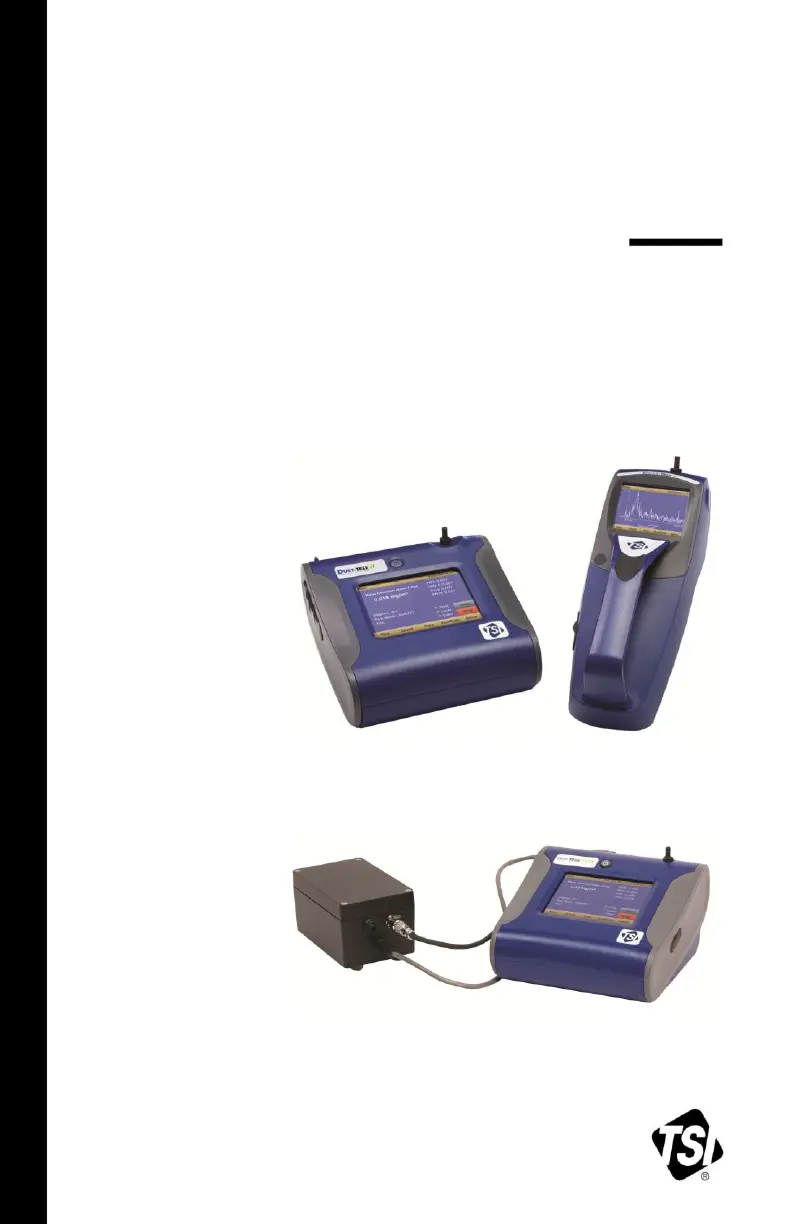
DustTrak DRX 8533 Desktop and 8534 Handheld
DustTrak DRX 8533EP Monitor

Table of Contents

Questions and Answers

  • N
    Nancy SmithSep 4, 2025
    What does 'Filter Error' mean on TSI Incorporated Measuring Instruments?
    • N
      Nicole Scott DDSSep 4, 2025
      If your TSI Incorporated Measuring Instruments shows a 'Filter Error', it means the filters need replacement. Replace the filters following the instructions in the maintenance section of this manual. Remember to reset the filter mass and date after changing the filters.
  • B
    Brandi EnglishSep 18, 2025
    What does 'Run Mode Error: The selected log mode will exceed the allowed number of samples' mean on TSI Incorporated Measuring Instruments?
    • T
      Thomas SchroederSep 18, 2025
      If your TSI Incorporated Measuring Instruments displays 'Run Mode Error: The selected log mode will exceed the allowed number of samples', it means the selected Run Mode program is programmed to save more samples than there is room in memory. Reduce the number of samples by reducing the test length or increasing the logging interval.
  • D
    davisjuanSep 16, 2025
    What does 'Run Mode Error: The start time has passed' mean on TSI Incorporated Measuring Instruments?
    • K
      kristimorganSep 16, 2025
      If your TSI Incorporated Measuring Instruments displays 'Run Mode Error: The start time has passed', it means the selected Run Mode program has “Use Start Date” selected, but the start date is prior to the current date. Correct or change the run mode program.
  • T
    Trevor NunezSep 14, 2025
    What to do if I get an error completing Zero Cal on my TSI Incorporated Measuring Instruments?
    • K
      Keith GreenSep 14, 2025
      If you receive an error completing Zero Cal on your TSI Incorporated Measuring Instruments, it may be caused by too much light scatter in the optics chamber due to dust deposits. Clean the inlet nozzle. Attach the zero filter and sample for about 2 minutes. During sampling, pulse the flow going into the DustTrak monitor by intermittently plugging the zero filter. Any dust in the optics chamber will break loose during flow pulsations and will be cleared out by the pump. Perform Zero Cal again. If the Zero Cal still cannot be performed, factory service may be required.
  • K
    Kenneth BurnsSep 12, 2025
    Why doesn't my TSI Incorporated Measuring Instruments store new data in survey mode?
    • C
      casey40Sep 13, 2025
      If your TSI Incorporated Measuring Instruments does not store new data, it might be because the instrument is in Survey mode. The instrument does not store data in survey mode. Change to manual or program log mode.
  • J
    juanbergSep 12, 2025
    Why is the analog output not working on my TSI Incorporated Measuring Instruments?
    • T
      Todd AlvaradoSep 12, 2025
      If the analog output of your TSI Incorporated Measuring Instruments isn't working, ensure the cable connector is fully seated. Also, verify that the output is wired with the correct polarity, making sure the analog out (+) and analog ground (-) are correctly wired to the data-logger.
  • C
    Crystal MckenzieSep 9, 2025
    What to do if there is no touch-screen response on my TSI Incorporated Measuring Instruments?
    • T
      Teresa ValdezSep 9, 2025
      If the touch screen on your TSI Incorporated Measuring Instruments isn't responding, it could be because the instrument is currently busy. The instrument requires time to open large data files and save configuration information, and it won't respond to additional touches during this time. Another possibility is that the touchscreen is locked. If the lock in the title bar is red, unlock the instrument following the instructions in Chapter 3, Operation: Title Bar section of this manual.
  • L
    Lisa SilvaSep 7, 2025
    How to troubleshoot erratic zero reading on TSI Incorporated Measuring Instruments?
    • R
      Ruth LarsonSep 7, 2025
      To address an erratic zero reading on your TSI Incorporated Measuring Instruments, start by checking the connections for any leaks. Inspect the inlet port and sample tube for dirt. If internal filters are not installed properly, replace the zero filter and clean the inlet port and tubing. Ensure the filters and o-rings are seated correctly in the internal filter wells, replacing the internal filters if needed.
  • G
    Gary MaxwellSep 5, 2025
    What does 'System Error has Occurred!' mean on TSI Incorporated Measuring Instruments?
    • M
      mary24Sep 5, 2025
      If you encounter a 'System Error' on your TSI Incorporated Measuring Instruments, the processor might not be receiving the expected input. Reboot the instrument. If the error persists, factory service may be required.
  • J
    Jennifer TaylorAug 20, 2025
    Why doesn't the alarm output work on my TSI Incorporated Measuring Instruments?
    • G
      greenandrewAug 21, 2025
      If the alarm output of your TSI Incorporated Measuring Instruments isn't functioning correctly, ensure the alarm function is enabled in the Settings->Alarm screen. Also, verify that the alarm settings are correct within the same screen. Lastly, confirm that the alarm output is wired with the correct polarity, ensuring the voltage input is connected to the alarm input (+).

Summary

Safety Information

Laser Safety

Information on laser safety precautions and hazards.

Chapter 1: Unpacking and Parts Identification

Chapter 2: Setting Up

Powering the DustTrak Monitor

Instructions on powering the DustTrak DRX monitor using batteries or AC adapter.

External Pump Module Connection

Guide for connecting the external pump to the DustTrak Model 8533EP.

Chapter 3: Operation

Setup Menu Details

Explains the functions and information displayed in the Setup Menu.

Zero Calibration Procedure

Step-by-step guide for performing a zero calibration on the instrument.

User Calibration Guide

How to store and use custom calibration factors for the instrument.

Chapter 4: Maintenance

Recommended Maintenance Schedule

Recommended schedule for performing maintenance tasks on the instrument.

Zeroing and Inlet Cleaning

Procedures for zeroing the instrument and cleaning the inlet port.

Internal Filter Replacement

Instructions for replacing the internal filters in the instrument.

External Pump Filter Replacement

Guide for replacing HEPA filters in the external pump module.

Chapter 5: Troubleshooting

Appendix B: DRX Advanced Calibration

Serial Gravimetric Calibration Procedure

Procedure for advanced calibration using a serial gravimetric setup.

Parallel Gravimetric Calibration Procedure

Procedure for advanced calibration using a parallel gravimetric setup.

TSI Incorporated DUSTTRAK DRX 8533 Specifications

General IconGeneral
ModelDUSTTRAK DRX 8533
TypeAerosol Monitor
Measurement PrincipleLight Scattering
Mass Concentration Range0.001 to 150 mg/m³
Data LoggingYes
Storage Temperature-20 to 60 °C
Operating Humidity0 to 95% RH, non-condensing
DisplayColor touch screen
Light SourceLaser Diode
BatteryRechargeable Lithium-Ion
External PowerAC Adapter
Concentration Resolution0.001 mg/m³
Particle Size Range0.1 to 15 μm
Flow Rate3.0 L/min
Operating Temperature0 to 50°C
Zero Stability±0.001 mg/m³

Related product manuals