8 9
E40 - OWNER’S MANUAL ENGLISH
P6-P10: TARGET HEART RATE PROGRAMMES
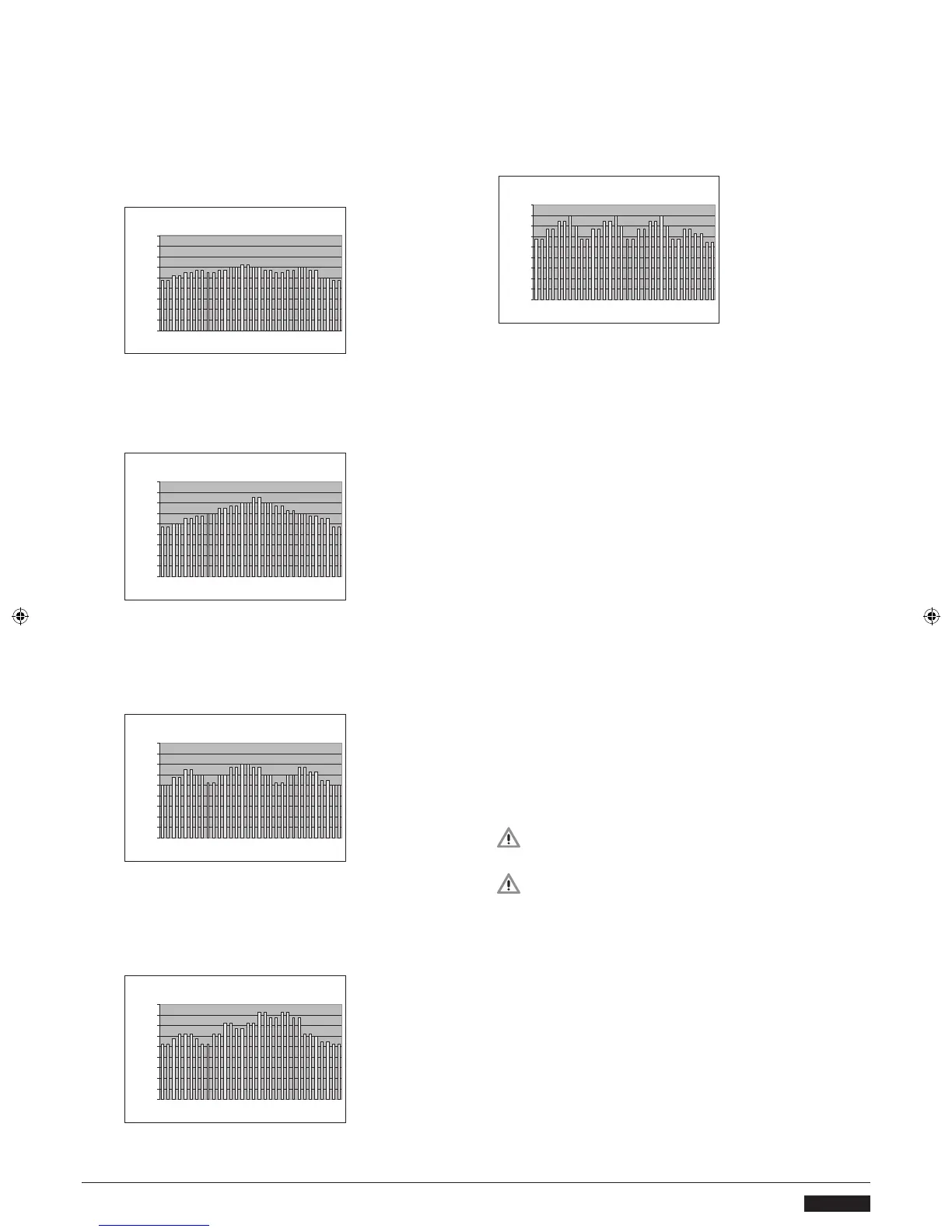
PROFILE P6. 3-peak heart rate prole for the improvement
of oxygen uptake capacity. With
relatively long-lasting peaks, this prole is suitable for
beginners. With default setting, max. HR value is 125,
average HR is 112.
PROFILE P8. 3-peak heart rate prole for the improvement
of endurance tness. Peaks are relatively long-lasting, but
the heart rate level remains fairly constant throughout. This
prole is suitable for all tness levels. With default setting,
max. HR value is 140, average HR is 120.
PROFILE P9. Uphill heart rate prole for the improvement
of endurance tness. Peaks are relatively long-lasting,
increasing in intensity until the closing phase of the prole.
This prole is specically suitable for the physically t. With
default setting, max. HR value is 165, average HR is 131.
PROFILE P10. 3-peak heart rate prole for the improvement
of oxygen uptake capacity. Peaks are relatively long-
lasting, with each followed by a steady recovery period.
This prole is specically suitable for the physically t. With
default setting, max. HR value is 160, average HR is 133.
T-RIDE™
T-RIDE™ TRAINING simulates riding a bike on a natural
terrain. During training, you can change gears using the
selection dial and watch the altitude prole.
1. Select T-RIDE™.
2. Select the terrain and conrm your selection.
3. Set the starting point for the session using the selection
dial.
4. Set the ending point for the session using the selection
dial.
5. Start your training session by pedalling. You can change
gears (1– 6) using the selection dial. During training,
you can display altitude prole or heart rate using the
selection dial. The heart rate display requires heart rate
measurement.
6. Once you have completed the route, the meter beeps
and the training session ends.
7. To stop the training session, press the BACK/STOP button.
You can then stop the session by selecting EXIT, save the
session to the memory by selecting SAVE AND EXIT or
continue your training session by selecting CONTINUE.
OWN TRAINING
You can create and save up to 10 training programmes
into user programmes P1 to P10.
SAVING A PROGRAMME
1. End your training session by pressing BACK/STOP.
2. Select SAVE AND EXIT and conrm your selection.
3. Enter a name for the training session and conrm it using
the selection dial.
IMPORTANT! You can only save programmes that
are longer than 10 minutes.
IMPORTANT! To save a training session you will
need to select a username.
USING SAVED PROGRAMMES
1. Select OWN TRAINING.
2. Select a training session from the list.
Edit = select the duration of the exercise with the
selection dial (set the time to 10 - 180 minutes or
distance 3 -10 km). Start pedalling to begin the exercise.
You can adjust the effort level with the selection dial.
3. To stop the training session, press the BACK/STOP button.
You can then stop the session by selecting EXIT, save the
session to the memory by selecting SAVE AND EXIT or
continue your training session by selecting CONTINUE.


 To Next Page
 Loading...