EasyManua.ls Logo

Tunturi E504 - Page 10

Tunturi E504
14 pages
Print Icon
To Next Page IconTo Next Page
To Previous Page IconTo Previous Page
Loading...
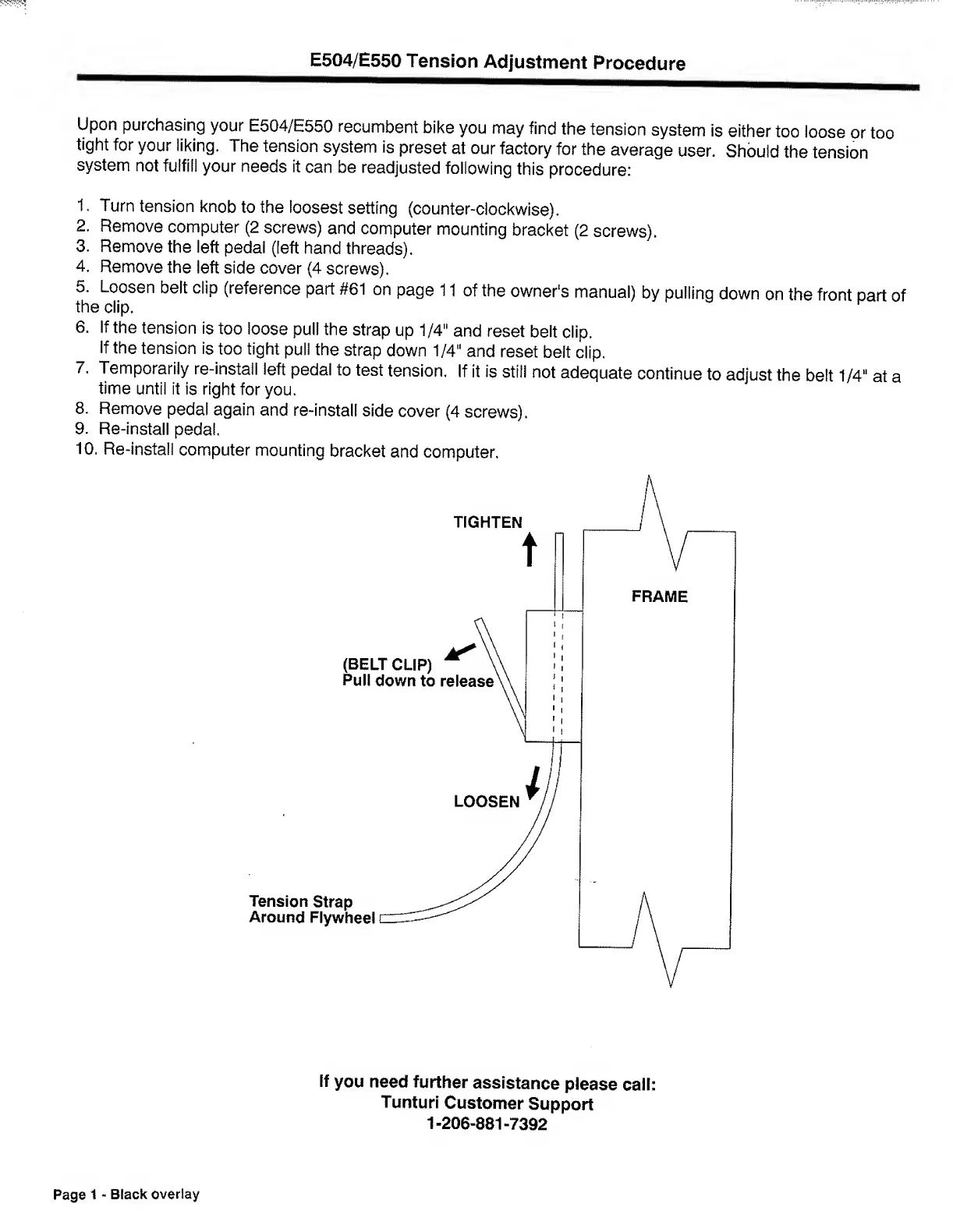
E504/E550
Tension
Adjustment
Procedure
Upon
purchasing
your
E504/E550
recumbent
bike
you
may
find
the
tension
system
is
either
too
loose
or
too
tight
for
your
liking.
The
tension
system
is
preset
at
our
factory
for
the
average
user.
Should
the
tension
system
not
fulfil!
your
needs
it
can
be
readjusted
following
this
procedure:
1.
Turn
tension
knob
to
the
loosest
setting
(counter-clockwise).
2.
Remove
computer
(2
screws)
and
computer
mounting
bracket
(2
screws).
3.
Remove
the
left
pedal
(left
hand
threads).
4.
Remove
the
left
side
cover
(4
screws).
5.
Loosen
belt
clip
(reference
part
#61
on
page
11
of
the
owner's
manual)
by
pulling
down
on
the
front
part
of
the
clip.
6.
If
the
tension
is
too
loose
pull
the
strap
up
1/4"
and
reset
belt
clip.
If
the
tension
is
too
tight
puli
the
strap
down
1/4"
and
reset
belt
clip.
7.
Temporarily
re-install
left
pedal
to
test
tension.
If
it
is
still
not
adequate
continue
to
adjust
the
belt
1/4"
at
a
time
until
it
is
right
for
you.
8.
Remove
pedal
again
and
re-install
side
cover
(4
screws).
9.
Re-install
pedal.
10.
Re-install
computer
mounting
bracket
and
computer.
If
you
need
further
assistance
please
call:
Tunturl
Customer
Support
1-206-881-7392
Page
1
-
Black
overlay

Related product manuals