EasyManua.ls Logo

Tunturi E504 - Operation

Tunturi E504
14 pages
Print Icon
To Next Page IconTo Next Page
To Previous Page IconTo Previous Page
Loading...
OPERATION
TheTunturi
Recumbent
Cycle
lets
you
set
an
exercise
program
that
meets
your
specific
needs.
You
can
determine
the
speed,
time,
and
dis¬
tance
that
you
cycle,
and
monitor
your
heart
rate
during
each
workout.
You
should
be
familiar
with
the
electronics
module
and
its
functions
before
you
begin
exercising.
The
keys
and
LCD
(liquid
crystal
display)
window
perform
the
following
func¬
tions.
Keys
ON/OFF:
Use
this
key
to
turn
the
electronics
module
on
or
off.
When
you
turn
the
power
on,
a
tone
will
sound
and
all
the
symbols
in
the
LCD
window
will
light
for
three
(3)
seconds.
START/STOP:
After
turning
the
elec¬
tronics
module
on,
press
this
key
to
begin
tracking
the
speed,
time,
and
distance
during
your
exercise
ses¬
sion.
If
you
press
the
START/STOP
key
again,
the
value
of
the
selected
mode
will
be
displayed
and
the
other
mode
values
retained
in
memory
un¬
til
you
turn
the
electronics
module
off
or
press
the
RESET
key,
The
word
STOP
will
appear
in
the
LCD
window
when
you
stop
the
electronics
module.
SET:
Pressing
this
key
allows
you
to
preset
your
exercise
time
or
upper
pulse
rate
limit.
To
preset
time
or
up¬
per
pulse
rate
limit,
turn
the
electron¬
ics
module
on
and
make
sure
STOP
is
displayed
in
the
LCD
window.
To
preset
exercise
time:
1.
Press
the
MODE
key
until
the
ar¬
row
in
the
LCD
window
points
to
the
time
mode,
2.
Press
the
SET
key
to
advance
the
preset
time
one
minute.
Hold
down
the
SET
key
to
advance
quickly
to
the
desired
time
(from
0
to
99
minutes),
A
bell
symbol
ap¬
pears
in
the
LCD
window
to
indi¬
cate
that
the
count-down
timer
is
set.
3.
Press
the
START/STOP
key.
The
electronics
module
will
begin
to
count
down
in
seconds.
The
time
remaining
will
be
displayed
in
the
LCD
window.
A
tone
will
sound
when
the
preset
time
reaches
zero
(0:00).
If
you
do
not
preset
your
exercise
time,
the
elapsed
time
will
be
displayed
and
the
bell
symbol
will
not
appear
in
the
LCD
window.
To
preset
the
upper
limit
heart
rate:
1.
Press
the
MODE
key
until
the
ar¬
row
in
the
LCD
window
points
to
the
pulse
set
mode.
2.
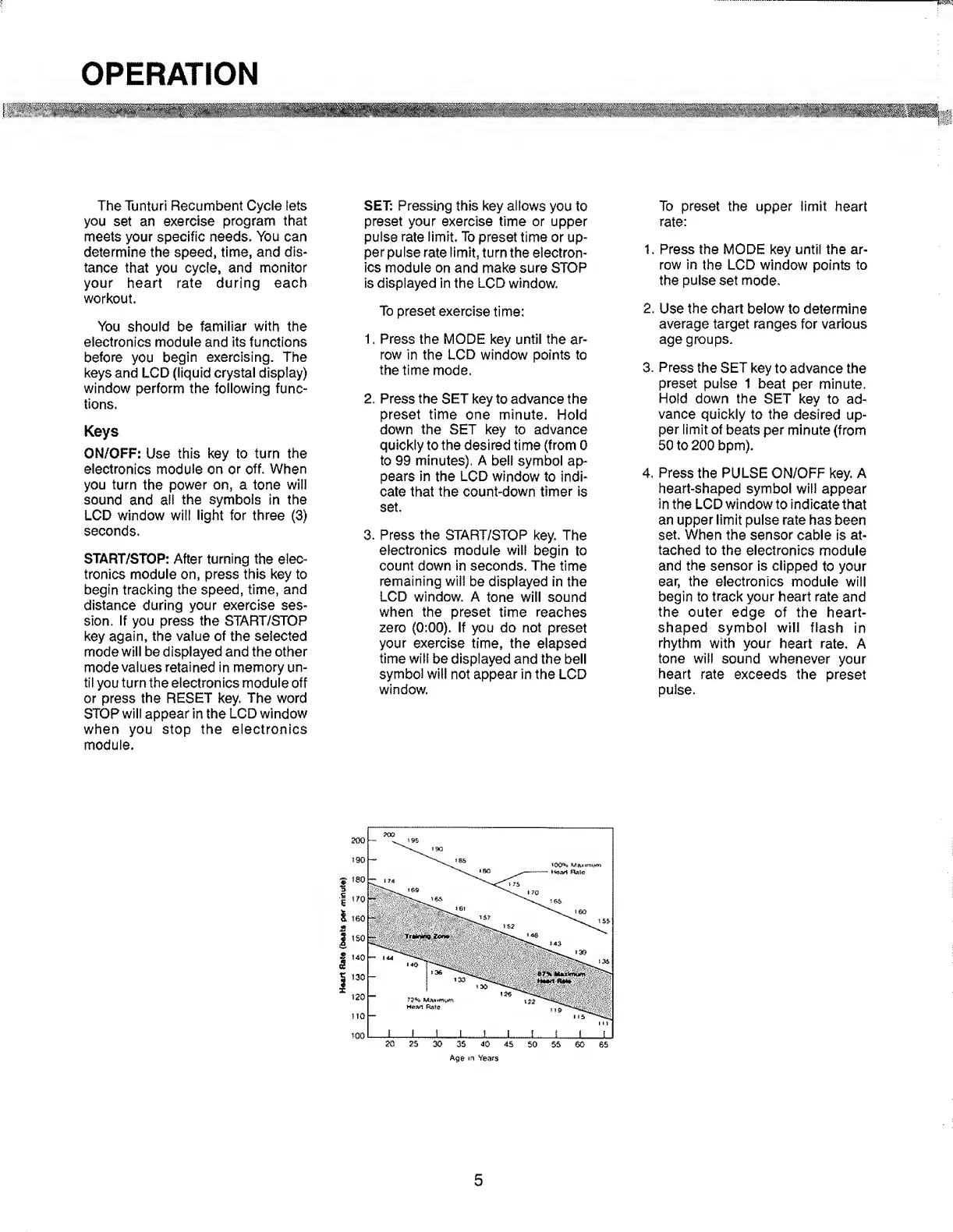
Use
the
chart
below
to
determine
average
target
ranges
for
various
age
groups.
3.
Press
the
SET
key
to
advance
the
preset
pulse
1
beat
per
minute.
Hold
down
the
SET
key
to
ad¬
vance
quickly
to
the
desired
up¬
per
limit
of
beats
per
minute
(from
50
to
200
bpm).
4.
Press
the
PULSE
ON/OFF
key.
A
heart-shaped
symbol
will
appear
in
the
LCD
window
to
indicate
that
an
upper
limit
pulse
rate
has
been
set.
When
the
sensor
cable
is
at¬
tached
to
the
electronics
module
and
the
sensor
is
clipped
to
your
ear,
the
electronics
module
will
begin
to
track
your
heart
rate
and
the
outer
edge
of
the
heart-
shaped
symbol
will
flash
in
rhythm
with
your
heart
rate.
A
tone
will
sound
whenever
your
heart
rate
exceeds
the
preset
pulse.
5

Related product manuals