EasyManua.ls Logo

Tunturi E504 - Page 5

Tunturi E504
14 pages
Print Icon
To Next Page IconTo Next Page
To Previous Page IconTo Previous Page
Loading...
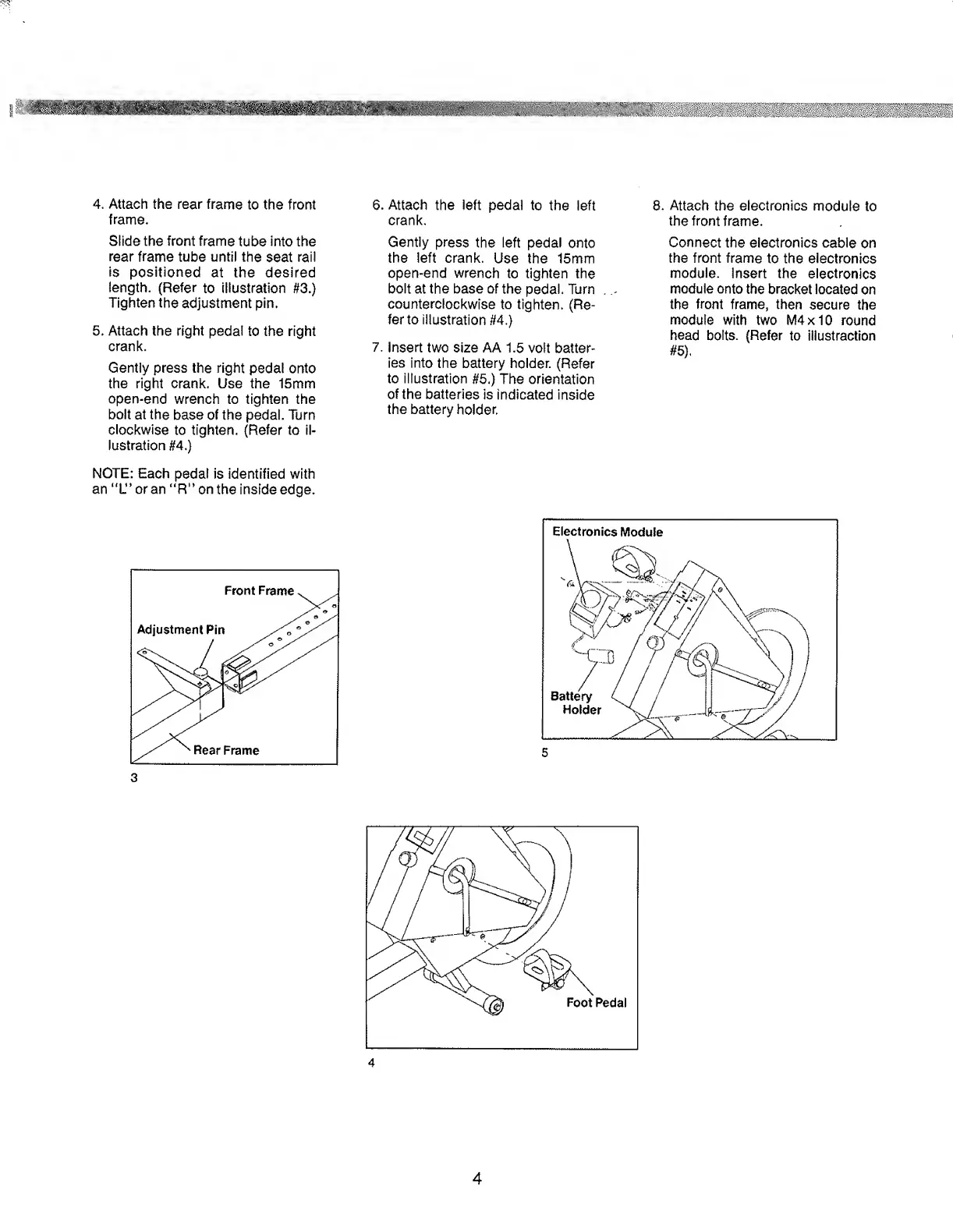
4.
Attach
the
rear
frame
to
the
front
frame.
Slide
the
front
frame
tube
into
the
rear
frame
tube
until
the
seat
rail
is
positioned
at
the
desired
length.
(Refer
to
illustration
#3.)
Tighten
the
adjustment
pin.
5.
Attach
the
right
pedal
to
the
right
crank.
Gently
press
the
right
pedal
onto
the
right
crank.
Use
the
15mm
open-end
wrench
to
tighten
the
bolt
at
the
base
of
the
pedal.
Turn
clockwise
to
tighten.
(Refer
to
il¬
lustration
#4.)
NOTE:
Each
pedal
is
identified
with
an
''L”oran
“R”
on
the
inside
edge.
3
6
.
Attach
the
left
pedal
to
the
left
crank.
Gently
press
the
left
pedal
onto
the
left
crank.
Use
the
15mm
open-end
wrench
to
tighten
the
bolt
at
the
base
of
the
pedal.
Turn
counterclockwise
to
tighten.
(Re¬
fer
to
illustration
#4.)
7.
insert
two
size
AA
1.5
volt
batter¬
ies
into
the
battery
holder.
(Refer
to
illustration
#5.)
The
orientation
of
the
batteries
is
indicated
inside
the
battery
holder.
8
.
A
ttach
the
electronics
module
to
the
front
frame.
Connect
the
electronics
cable
on
the
front
frame
to
the
electronics
module,
insert
the
electronics
module
onto
the
bracket
located
on
the
front
frame,
then
secure
the
module
with
two
M4x10
round
head
bolts.
(Refer
to
iliustraction
#5),
4

Related product manuals