EasyManua.ls Logo

Tunturi E504 - Page 11

Tunturi E504
14 pages
Print Icon
To Next Page IconTo Next Page
To Previous Page IconTo Previous Page
Loading...
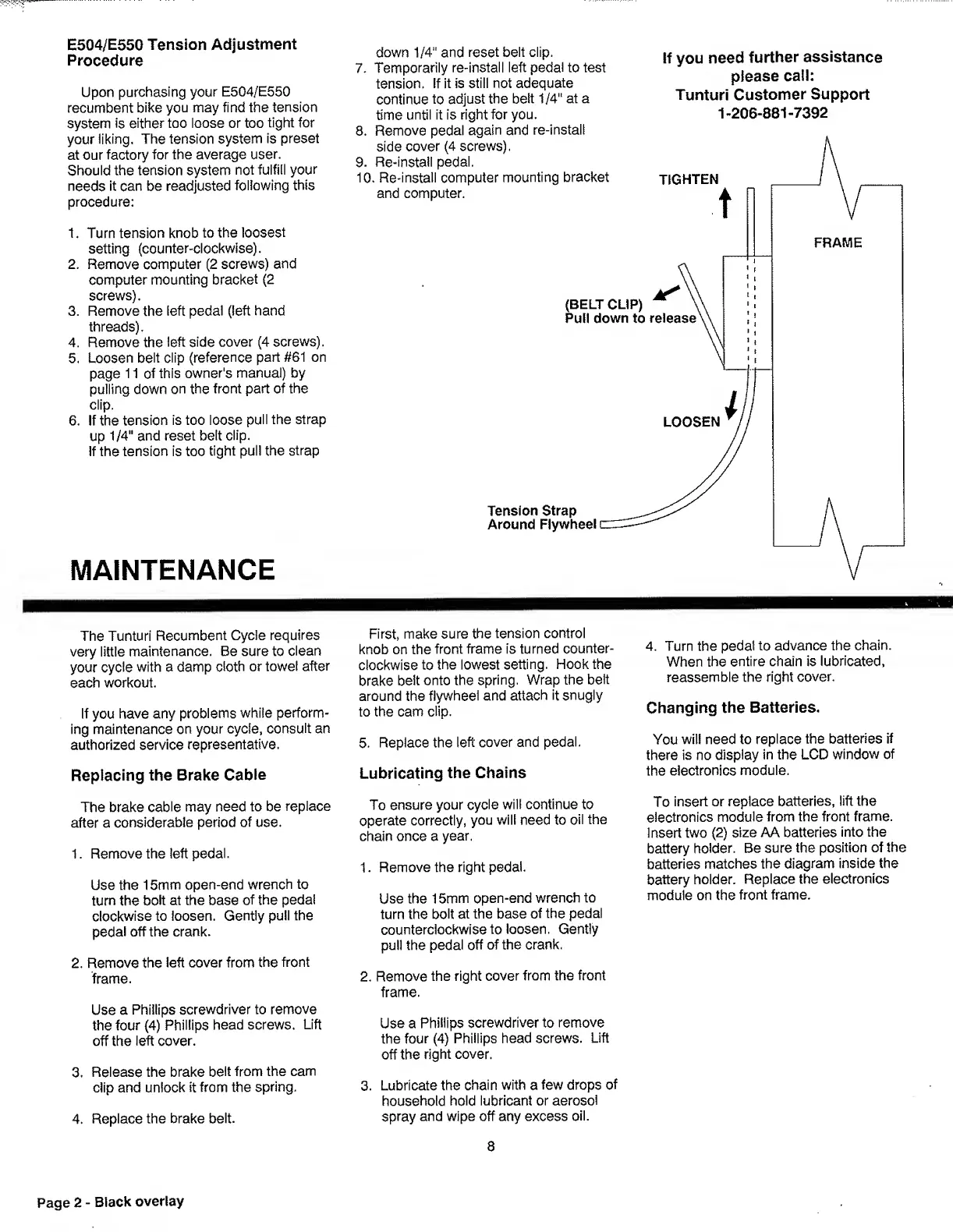
E504/E550
Tension
Adjustment
Procedure
Upon
purchasing
your
E504/E550
recumbent
bike
you
may
find
the
tension
system
is
either
too
loose
or
too
tight
for
your
iiking,
The
tension
system
is
preset
at
our
factory
for
the
average
user.
Should
the
tension
system
not
fulfill
your
needs
it
can
be
readjusted
following
this
procedure:
1.
Turn
tension
knob
to
the
loosest
setting
(counter-clockwise).
2
.
Remove
computer
(2
screws)
and
computer
mounting
bracket
(2
screws).
3.
Remove
the
left
pedal
(left
hand
threads).
4.
Remove
the
left
side
cover
(4
screws).
5.
Loosen
belt
clip
(reference
part
#61
on
page
11
of
this
owner's
manual)
by
pulling
down
on
the
front
part
of
the
clip.
6
.
If
the
tension
is
too
loose
pull
the
strap
up
1/4"
and
reset
belt
clip.
If
the
tension
is
too
tight
puli
the
strap
MAINTENANCE
down
1/4"
and
reset
belt
clip.
7.
Temporarily
re-install
left
pedal
to
test
tension.
If
it
is
still
not
adequate
continue
to
adjust
the
belt
1/4"
at
a
time
until
it
is
right
for
you.
If
you
need
further
assistance
please
call:
Tunturi
Customer
Support
1-206-881-7392
The
Tunturi
Recumbent
Cycle
requires
very
little
maintenance.
Be
sure
to
clean
your
cycle
with
a
damp
cloth
or
towel
after
each
workout.
If
you
have
any
problems
while
perform¬
ing
maintenance
on
your
cycle,
consult
an
authorized
service
representative.
Replacing
the
Brake
Cable
The
brake
cable
may
need
to
be
replace
after
a
considerable
period
of
use.
1.
Remove
the
left
pedal.
Use
the
15mm
open-end
wrench
to
turn
the
bolt
at
the
base
of
the
pedal
clockwise
to
loosen.
Gently
pull
the
pedal
off
the
crank.
2.
Remove
the
left
cover
from
the
front
frame.
Use
a
Phillips
screwdriver
to
remove
the
four
(4)
Phillips
head
screws.
Lift
off
the
left
cover.
3.
Release
the
brake
belt
from
the
cam
clip
and
unlock
it
from
the
spring.
4.
Replace
the
brake
belt.
First,
make
sure
the
tension
control
knob
on
the
front
frame
is
turned
counter¬
clockwise
to
the
lowest
setting.
Hook
the
brake
belt
onto
the
spring.
Wrap
the
belt
around
the
flywheel
and
attach
it
snugly
to
the
cam
clip.
5.
R
eplace
the
left
cover
and
pedal.
Lubricating
the
Chains
To
ensure
your
cycle
will
continue
to
operate
correctly,
you
will
need
to
oil
the
chain
once
a
year.
1.
Remove
the
right
pedal.
Use
the
15mm
open-end
wrench
to
turn
the
bolt
at
the
base
of
the
pedal
counterclockwise
to
loosen.
Gently
pull
the
pedal
off
of
the
crank,
2.
Remove
the
right
cover
from
the
front
frame.
Use
a
Phillips
screwdriver
to
remove
the
four
(4)
Phillips
head
screws.
Lift
off
the
right
cover.
3.
Lubricate
the
chain
with
a
few
drops
of
household
hold
lubricant
or
aerosol
spray
and
wipe
off
any
excess
oil.
8
4.
T
urn
the
pedal
to
advance
the
chain.
When
the
entire
chain
is
lubricated,
reassemble
the
right
cover.
Changing
the
Batteries.
You
will
need
to
replace
the
batteries
if
there
is
no
display
in
the
LCD
window
of
the
electronics
module.
To
insert
or
replace
batteries,
lift
the
electronics
module
from
the
front
frame.
Insert
two
(2)
size
AA
batteries
into
the
battery
holder.
Be
sure
the
position
of
the
batteries
matches
the
diagram
inside
the
battery
holder.
Replace
the
electronics
module
on
the
front
frame.
Page
2
-
Black
overlay

Related product manuals