EasyManua.ls Logo

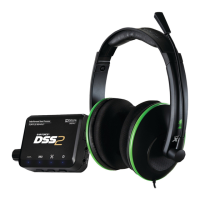
Turtle Beach Ear Force DP11 - User Manual

Turtle Beach Ear Force DP11
15 pages
Print Icon
To Next Page IconTo Next Page
Loading...
TB521-2140-01
Question and Answer IconNeed help?

Do you have a question about the Turtle Beach Ear Force DP11 and is the answer not in the manual?

Summary

Product Overview

Using the Amplifier

PS3 Setup Guide

Configure PS3 System Settings

Steps to configure audio output and microphone settings for PS3 system.

PS3 Home Theater Setup

PC and Mac Setup

Connect Digital Music Player

Dolby Digital Surround Sound Explained

Surround Sound Angle Customization

Equalizer Presets

Technical Specifications

Troubleshooting Common Issues

No Audio When Using a BluRay Player

Troubleshooting steps for no audio output when using a Blu-ray player with the DSS2.

No Sound When Using a Digital Connection

Steps to resolve no audio issues when a digital connection is used with the DSS2.

Analog Input Isnt Working

Troubleshooting guide for when the analog input on the DSS2 is not functioning.

Safety and Usage Warnings

Turtle Beach Product Limited Warranty

Exclusions from Limited Warranty

Details specific conditions under which the Turtle Beach limited warranty does not apply.

FCC Interference Statement

Canada Industry Canada Notices

Information regarding Industry Canada compliance and RF exposure for Canadian users.

Radio Frequency Exposure Information

Details on RF exposure compliance and certifications for the product.

Summary

Product Overview

Using the Amplifier

PS3 Setup Guide

Configure PS3 System Settings

Steps to configure audio output and microphone settings for PS3 system.

PS3 Home Theater Setup

PC and Mac Setup

Connect Digital Music Player

Dolby Digital Surround Sound Explained

Surround Sound Angle Customization

Equalizer Presets

Technical Specifications

Troubleshooting Common Issues

No Audio When Using a BluRay Player

Troubleshooting steps for no audio output when using a Blu-ray player with the DSS2.

No Sound When Using a Digital Connection

Steps to resolve no audio issues when a digital connection is used with the DSS2.

Analog Input Isnt Working

Troubleshooting guide for when the analog input on the DSS2 is not functioning.

Safety and Usage Warnings

Turtle Beach Product Limited Warranty

Exclusions from Limited Warranty

Details specific conditions under which the Turtle Beach limited warranty does not apply.

FCC Interference Statement

Canada Industry Canada Notices

Information regarding Industry Canada compliance and RF exposure for Canadian users.

Radio Frequency Exposure Information

Details on RF exposure compliance and certifications for the product.

Turtle Beach Ear Force DP11 Specifications

General IconGeneral
Cable length3.7 m
Headset typeBinaural
Product typeHeadset
Product colorBlack
Wearing styleHead-band
Recommended usageGaming
USB connectivityYes
Connectivity technologyWired
Impedance- Ω
Driver unit50 mm
Magnet type-
Ear couplingCircumaural
Headphone frequency20 - 20000 Hz
Headphone sensitivity120 dB
Total Harmonic Distortion (THD)1 %
Microphone frequency50 - 15000 Hz
ManualNo
Cables includedS/PDIF, USB

Related product manuals