
 Need help?
Do you have a question about the Turtle Beach Ear Force DX12 and is the answer not in the manual?
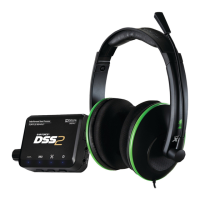
Components included: The Ear Force X12 headset with in-line amplifier.
Components included: The DSS2 surround sound processor unit.
Accessories provided: Digital optical cable, USB cable, Xbox 360 talkback cable, and a sticker.
Requirements for connecting to an Xbox 360 console, including specific A/V cables for digital audio output.
Requirements for connecting to a PC or Mac, including sound card capabilities and USB port.
Combines X12 headset and DSS2 processor for Dolby Digital surround sound gaming.
Highlights 50mm speakers, adjustable bass, comfort, and competitive gaming advantage.
Explanation of controls: Game Volume, Chat Volume, Bass Boost, Mic Mute Switch, and LED indicator.
Details on front panel connections like Headphone Output and indicators like Power LED and Digital Input LED.
Details on rear panel inputs like Analog In, Digital Input, USB, and the Power Switch.
Instructions for activating special modes like Basic Stereo Mode.
Step-by-step guide for connecting the DSS2 and headset to the Xbox 360 console.
Configuration steps within the Xbox 360 settings for optimal audio output.
Guide for routing audio through home theater speakers or TV via HDMI or RCA cables.
Instructions for connecting the DSS2 and headset to a PC or Mac, including mic input.
Configuration details for PC/Mac audio, including the importance of Dolby Digital Live.
Connect music players for stereo pass-thru, bypassing DSS2 processing.
Connect music players for processing with Virtual Surround Sound or EQ presets.
Explanation of Dolby Digital 5.1 technology for multi-channel surround sound.
Description of LEDs that indicate Dolby Digital signal reception and processing status.
Details on the 6 available presets for adjusting virtual speaker angles for optimal immersion.
Instructions on how to cycle through and select from 9 EQ presets.
Lists all 9 EQ presets and provides important notes on Bass Boost interaction.
Solutions for issues related to digital output on older Xbox 360 models.
Troubleshooting for BluRay players, digital connection sound, and PC/Mac surround sound.
Guidance when the analog input is not functioning correctly, often due to digital input priority.
Detailed specifications for the X12 headset and its amplifier.
Detailed specifications for the DSS2 surround sound processor.
Precautions and advice on preventing hearing damage from prolonged exposure to high volumes.
Information on the manufacturer, product name, and model number.
Details on compliance with Low Voltage and EMC Directives.
Statement regarding compliance with FCC Part 15, Class B digital device rules.
Guidance for users on managing potential radio frequency interference.
Manufacturer, product name, model number, and compliance with EMC directives for DSS2.
Statement regarding DSS2 compliance with FCC Part 15 Subpart B Class B rules.
User guidance for DSS2, including handling interference and modifications.
Details the one-year warranty period, coverage for defects, and non-transferable nature.
Procedure for obtaining warranty service, including RMA requirements and shipping.
Lists conditions and actions that void the warranty, such as misuse or unauthorized service.
Information on providing reasonable protection against harmful interference in residential installations.
Warning that unauthorized changes or modifications may void user authority to operate the equipment.
Statement on compliance with Canadian ICES-003 for Class B digital apparatus.
Information and web links regarding RF exposure compliance for Canada.
Indicates product compliance with R&TTE Directive for safety and EMC.
 General
| Cable length | 4.87 m |
|---|---|
| Headset type | Binaural |
| Product type | Headset |
| Product color | Black |
| Wearing style | Head-band |
| Volume control | Rotary |
| Recommended usage | Gaming |
| Compatible products | Xbox 360, PC |
| 2x 3.5 mm connectors | Yes |
| Connectivity technology | Wired |
| Impedance | - Ω |
| Driver unit | 50 mm |
| Magnet type | Neodymium |
| Ear coupling | Supraaural |
| Headphone frequency | 20 - 20000 Hz |
| Headphone sensitivity | 120 dB |
| Microphone frequency | 50 - 15000 Hz |
| Microphone connectivity | 3.5 mm |
 Weight and Dimensions
| Weight | 233 g |
|---|








 To Next Page