GAME
CHAT
ON MIC MUTE
PS3
™
Home Theater Setup PC / Mac
®
Setup
1,3
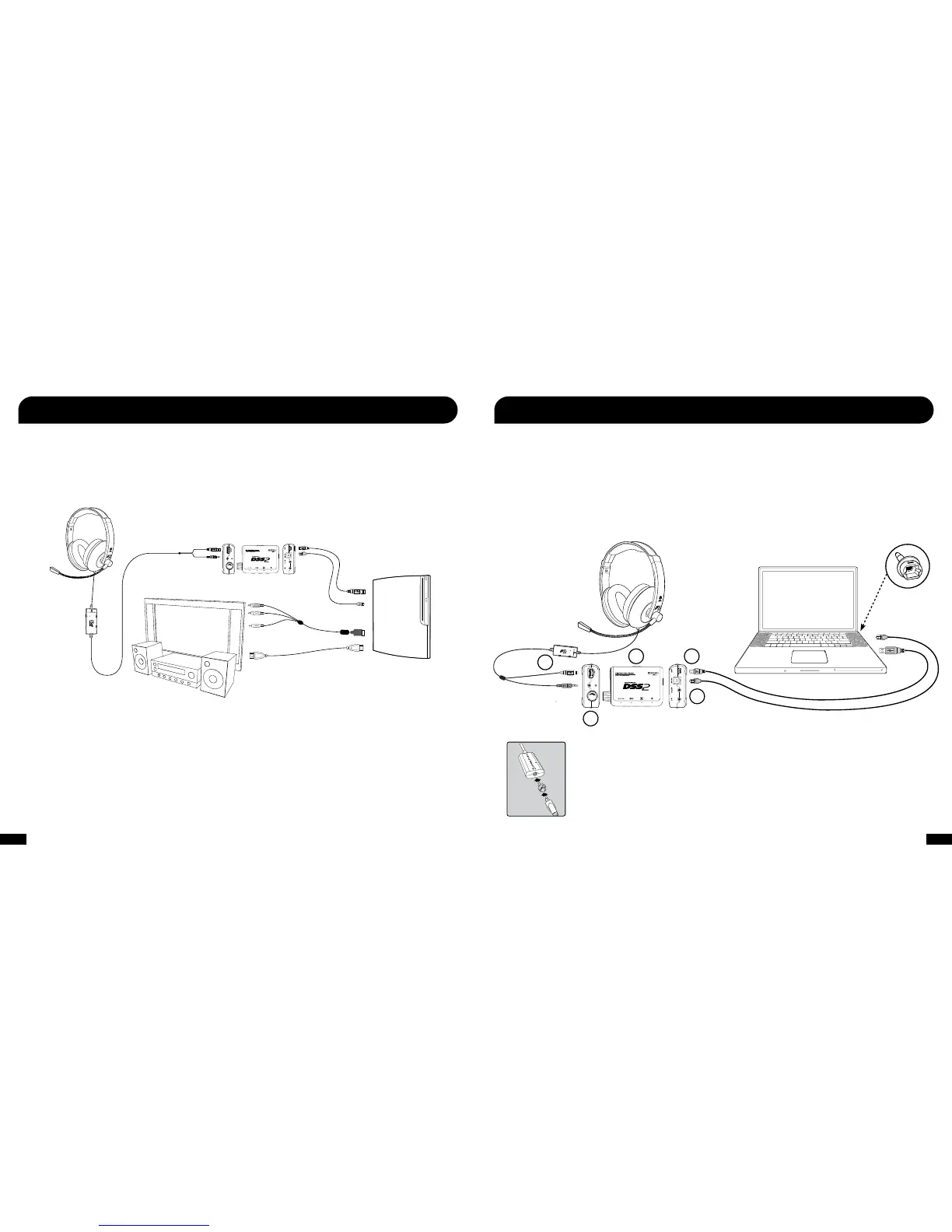
Connect the DP11 to your PS3 as described in the previous section and then use an HDMI cable or red/white RCA plugs
on the PS3 A/V cable to send audio to the home theater speakers or TV. Setting up the DP11 as illustrated below lets you hear
your PS3 on your home theater speakers without disconnecting the optical cable from the DSS2. To hear the game audio only on
the headset, turn down or mute your home theater speakers.
Console A/V cable or
HDMI Cable
USB Cable
(included)
Optical Cable
(included)
PS3
OR
1. Connect the digital optical cable (included) from the digital output on the PC or Mac to the digital input on the DSS2.
1
(NOTE: Remove the protective caps from each end of the optical cable before inserting into the sockets.)
2. Connect the DSS2 USB power cable from the power socket on the rear of the DSS2 to a free USB port on your PC or Mac.
3. Slide the DSS2 power switch to the ON position. Check if the Power LED on the DSS2 is turned ON.
4. Insert the green 3.5mm connector from the headset to the Headphone Output Jack on the front of the DSS2. Then insert the
USB connector from the headset to the USB Output on the DSS2.
5. Adjust the Volume Control knob to adjust the overall volume level of the Headset Output.
1
2
3
4
5
1: If your PC or Mac does not include a digital optical output, then you will need to purchase an “Optical S/PDIF
Adapter”. Turtle Beach offers the “Audio Advantage
®
Micro II” which is available on our website.
2: In this configuration, the amplifier game volume may be used to adjust the game sound level and the mic mute switch
may be used to silence the microphone. The chat volume serves no function in this setup.
3: Most games will not output Dolby 5.1 unless your computer is running Dolby Digital Live. You will hear enhanced
stereo audio unless Dolby Digital Live is installed.
Optical
Output
Adapter
USB Cable
(included)
Optical Cable
(included)
Optical S/PDIF
adapter for use
with Mac
(sold separately)
1
GAME
CHAT
ON MIC MUTE










 To Next Page