www.TurtleBeach.com
Page 28
Blast Limiter
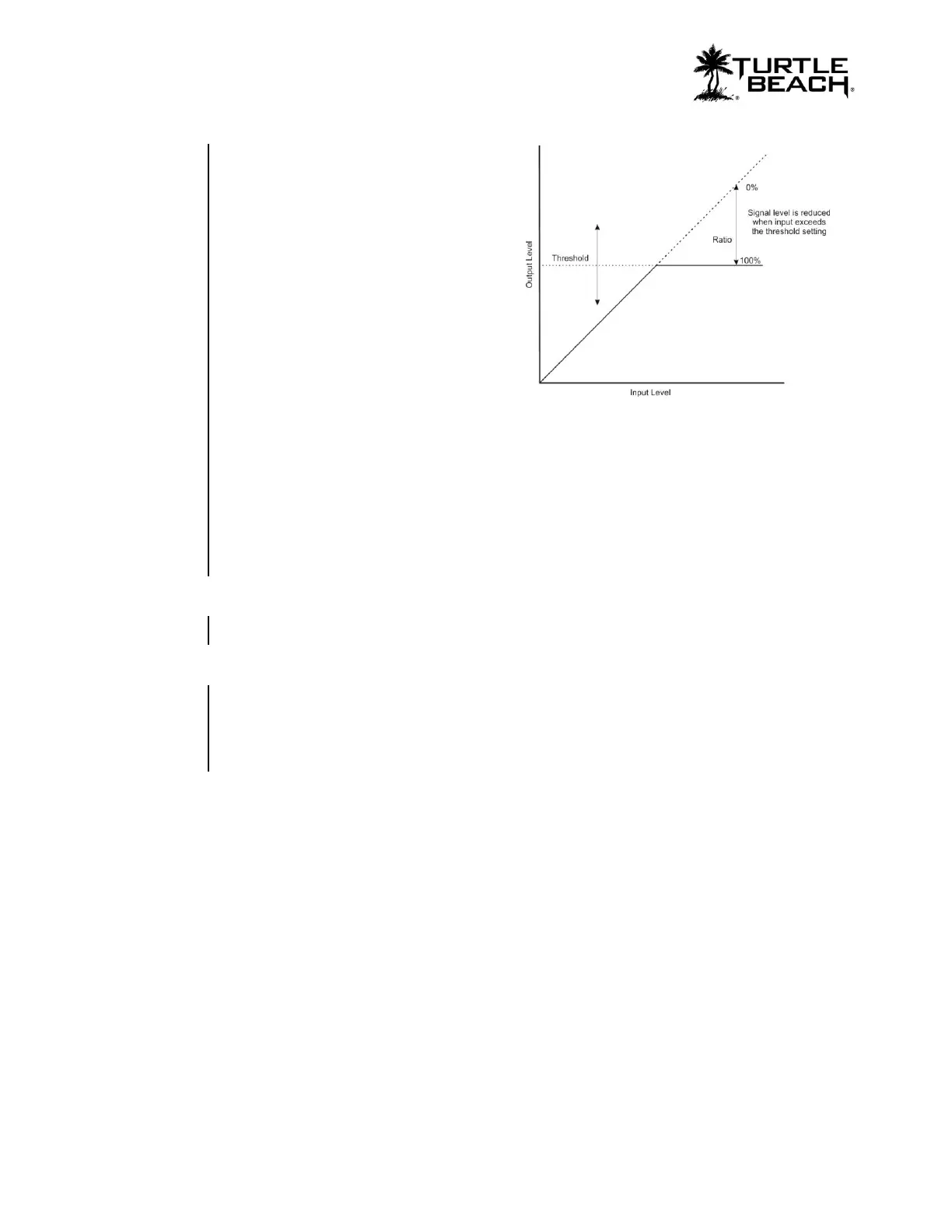
The Blast Limiter lets you turn up the
volume to hear soft sounds while limiting
the volume of louder sounds, like gun shots
and explosions. The Blast Limiter is a
variable gain stage with a threshold used for
limiting the signal levels above the
threshold setting. The amount of gain
reduction is set by the Ratio slider. The
higher the Ratio slider is turned up, the
more the sounds above the threshold are
attenuated. This effect is placed at the end
of the game sound chain so that the sound
level caused by processing in all preceding
stages can be limited in amplitude.
Threshold
The volume of any game sounds below the threshold setting is not changed. The volume of
game sounds above the threshold setting are reduced an amount set by the ratio slider.
Ratio
The gain above the threshold is reduced by this ratio setting. For example, a setting of 25
reduces the gain by 25%.
Game Volume
This slider adjusts the volume level of the game channel heard in the headset.
Dolby on/off Button
When using the Sound Field Expander, some settings might compromise the Dolby
processing. In these cases, you can instruct the game preset to turn off Dolby processing by
clicking on the Dolby button and shutting it off. If Dolby is turned off in a preset, the
Bypass LED on the transmitter will turn on to indicate that Dolby processing is inactive.















 To Previous Page