Setting Jumpers
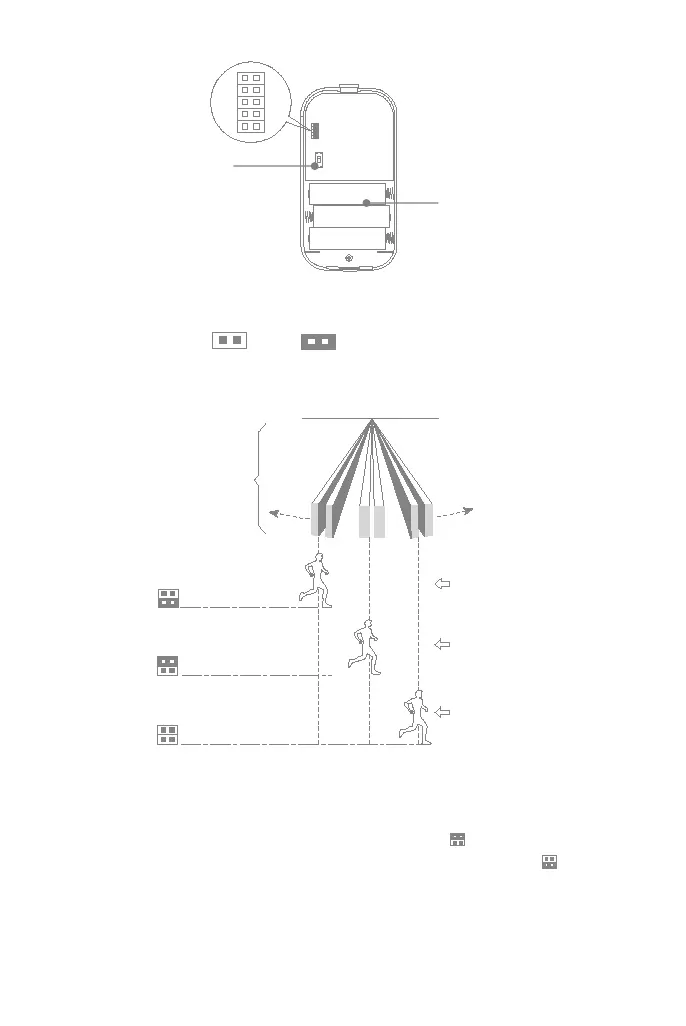
Setting the Pulse Counter (PULSE2 & PULSE1 jumpers)
The motion detector is equipped with a programmable pulse counter which can be set to count 1,3 or 5
pulses. Place the pulse count jumpers at the desired setting as shown below.
Working mode (TEST & NORMAL jumpers)
To save battery power in normal use, if the detector is triggered twice within 3 minutes, it enters
sleeping state immediately. During this period, any movement detected does not generate an alarm.
After no movement within the next 3 minutes, it goes back to working state again.
For effective walk testing, set jumpers as shown on the right.
When walk testing is done, set jumpers to save power as shown on the right .
LED jumper
CLOSED enables LED on.
Battery receptacle
Contains three AA 1.5V
battery.
Power on/off
Slide it up to ON to
power up the detector.
1
2
3
4
6
5
P A R T O F IN FR A R E D
S E N S ITIV E B E A M
A R R A Y
C rossing one beam
causes detection
C rossing 3 beam s
causes detection
C rossing 5 beam s
causes detection
FO R FA S T C A TC H
P E R FO R M A N C E
FO R E X C E LLE N T
FA LS E A LA R M
P R O TE C T IO N
FO R M A X IM U M
FA LS E A LA R M
P R O TE C T IO N IN
H O S TILE
E N V IR O N M E N T
P U LS E 2
P U LS E 1
P U LS E 2
P U LS E 1
P U LS E 2
P U LS E 1


 To Next Page