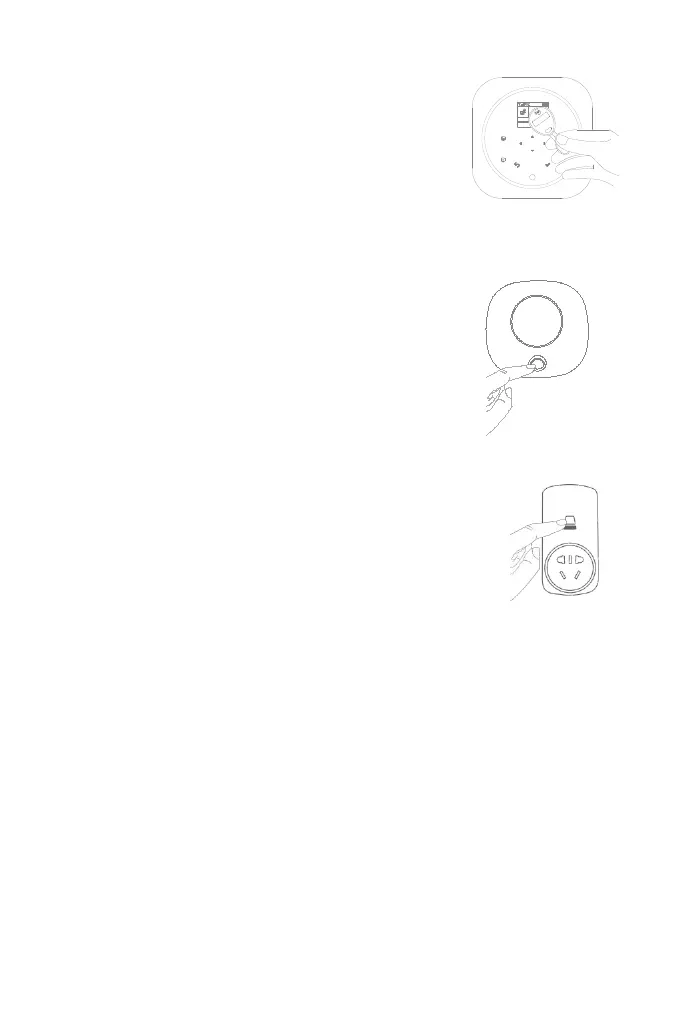
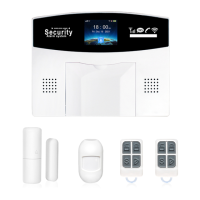
Press and hold the SET button of the siren until you hear two
beeps, then the siren goes into the paring mode and the light
ring blinks quickly.
Press √ button on the panel within 6 seconds. The panel
shows Learn Signal Sent and sends a transmission signal
to the siren.
The siren gives four beeps of successful indication.
How to Pair a New RFID Tag by Panel
Go to Menu>Parts>RFID>Add and enter
Go to Menu>Parts>RFID>Delete to delete the RFID Tag specified by serial number.
Go to Menu>Parts>RFID>Delete All to delete all the RFID Tags. Total number of paired tags is shown
before deleting.
How to Pair a New Wireless Siren by Panel
Go to Menu>Parts>Siren Learn
If you want to unbind the wireless siren with the hub, press and hold the SET button of the siren until
you hear three beeps.
How to Pair a New Alarm Wireless Switch by Panel
Go to Menu>Parts>Alarm Socket
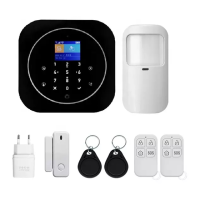
Press and hold the button of the switch until it lights up, then the switch
goes into the paring mode.
Tap ◄/▲ to send ON transmission signal to the switch.
Tap ►/▼ to send OFF transmission signal to the switch.
The siren gives three flashes of successful indication.
When a sound alarm occurs, the alarm wireless switch opens until the system is disarmed or alarm
sounder timeout occurs.
If you want to unbind the alarm wireless switch with the hub, press and hold the button of the switch for
about 10 seconds until light is off.
Synchronizing is shown, the panel goes into the paring mode
and count down the pairing time remaining.
Tap the RFID Tag on the RFID read zone of your panel.
As the serial number of RFID Tag is added to the hub, Leaning
OK will be shown.
The hub will show Device code has been learned if serial
number of RFID Tag has been learned.


 To Next Page