Home
TUYA
Security System
G12
Page 5 (Alarm System Overview)
TUYA G12 - Alarm System Overview; How the System Operates
25 pages
Manual
Save Page as PDF
To Next Page
To Next Page
To Previous Page
To Previous Page
Loading...
3
MEET
YOUR
A
LARM
SYSTEM.
How
the
Alarm
Sy
stem
Works
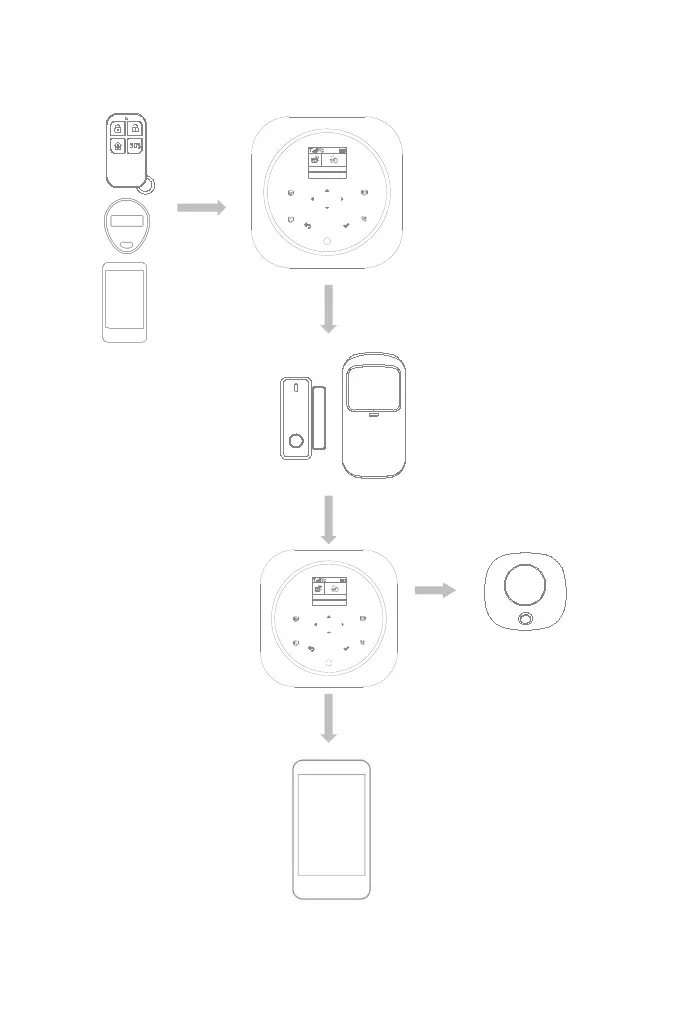
The
hub
internal
siren
sounds
at
85dB
on-site
The
hub
sends
a
push
notification
and
text
mes
sage
to
your
phone
when
a
sensor
is
tri
ggered
if
you
enable
the
notification
f
unction
located
in
your
app
settings.
After
that
the
hub
will
also
make
phone
calls
to
each
preset
phone
numbers.
The
hub
receives
the
command
and
ente
rs
“Armed”
mode.
Arm
the
system
by
the
remote,
RFID
tag,
the
ARM
button
of
hub
touchscreen
or
the
APP
.
When
an
optional
external
wireless
siren
has
been
placed
there
will
be
a
signal
to
be
sent
to
th
e
siren.
When
a
Door/W
indow
Sensor
detects
a
door/window
is
being
opened,
the
sensor
sends
a
signal
to
the
panel
letting
the
hub
know
that
there
has
been
an
intrusion.
2
1
5
4
6
7
8
9
3
0
10:35:42
2019-06-05 Wednesday
The
APP
lets
you
know
what’s
hap
pening
at
home,
anywhere,
any
time.
2
1
5
4
6
7
8
9
3
0
10:35:42
2019-06-05 Wednesday
4
6
Table of Contents
Main Page
Table of Contents
2
Do this First
3
Things to be Noted before Getting Started
3
What You Need
3
In the Box
4
Meet Your Alarm System
5
How the Alarm System Works
5
Getting to Know Your System
6
Smart Hub
6
Remote Tag
11
RFID Tag
12
Door/Window Sensor
12
PIR Motion Detector
13
Placement/Installation
15
Where to Place/Install Smart Hub
15
Where to Place Door/Window Sensor
15
How to Install PIR Motion Detector
16
Getting Started
17
Install the SIM Card
17
Cellular Network Connection
17
How to Set Phone Numbers for SMS and Phone Calls by Panel
17
Exit/Entry Delay
18
How to Record a Voice Message by Panel
18
How to Pair a New Remote Tag by Panel
19
How to Pair a New Wireless Sensor by Panel
19
How to Pair a New RFID Tag by Panel
20
How to Pair a New Wireless Siren by Panel
20
How to Pair a New Alarm Wireless Switch by Panel
20
App
21
Download App
21
Using Smart Security System
22
The Security Levels
22
How to Arm or Disarm
23
Make a Call on Panel
24
Smart Hub Features
24
Reset to Factory Settings
24
Specifications
25
Related product manuals
TUYA WL-JT-99BST
37 pages


 To Next Page