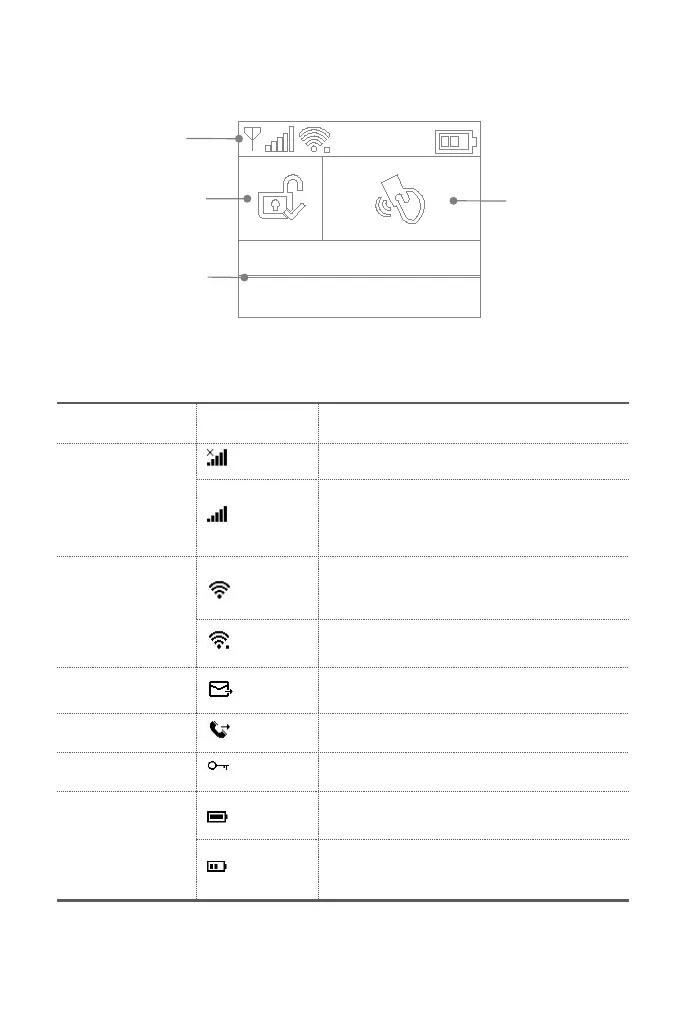
Home screen
Your home screen may look different if you use another version of hub.
Status bar
The icons in the status bar at the top of the screen shows information about the hub.
No SIM card inserted or SIM card faulty
Shows that your carrier’s cellular network is
available in case of white bars. More bars means
stronger signal. The bars are gray if not registered
with cellular network.
Wi-Fi network
(Cellular+Wi-Fi model)
Shows that the system is connected to a Wi-Fi
source and the signal strength when it is shown in
white. More bars means stronger connection.
Shows that the hub has a Wi-Fi Internet
connection when dot is shown.
AC powered, and the progress bars shows in case
of charging.
Shows the battery level when the system has lost
AC power. The icon is red when the backup
battery power is low.
10:35:42
2019-06-05 Wednesday
Bottom status area
for countdown bar,
alarm information
and clock.


 To Next Page