17
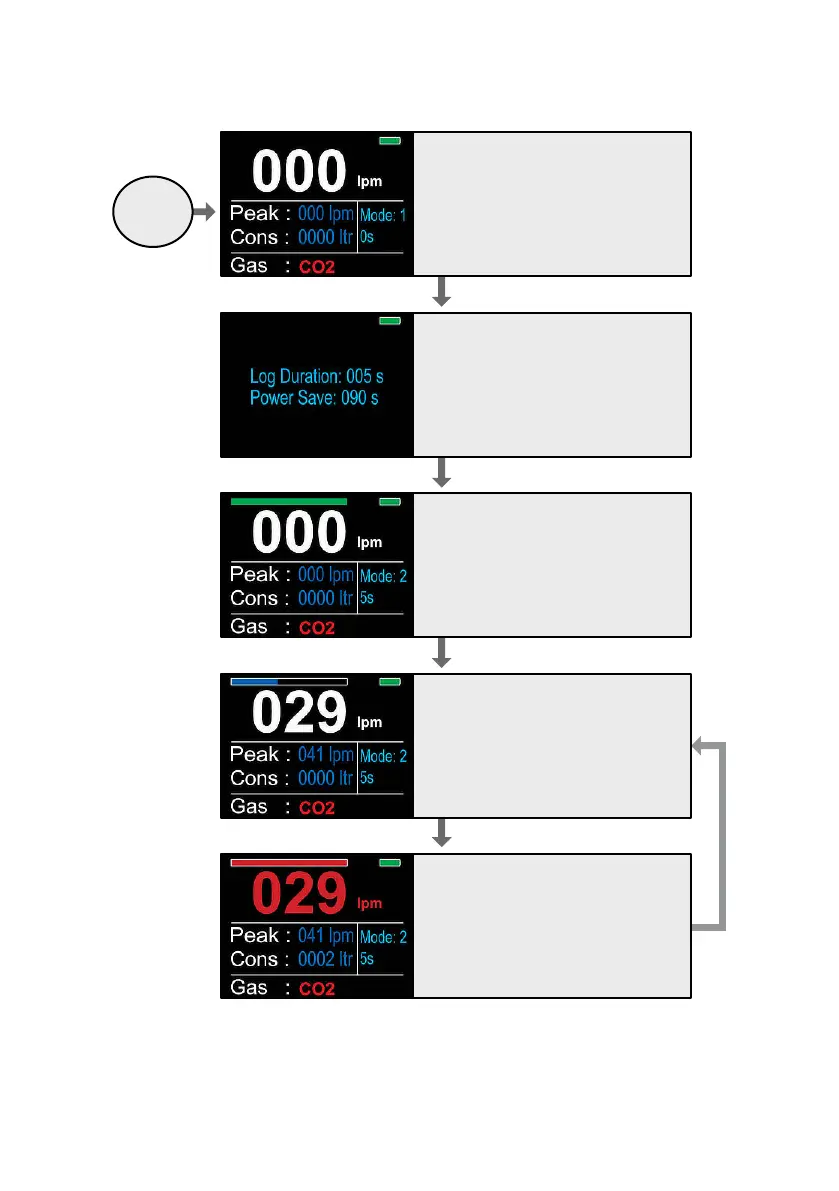
2.9.3 Flow chart 3: NFM3 Advanced ‘Mode 2’
Ensure 'Mode 2' operation is selected.
To change from 'Mode 1' to 'Mode 2', press
and hold the 'Reset' button for 5 seconds.
The Setup screen will be displayed.
For 'Mode 2' operation, use the 'Up'/'Down'
buttons to set the log duration from 005s
to 060s.
To exit the setup screen, press the 'Reset'
button.
Select gas by using 'Up'/'Down' buttons.
Press the 'Log' button. A green bar will
appear at the top of the screen. The NFM3
is now ready to record the gas surge.
Insert welding torch nozzle in to the NFM3
nozzle and purge gas.
Gas ow is displayed in LPM whilst gas is
owing. The unit will display the peak ow
achieved when the gas stops owing, and
the gas consumed. When the gas ows,
the green bar will change to blue and
move across the screen for the pre-set log
duration.
Once the surge data is recorded, the bar
will turn red and then disappear. Reset the
displayed data by pressing the 'Reset'
button.
Power On


 To Next Page