ENGLISH
Chapter 2 — Getting Started
Precautions for Handling CD-ROM Discs
Keep these precautions in mind when handling CD-ROM discs.
• Always hold the disc by the edges; avoid touching the surface of
the disc.
• Use a clean, dry, cloth to remove dust, smudges, or fingerprints.
Wipe from the center outward.
• Do not write on the surface of the disc.
• Extremes in temperature may damage discs. Store discs in a
cool dry place.
• Do not use benzene, thinners, or cleaners with detergent. Only
use CD-ROM cleaning kits.
• Do not bend or drop the discs.
• Do not place objects on top of discs.
Warning: Do not insert any
foreign objects into the
disc tray. Do not force
the tray to open or close
manually. When not in use,
keep the tray closed to
prevent dust or dirt from
entering the drive unit.
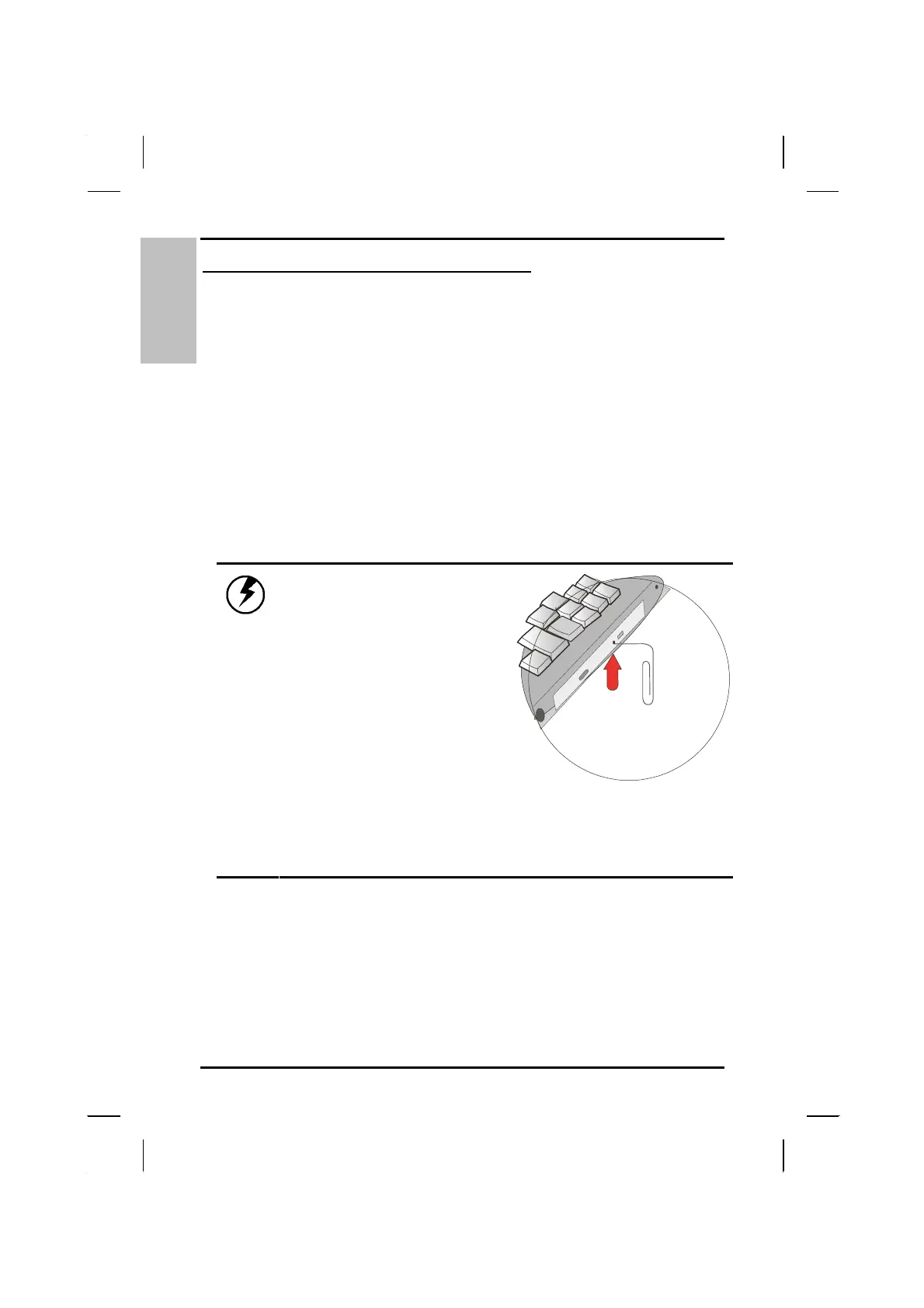
If you experience
difficulty when removing a
CD disc, stretch a paper
clip (or use a pin or a
thin metal rod) and insert
it into the emergency
eject hole located on the
front panel:
The CD disk tray should eject immediately. This
procedure can also be used to remove a CD from the
drive when the notebook is powered off.
24



 To Next Page