EN
Set up TTC450 Pro
6
Set up TTC450 Pro
7
Required parts
TS35 touch screen kit*1
2.0 hexagonal wrench
Wifi antenna*1
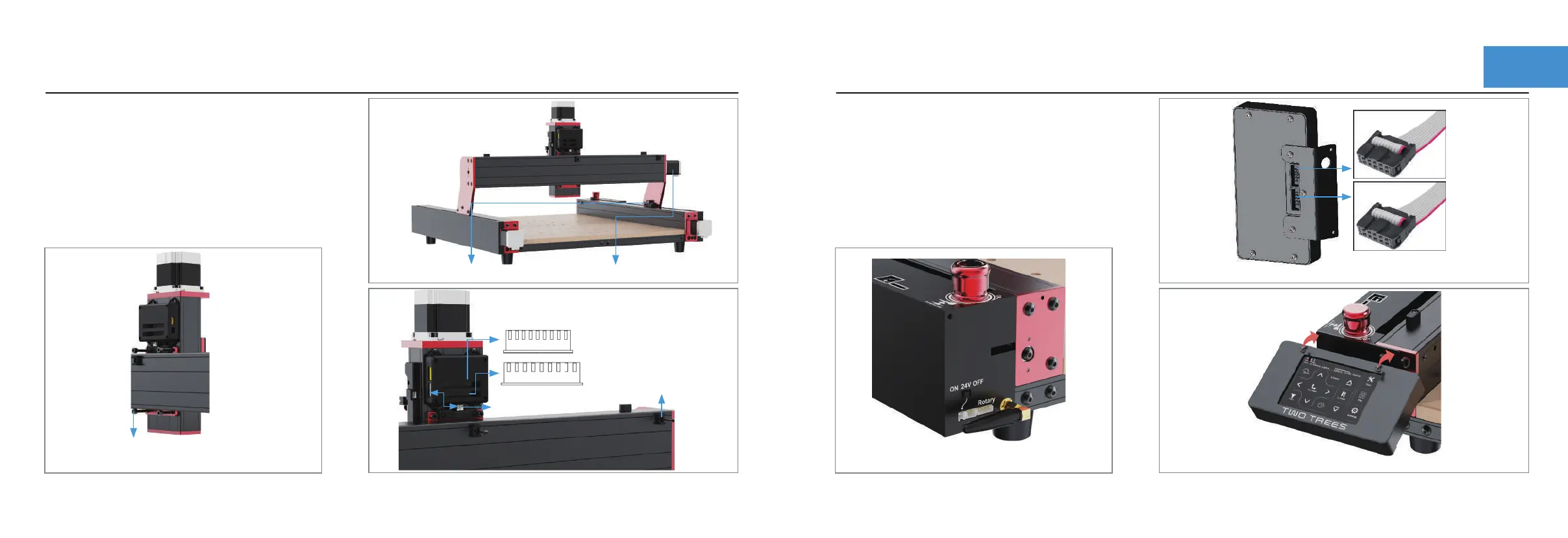
Step 3 :Installation of TS35 Touch Panel
Assembled in numerical order.
Required parts
① Pass the Cup head M5X20 screws through
the back of the X-axis to lock the Z-axis.
Step 2 :Assemble the Z-axis and connect the cables
Z-axis components
Cable Tie Mount*2
M3X16 screw *2
Cup head M5X20 screws *4
2.0 hexagonal wrench
4.0 hexagonal wrench
②Connecting Y-axis limit switches and X-axis motors.
9pin cable
⑤ Connect the X limit line
to the back of the Z axis
M
S
Install the Wifi antenna.
Control box row cable into the back of the touch screen.
EXP1
EXP2
M3X5 screws through the fixing plate to lock the screen.
10pin cable
③Connect 9pin power cable to M and
10pin signal cable to S
④Locking cable
Tie Mount


 To Next Page