Z+
Z-
X-
EN
Set up TTC450 Pro
10
Operation Guide
11
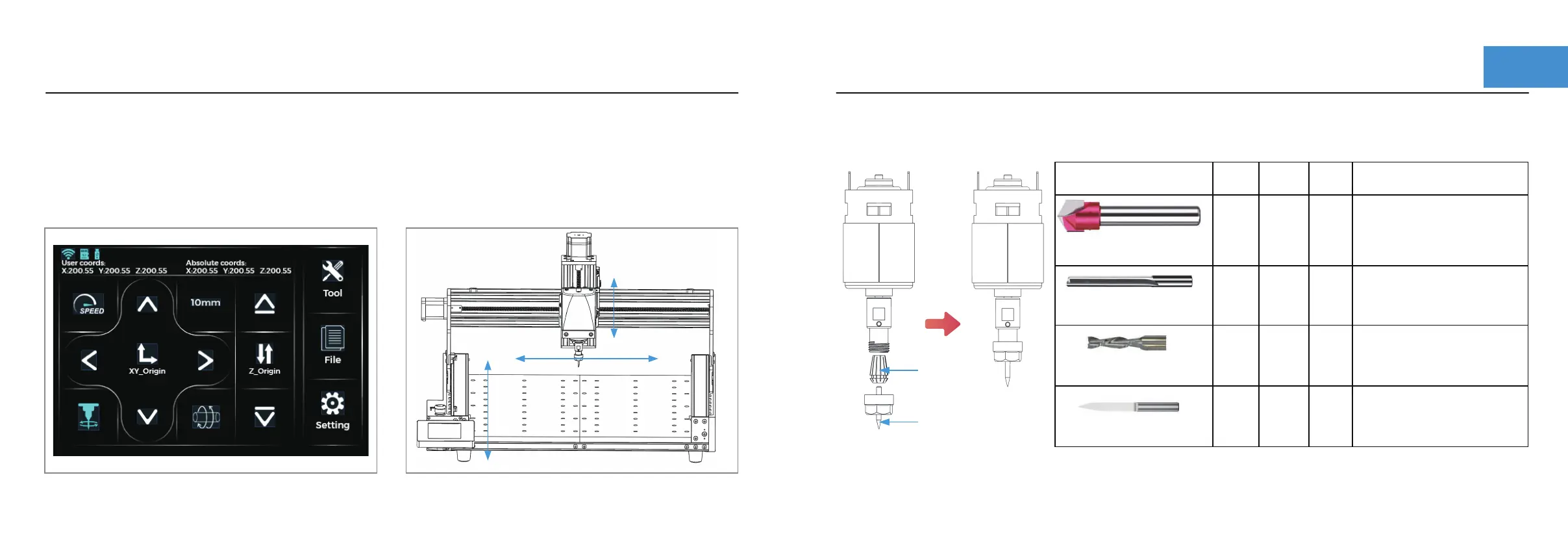
Note: The clamping length of the cutter is approximately 1/2 or 1/3 of the total length of the cutter.
Step 1 :Installation of milling cutter
Click the "Control" button and move XY-axis to the bottom left corner of the machine.
Click XY Clear and Z Clear .Then move the XY axis away from the corner.
Click "NEXT", click "Home" to return to corner.XYZ axis will return to the bottom left corner of the machine.
Click "Spindle" to rotate the spindle. Click "Spindle" again to stop the spindle.
Make sure the emergency stop switch is popped up, plug in the power.If the screen lights up, the power on is
normal. If the screen does not light up, after power off, exchange the screen line position to reboot.
Step 6 :Test
Y+
Y-
X- X+
Z+
Z-
Y+
Y-
X+
V-Bit 0.393 Inch(10mm)
90 degree
Cutting
length
Flute
count
Ovreall
length
Explanatory note.
V-Bit tools are generally used
for engraving V-style letters.
They could also be used to
remove the background and
leave areas flat on the fac of
the material.
Straight cut
0.125 Inch(3.175mm)
Straight cut can be used for
Roughing, Area Clearance,
Cutouts, Inlays and Profiling.
30 degree carving cutter 0.125 Inch
(3.175MM diameter,0.1 end)
Millcutter
0.125 Inch(3.175mm)
11mm
20mm
50mm
2
2
2
1
38mm
39mm12mm
15mm
27mm
Use for fine detail engraving.
Designed for routing where
upward chip removal, tool
rigidity, long life and high
quality finish is desired.
CNC tool
ER11 chuck


 To Next Page