EasyManua.ls Logo

TWO TREES TTC450 Pro - Page 9

TWO TREES TTC450 Pro
27 pages
Print Icon
To Next Page IconTo Next Page
To Previous Page IconTo Previous Page
Loading...
EN
Operation Guide
12
Operation Guide
13
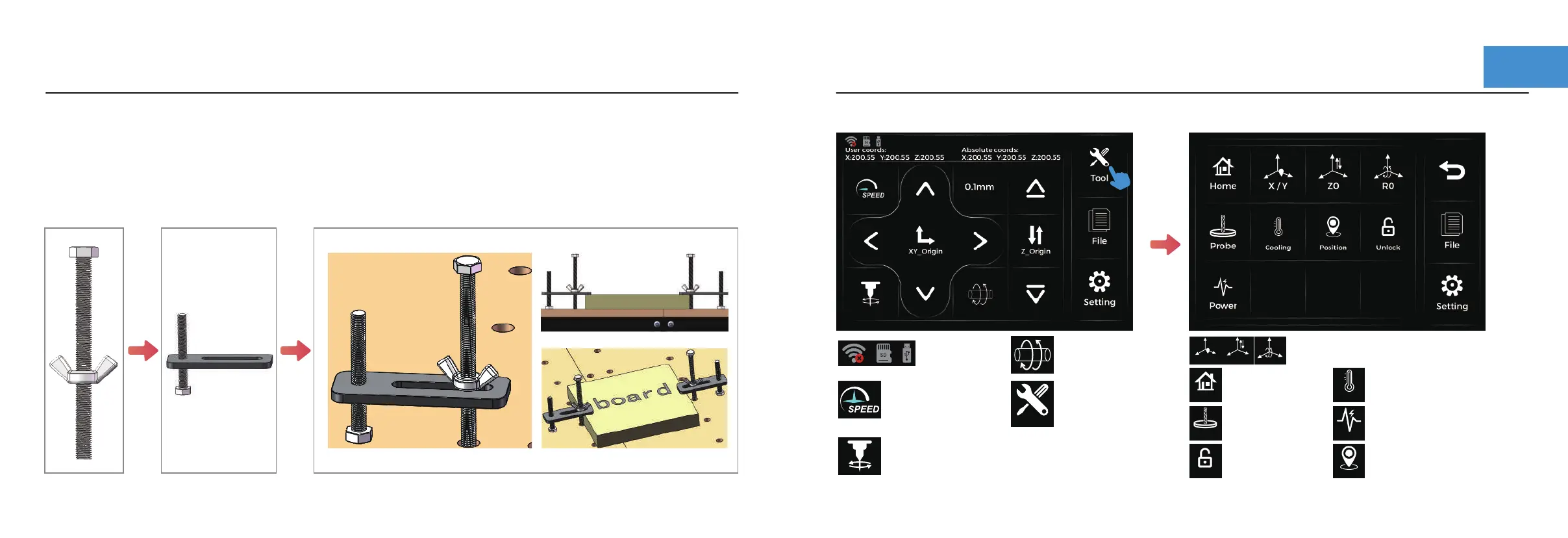
Connection status display.
Step 3 :Get familiar with the operation interface
The workpiece is clamped by adjusting the butterfly nut.
Note: The tool path bypasses the fixture to avoid collisions.
Step 2 :Fixture installation
Connection
status display
Switching Z-axis
and rotary
Back to the original
point of customisation
Click Tool
Speed regulation
Spindle or Laser
switch
Tool
Back to the machine
tool origin
Setting the
tool origin
X / Y
Z0
R0
Home
Turn on the air pump
Cooling
Probe
Unlock
Motor
Unlock
Adjustment of spindle
or laser working power
Setting tool coordinates
Power
Power

Related product manuals