http://www.tyan.com
36
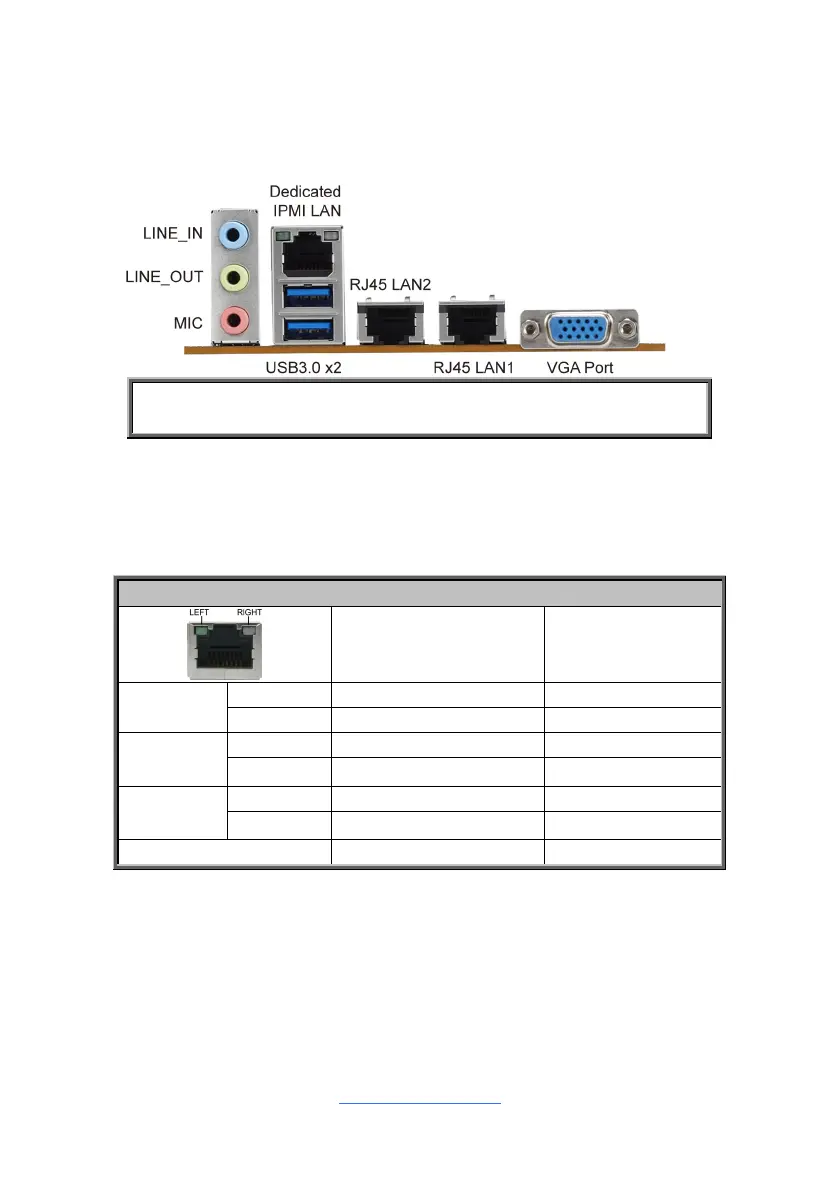
2.11 Connecting External Devices
Connecting external devices to the motherboard is an easy task. The motherboard
supports a number of different interfaces through connecting peripherals. See the
following diagrams for the details.
NOTE: Peripheral devices can be plugged straight into any of these
ports but software may be required to complete the installation.
Onboard LAN LED Color Definition
The three (3) onboard Ethernet ports have green and yellow LEDs to indicate LAN
status. The chart below illustrates the different LED states.
10/100/1000 Mbps LAN Link/Activity LED Scheme
Left LED Right LED
10 Mbps
Link Green Off
Active Blinking Green Off
100 Mbps
Link Green
Solid Green
Active Blinking Green
Solid Green
1000 Mbps
Link Green
Solid Yellow
Active Blinking Green
Solid Yellow
No Link Off Off


 To Next Page