MM23772, Rev. B
53
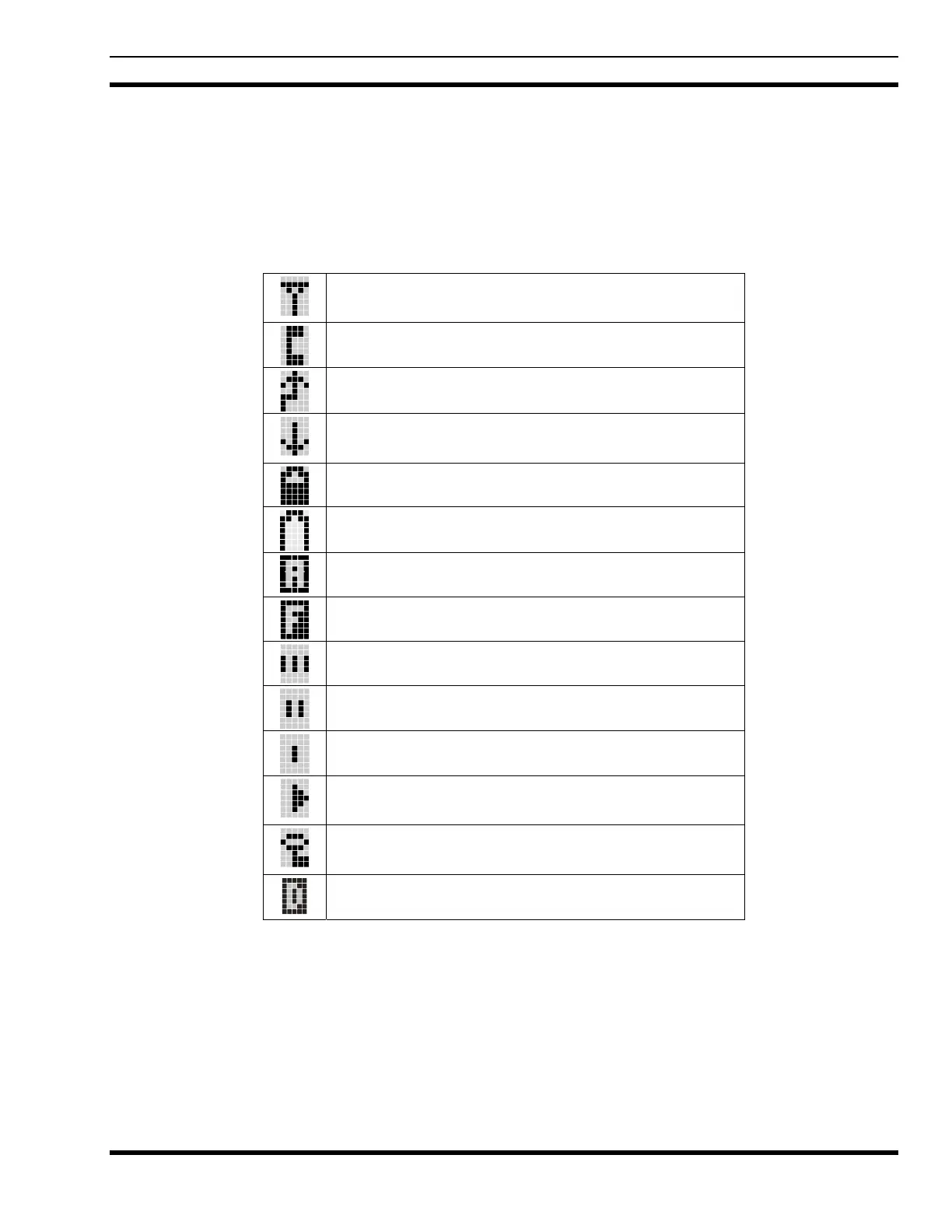
8.4 RADIO STATUS ICONS
Status Icons indicate the various operating characteristics of the radio. The icons show operating modes
and conditions and appear on the third line of the display (see
Table 8-1). The battery icon indicates
approximate level only, based on battery voltage.
Table 8-1: Display Descriptions
Steady – “Busy” transmitting or receiving
Flashing – call queued
Steady – special call mode (individual or telephone)
Steady – during all radio transmissions
Steady – transmit at low power
If icon is not visible – transmit at high power
Steady – battery charge indicator.
Flashing – Low battery indicator.
Steady – Indicates the current channel is set up as
an analog channel.
Steady – trunked system in Failsoft
™
mode
Steady – group or channel in scan list
Steady – priority 2 group or channel
Steady – priority 1 group or channel
Steady (rotates clockwise) – scan mode enabled
If icon is not visible – scan is disabled
Steady – transmit in encrypt mode
Flashing – receiving an encrypted call
Steady – Indicates the current channel is set up as a
ProVoice or Aegis channel



 To Next Page