MM23772, Rev. B
80
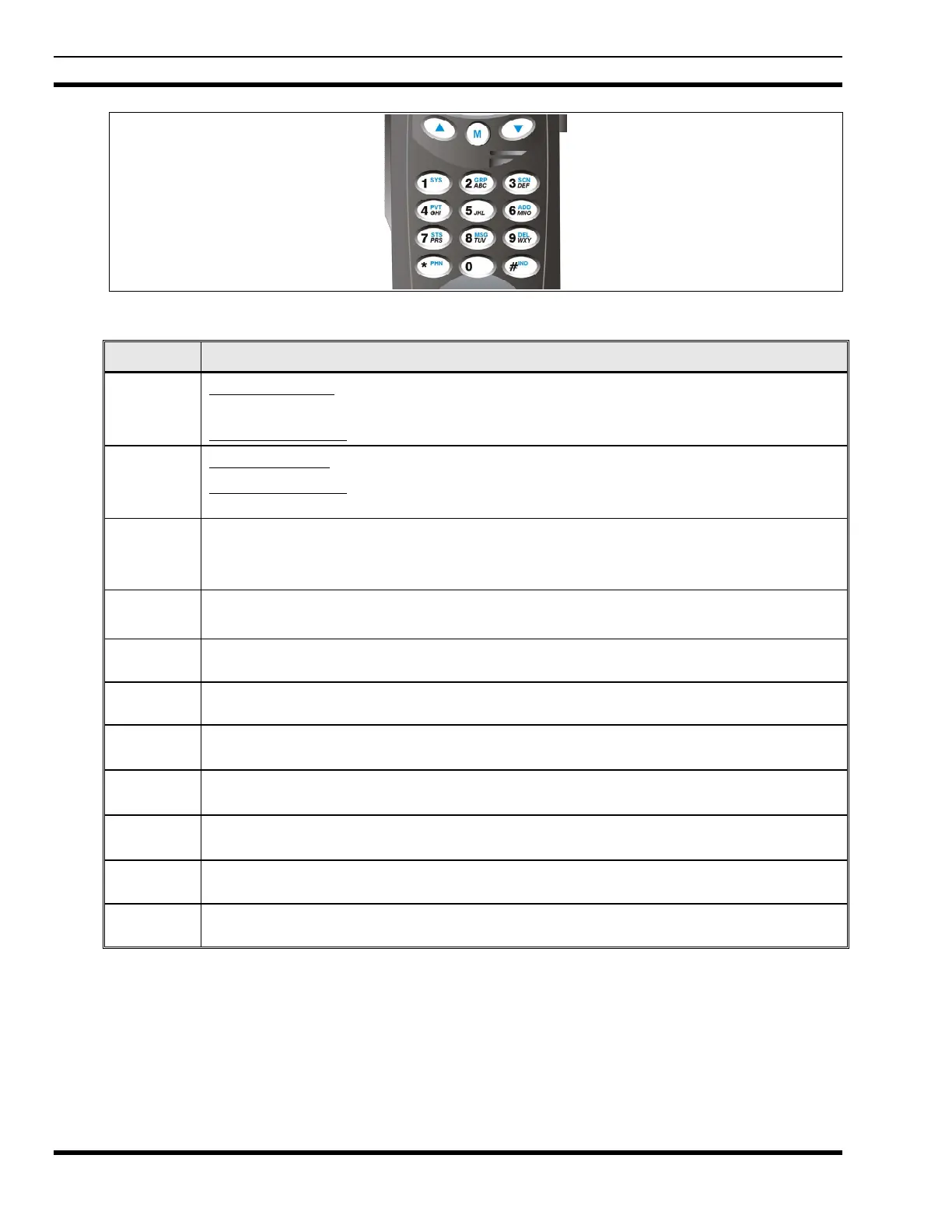
Figure 9-3: P7270 “System” Radio Front Panel
KEY FUNCTION
Primary Function: Allows the user to scroll through available systems, groups, or channels,
depending on personality programming.
Secondary Function
: Changes the selection for an item within a list.
Primary Function: Accesses the pre-stored menu.
Secondary Function
: Activates a selected item within a list. This is similar to an “Enter”
key.
Selects a specific system. If the rotary knob is used to select the system and more than 16
systems are programmed in the radio, the
key is used to select additional banks
(groupings) of systems.
1-9, *, 0,
#
These keys are used to place telephone interconnect and individual (unit-to-unit) calls. The
keys operate like a normal telephone keypad.
Selects a specific group.
Turns the Scan operation ON and OFF.
Enables or disables Private Mode for the system/group/channel displayed.
Adds groups or channels from the currently selected system to the Scan list.
Deletes selected groups or channels of the currently selected system from the Scan list.
Places telephone interconnect calls.
Initiates individual calls.



 To Next Page