MM23772, Rev. B
77
9 PROJECT 25 (P25) CONVENTIONAL OPERATION
9.1 TURNING ON THE RADIO
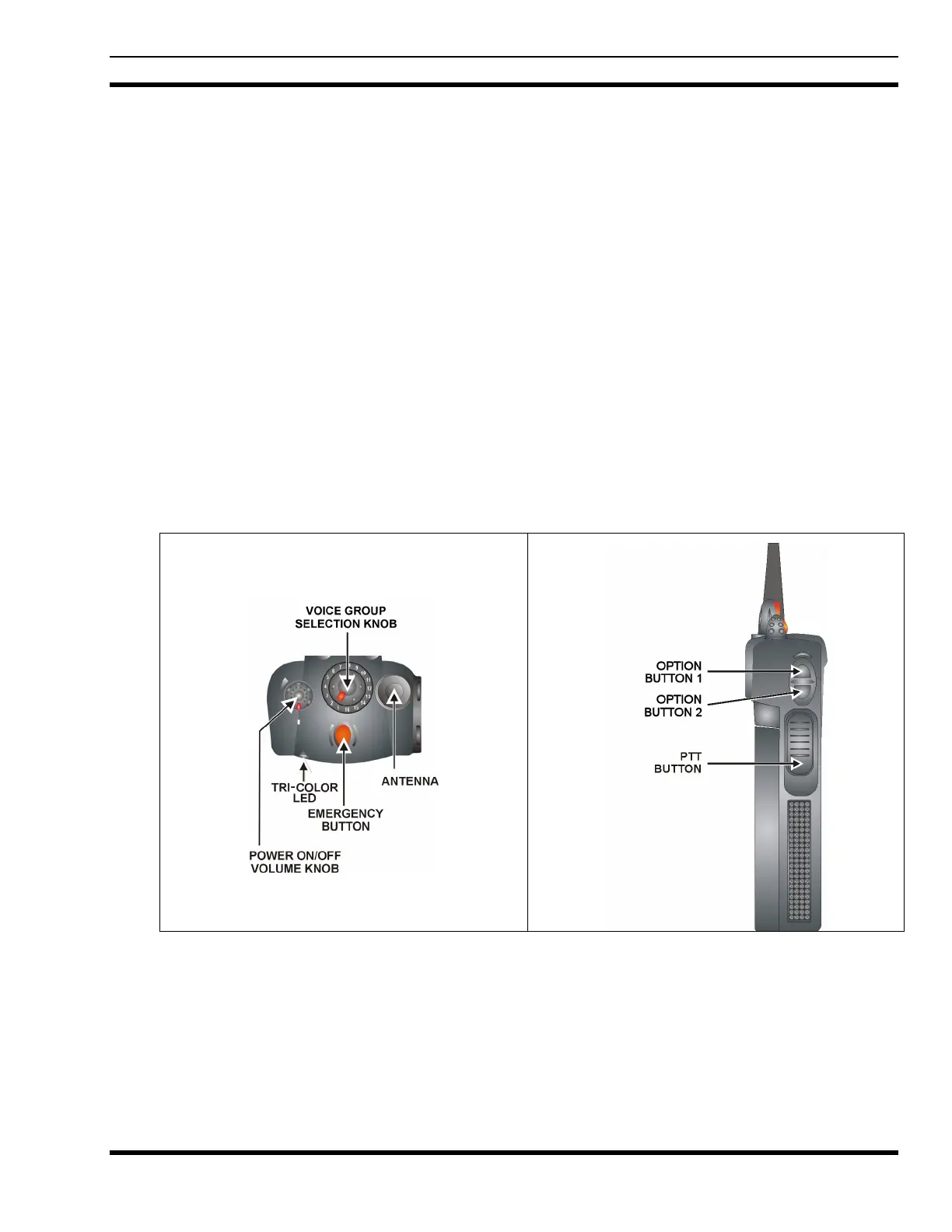
Power ON the radio by rotating the POWER ON-OFF/VOLUME knob clockwise. A short alert signal (if
enabled through programming) indicates the radio is ready to use. Refer to
Figure 9-1 for location of the
POWER ON-OFF/VOLUME KNOB.
The display shows the last selected system and group or a default system and group (depending on
programming).
Adjust the POWER ON-OFF/VOLUME knob to the desired volume level.
Select the desired system and group. The display indicates the current system and group names.
The radio is now ready to transmit and receive calls.
9.2 CONTROLS
The radio features two rotary control knobs and an emergency button mounted on the top of the radio
(
Figure 9-1). Push-To-Talk and option buttons are mounted on the side (Figure 9-1). The front mounted
keypad has no buttons on the P7230 Select model, six buttons on the P7250 Scan model, and 15 buttons
on the P7270 System Radio.
Figure 9-1: Top and Side View



 To Next Page