Minilase™ e System Guide
3 | P a g e
Getting Started
Thank you for purchasing the Minilase™ e laser marking system. Minilase™ e is
shipped fully assembled and is completely operational within 15 minutes. Most
laser marking systems require elaborate, time consuming setup, plus complex
assembly and training sessions. But Minilase™ e changes all of that. Let’s get
started!
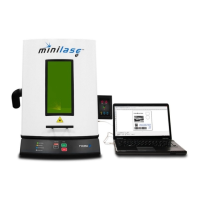
Your Minilase™ is shipped fully assembled in one box. Minilase™ is a desktop
system, so you should arrange a suitable workbench or desk area. You will
need:
An area 17” (432mm) wide x 34” (864mm) deep with at least 50”
(1,270mm) of headroom to accommodate the system footprint.
Ample room next to the system for a laptop or desktop PC, monitor,
keyboard and mouse. You will be installing Minilase™ Pro SE software
on your PC to program and run Minilase™.
USB drive labeled with system
serial number
Software (USB drive)
System guide, you’re reading
it!
Minilase™ Pro SE software
manual
Video tutorials
Laser programming guide
Laser safety manual
One (1) power cord
One (1) USB cable
Windows™ XP Pro, 7 Pro, 8 or
10
Pentium 4 processor or
greater
80GB hard drive storage or
greater
2GB RAM or greater
USB 2.0 or greater


 To Next Page