age 5
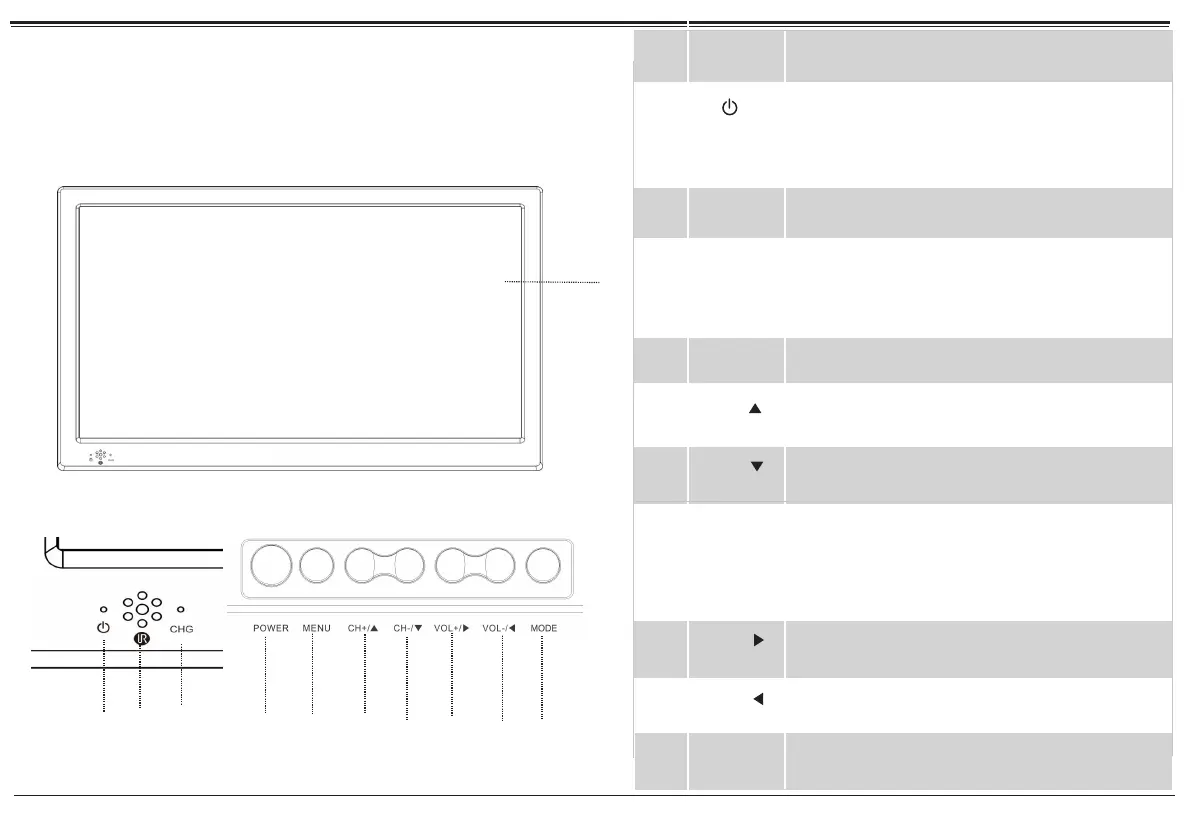
Power indicator; Lights Blue when the TV is
ess VOL+/-
CHG
P
At a Glance
Main Unit
1
2
3
4
5
6
Power/Standby. Press to turn the TV on or to
place it in standby mode.
7
Remote
sensor
Detects IR signals from the included remote
control.
POWER
MENU
Access the system menu to adjust the TV’s
options.
CH+/
Channel up/browse up when navigating a
menu
VOL–/
Volume down/browse left when navigating
a menu
TV display
Color TFT LCD screen
8
9
10
11
1.
connected to the power and stand by;
Lights red when TV is charging; The indicator
3
4
5
6
7
9
10
CH-/
MODE
Channel down/browse down when navigat-
ing a menu
Change the active source mode. Press to view
the Mode menu; press CH+/CH- to browse
the list of modes; then pr to select
and change the mode.
VOL+/
Volume up/browse right when navigating a
menu
will darken
the TV is fully charged.
When with built-in rechargeable batteries,
it is charge indicator. lt
bright when re
charging,
Not brig ht state, charg ing
full
(Only available for the
machine of
internal battery)
11
1
2
8


 To Next Page