EasyManua.ls Logo

Tymate M12-3 - User Manual

Tymate M12-3
16 pages
Print Icon
To Next Page IconTo Next Page
Loading...
Tire Pressure Monitoring System
User Manual
Implementation Standard: GB26149-2017
Question and Answer IconNeed help?

Do you have a question about the Tymate M12-3 and is the answer not in the manual?

Summary

Product Overview and Introduction

Product Introduction

Introduces the tire-pressure monitoring system, its purpose, and benefits for vehicle performance and safety.

Safety Warnings

Lists critical safety precautions and warnings to be followed before installing and using the TPMS.

Installation Precautions

Product Features

Product Composition and Monitor Installation

Monitor Buttons and LCD Image

Identifies the monitor's buttons, LCD display elements, and common icons used in the system.

Monitor Installation Instructions

Provides step-by-step instructions for installing the TPMS monitor within the vehicle.

Monitor Operation and Parameter Settings

Turn on;off the Monitor

Explains the procedure for manually turning the TPMS display unit on and off.

Factory Settings

Lists the default preset values for pressure units, alarm thresholds, and temperature units.

Restore Factory Settings

Details the method for resetting the system to its original factory default configurations.

Detailed Setting Order

Pressure Unit Setting

Explains how to select the preferred pressure unit, either PSI or BAR.

Temperature Unit Setting

Explains how to select the preferred temperature unit, either Celsius (°C) or Fahrenheit (°F).

Front Tire High Pressure Alarm Value Setting

Guides on setting the maximum pressure threshold for front tires to trigger a high-pressure alarm.

Front Tire Low Pressure Alarm Value Setting

Guides on setting the minimum pressure threshold for front tires to trigger a low-pressure alarm.

Rear Tire High Pressure Alarm Value Setting

Guides on setting the maximum pressure threshold for rear tires to trigger a high-pressure alarm.

Additional Setting Order Items

Rear Tire Low Pressure Alarm Value Setting

Guides on setting the minimum pressure threshold for rear tires to trigger a low-pressure alarm.

Spare Tire High Pressure Alarm Value Setting

Guides on setting the maximum pressure threshold for spare tires to trigger a high-pressure alarm.

Spare Tire Low Pressure Alarm Value Setting

Guides on setting the minimum pressure threshold for spare tires to trigger a low-pressure alarm.

High Temperature Alarm Value Setting

Guides on setting the maximum temperature threshold for tires to trigger a temperature alarm.

Alarm Status and Types

High Pressure Alarm

Describes the display indication and sound prompt for a high tire pressure condition.

Low Pressure Alarm

Describes the display indication and sound prompt for a low tire pressure condition.

High Temperature Alarm

Describes the display indication and sound prompt for a high tire temperature condition.

Advanced Alarm Conditions

Sudden Air Leak Alarm

Details the display and alarm for a rapid loss of tire pressure indicating a leak.

Sensor Low Voltage Alarm

Explains the display and alarm indicating a low battery level in a tire sensor.

Additional System Functions

4-7 Tire Display

Explains how the display shows pressure values for four or seven tires, including switching intervals.

Power Saving Mode

Describes the automatic power-saving feature when the monitor is stationary and inactive.

Automatically Brightness Adjustment

Details how the monitor automatically adjusts its backlight brightness based on ambient light.

Charging of Monitor

Explains the charging methods for the monitor, including solar and USB charging, and battery level indicators.

Tire Interchange

Provides instructions on how to reassign sensors to different tire positions if tires are swapped.

Sensor Management

Recode the Sensor

Explains the procedure for re-coding or re-matching sensors to tires using inflate code learning.

Technical Parameters

Disclaimer and Usage Tips

Disclaimer

Outlines limitations of liability, usage scope, and manual content changes.

Some Using Tips

Provides notes on normal operating conditions, data updates, and sensor wear.

Troubleshooting: Sensor Operation

Sensor Not in Normal Operation

Guides on troubleshooting issues when the sensor is not operating normally, including battery checks.

Troubleshooting: Accuracy Issues

Device Not Monitoring Pressure Accurately

Explains potential reasons for inaccurate pressure readings, such as data update delays or measurement tool differences.

Contact Information and Support

Contact Us

Provides contact details for customer service, including email, phone number, and official website.

Overview

This document describes the Tymate Tire Pressure Monitoring System (TPMS), User Manual Item No. M12-3, which adheres to Implementation Standard GB26149-2017.

Function Description

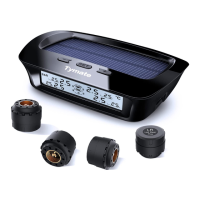
The Tymate TPMS is designed to monitor the air pressure and temperature of each tire in real-time. It collects pressure and temperature data from sensors and transmits it via radio frequency to a display unit. The display processes and shows this data, alerting users to abnormal situations based on user-defined standard pressure and temperature alarm values. The system aims to enhance vehicle comfort, reduce fuel consumption and wear, and improve dynamic performance by providing timely warnings to prevent traffic accidents and tire blowouts.

Key functions include:

  • Real-time Monitoring: Continuously tracks tire pressure and temperature.
  • Alarm System: Issues visual and audible alarms for excessive pressure, low pressure, high temperature, sudden air leaks, and low sensor battery voltage.
  • User-Configurable Alarms: Allows users to set custom alarm thresholds for tire pressure and temperature.
  • Automatic Detection: Automatically detects tire abnormalities and triggers alarms, reducing the need for constant driver attention.
  • Power Saving Mode: The monitor enters a sleep mode after 10 minutes of no vibration or being stationary without charging, conserving battery. It wakes up automatically upon vibration or user interaction.
  • Automatic Brightness Adjustment: The display backlight adjusts its brightness based on ambient light conditions.
  • Tire Interchange Function: Allows users to easily reconfigure tire positions on the display without re-coding sensors.
  • Sensor Recoding: Provides an "inflate code learning" method for re-coding sensors if positions are exchanged, codes are wrong, or positions are forgotten.

Important Technical Specifications

  • Pressure Unit Options: BAR, PSI
  • Temperature Unit Options: °C, °F
  • Factory Default Alarm Values:
    • High voltage alarm: 3.0 BAR (44 PSI)
    • Low pressure alarm: 2.0 BAR (29 PSI)
    • High temperature alarm: 158°F
  • Operating Temperature: -20°C ~ 80°C
  • Storage Temperature: -30°C ~ 85°C
  • Charger Input Voltage: DC 5V
  • Frequency: 433.92 MHz
  • Size (LxWxH): 104x82x29.5mm
  • Weight: 91g
  • Battery: Built-in rechargeable lithium battery, supports solar charging. Full charge takes approximately 2.5 hours.
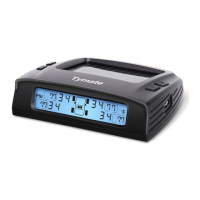
  • Display: Shows pressure and temperature for four tires simultaneously. Supports up to seven tires (including spare tires) with a 10-second interface switch for 7-sensor systems.

Usage Features

  • Installation: The monitor can be easily installed on the dashboard using a sticky pad. It connects to the car's cigarette lighter for charging via a DC-DC power adapter. Initial charging for at least 2.5 hours is recommended.
  • Monitor Control:
    • Turn On/Off: Press and hold the "-" key to turn the monitor on or off.
    • Parameter Settings: In standby mode, press and hold the "SET" button to enter the setting interface. Use "-" or "+" keys to adjust values and "SET" to confirm. Press "SET" and "+" simultaneously to exit without saving.
    • Restore Factory Settings: Turn off the display, then press and hold the "-" button to turn it on. Within 3 seconds, press and hold "SET" until a beep sounds.
  • Alarm Indications: When an alarm is triggered, the corresponding tire icon, parameter, and fault icon flash, accompanied by an audible beep. Pressing any key silences the sound, but visual indicators continue until the fault is resolved.
  • Tire Interchange: In standby mode, press and hold "-/SET" for 3 seconds to enter interchange mode. Select tire positions using "-/SET" and confirm with "SET".
  • Sensor Recoding (Inflate Code Learning): In standby mode, press and hold "+" until a beep sounds to enter learning mode. Select the tire position with "-", then install the sensor and inflate the tire. The monitor will beep and display the sensor's ID code upon successful learning. Press and hold "SET" to save and exit.
  • Display Modes: For systems with 7 sensors, the display cycles between two interfaces every 10 seconds to show data for all tires.
  • Charging: The monitor can be charged via solar panels or the USB charging socket. The display shows battery level and solar charging status. Recommended charging temperature is 0~45°F.

Maintenance Features

  • Safety Warnings: Users are advised to install the display in a location that does not obstruct driving vision and to secure it to prevent falling. Precautions regarding tire temperature and pressure changes during driving are provided, emphasizing the importance of checking for leaks and using high-quality tires.
  • Troubleshooting Tips:
    • Sensor Not Operating Normally: If the monitor beeps when the sensor is removed from the tire, the sensor is likely functional. Reinstall it or try a new battery if issues persist. A video link for battery replacement is provided.
    • Inaccurate Tire Pressure Readings: The system updates data approximately every 5 minutes. Allow time for updates. Deviations compared to tire pressure gauges are normal due to different measurement theories (TPMS monitors variations over time, while gauges provide instantaneous data).
  • General Usage Notes:
    • Sensor data updates every 5 minutes. Previous data may persist for up to 2 hours after a sensor is moved or removed.
    • Slight air leaks after sensor installation are normal.
    • Sensors may experience wear and corrosion over time. Users are recommended to have spare sensors.
  • Customer Support: Tymate offers a 2-year warranty and 24/7 customer service. Contact information (email and phone number) and a QR code for quick access to the after-sales team are provided.
  • Installation Precautions: The manual highlights that the monitor enters sleep mode if no vibration is detected for 10 minutes and wakes up with slight vibration. It also notes that wireless interference is minimal, and natural air leaks in tires are normal and unrelated to product installation. Users are advised to contact support for installation issues.
  • Disclaimer: Users must use the product within its allowable range and follow installation instructions strictly. The company is not responsible for damages due to improper use or installation. Alarm values should be set according to tire parameters or manuals. The manual content is subject to change, and illustrations are for reference only. Professional installation and careful handling during tire disassembly are recommended to avoid sensor damage.

Tymate M12-3 Specifications

General IconGeneral
BrandTymate
ModelM12-3
CategoryMeasuring Instruments
LanguageEnglish

Related product manuals