Inflate code learning
The 4 sensors have been coded and marked with their positions before leaving the
factory. Users only need to install the corresponding sensor positions to the corresponding
tires. When the user needs to exchange the tires, or there is a wrong code, or the position
of the sensor is forgotten during the assembly process, the following "inflate code
learning" is available for the user to re-code.
In the standby mode, press and hold the "+" button and release after a beep sound to
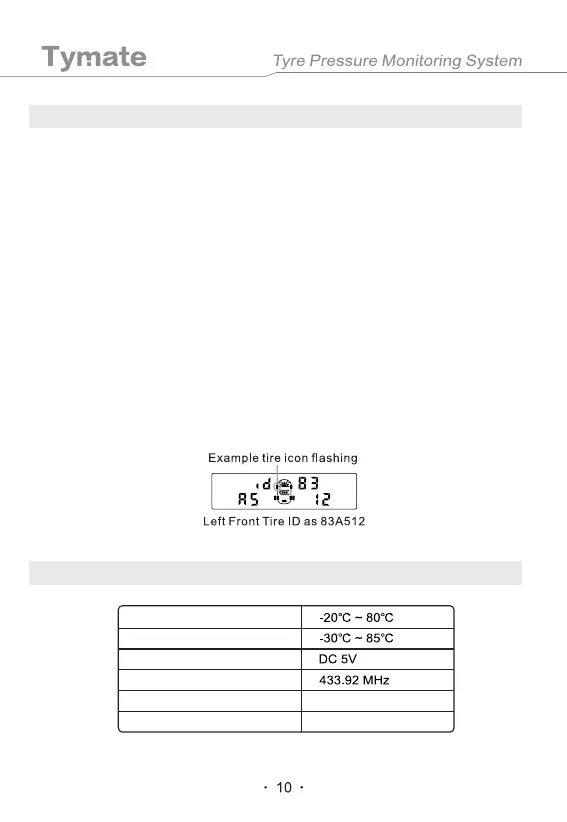
enter the learning mode interface. Then you can see the current tire icon on the LCD
flashes, showing the word "Id" and the 6-digit ID codes of the current tire. Short press the
"-" key to select the tire position that needs to be coded, and then install the sensor on the
corresponding tire and then inflate the corresponding tire. When the sensor senses the
inflation, a beep sound will be heard and the ID code of the sensor (as shown below) will
be shown, indicating that the tire ID code has been aligned. Then you can repeat above
operation and use the same method to code other sensors. When all the required ID
codes have been successfully received, press and hold the "SET" button on the display.
Release the button after the beep sound, save the ID code to the display and resume to
the standby state. And if you press the "SET" and "+" keys together, you will not save any
ID code and resume to standby state.
7. Recode the Sensor
8. Technical Parameters
Operating temperature
104x82x29.5mm
91g
Charger input voltage
Frequency
Size (LxWxH)
Weight
Storage temperaturet


 To Next Page