11
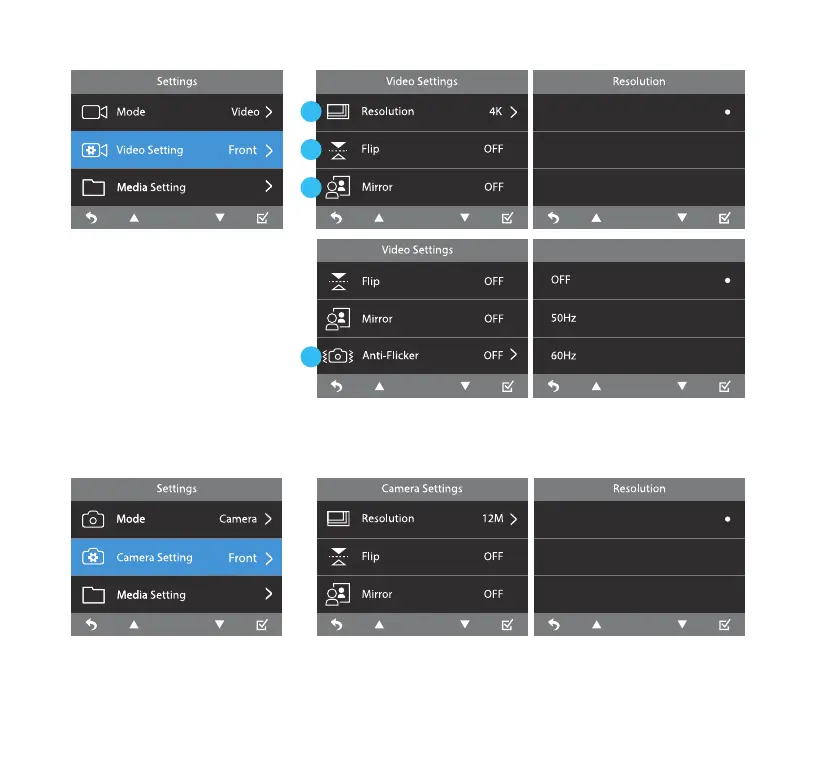
1. Select camera resolution
between 4K (3840 X 2160P),
2K (2560 x 1440P) and FHD
(1920 x 1080P).
2. Select to invert the camera
image upside down.
3. Select to invert the camera
image left to right.
4. Adjust anti-ickering setting between O, 50Hz and 60Hz.
Select Camera Mode and then go to Camera Setting. Select camera recording resolution between
12M (4608 x 2592), 8M (3840 x 2160) and 5M (3072 x 1728). Other settings are similar to Video Settings.
Video Setting
Camera Setting
1
2
3
4
Anti-Flicker
12M (4608*2592)
8M (3840*2160)
5M (3072*1728)
4K (3840*2160P)
2K (2560*1440P)
FHD (1920*1080P)



 To Next Page