12
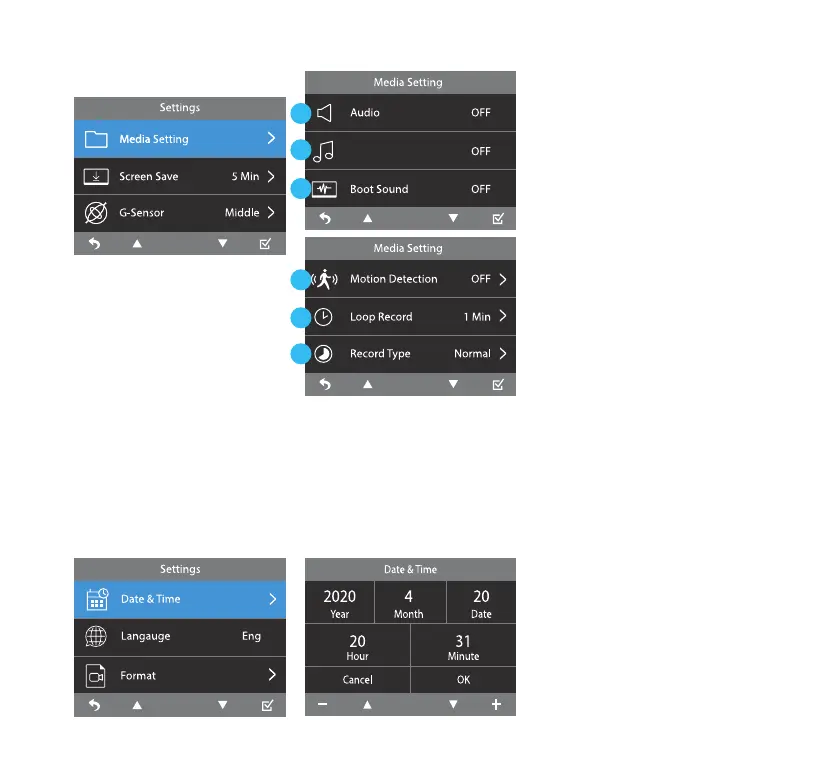
Key Tone
Media Setting
Screen Save
Date & Time
1
2
3
1. Select to turn On/O the
audio of recorded video les.
2. Turn On/O the key tone for
each button pressed.
3. Turn On/O boot sound.
4. Select the level of sensitivity
of the motion detection
function.
5. Select the duration of each
recorded footage. Select
between 1 minute, 3 minutes
and 5 minutes.
6. Select between normal
video or time lapse video.
(Refer to page 15)
Turn o the display after a
chosen period of inactivity. To
turn on the display press any
of the function buttons.
Set the date and time before
using the 4K Dash Cam as this
will aect the time stamp on
all recorded media les. Time
stamp will always be displayed;
it cannot be removed.
G-Sensor
When G-Sensor detects a sudden movement such as an impact or collision, it will trigger an Event
Recording and the footage will be permanently stored and locked within the Event folder inside the
MicroSD card. The level of sensitivity can be adjusted from High to Middle, Low. Turn OFF to disable
G-Sensor function.
Note: The default G-Sensor sensitivity is set as Middle.
4
5
6



 To Next Page