Prisir:: ce
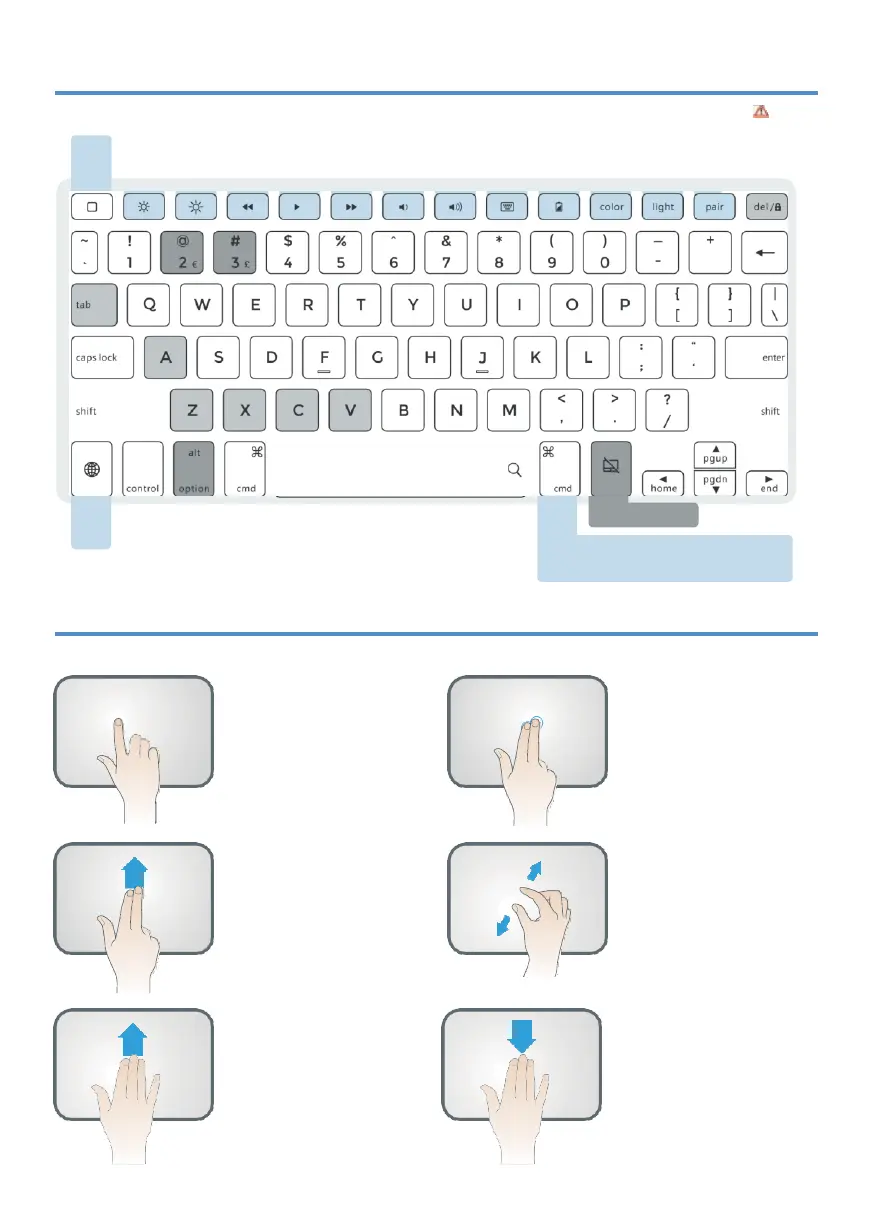
Press twice
CtrlCenter
Long Hold
Siri
Chang e
Chang e
color brightness
Shortcut Keys
CMO+ Tab =APP switch
CMD +k =Select all
CMO+C=Copy
CMO+V=Poste
CMD+Z=Undo
CMD+X=Cu t
CMO+Shift+3=Screen Sho t
Color=Change backlight color
Light=Backlig ht brig htness {low,
medium,high,off)
Alt +Oel=Screen Lock/Unlock
0ption +Shift +2= € ;0p tion+3=
£
Long Hold
-
App specific shortcut shows up (e.g. when
you are in an App , hold this key and you will see all the
shortcuts that can be used in this App) .
SHORTCUT MAP
Notice: Long Hold
[:j
in any app to view available shortcuts.
Flashes Red
Needs charge
h
TOUCHPAD FUNCTION
Notice: Make sure bluetooth connected and touchpad function turned on!
One Finger Tap Mode
Action 1: Tap one tim e whil e on
main interface;
Function:
mouse cur sor
mani pul ati on.
Action 2: ta p 2 tim es and slide;
Function: select or move th e icO!i
Jump out of the mode:r efer to
th e ri ght in structi on.
Two Fingers Scroll
Action 4: Sli de fin gers up or
dow n;
Function: Scroll web page or file
up/dow n or scroll splitt ed scree.n
Three Fingers Swipe UP
Action 6: Swipe Up;
Function: Switch between Main
int erface and pr evious program
or page.
Two Fingers Tap Mode
Action 3: Tap th e pad one tim e;
Function: Cance l the selecti on.
Two Fingers Zoom
Action 5:
Two fingers slide fo r
zoo min g in or out.
Function: Can onl y be used
on th e websit es.
Three Fingers Swipe Down
Action 7: Swipe Dow n;
Function: Switch between main
interface and splitt ed screen.


 To Next Page