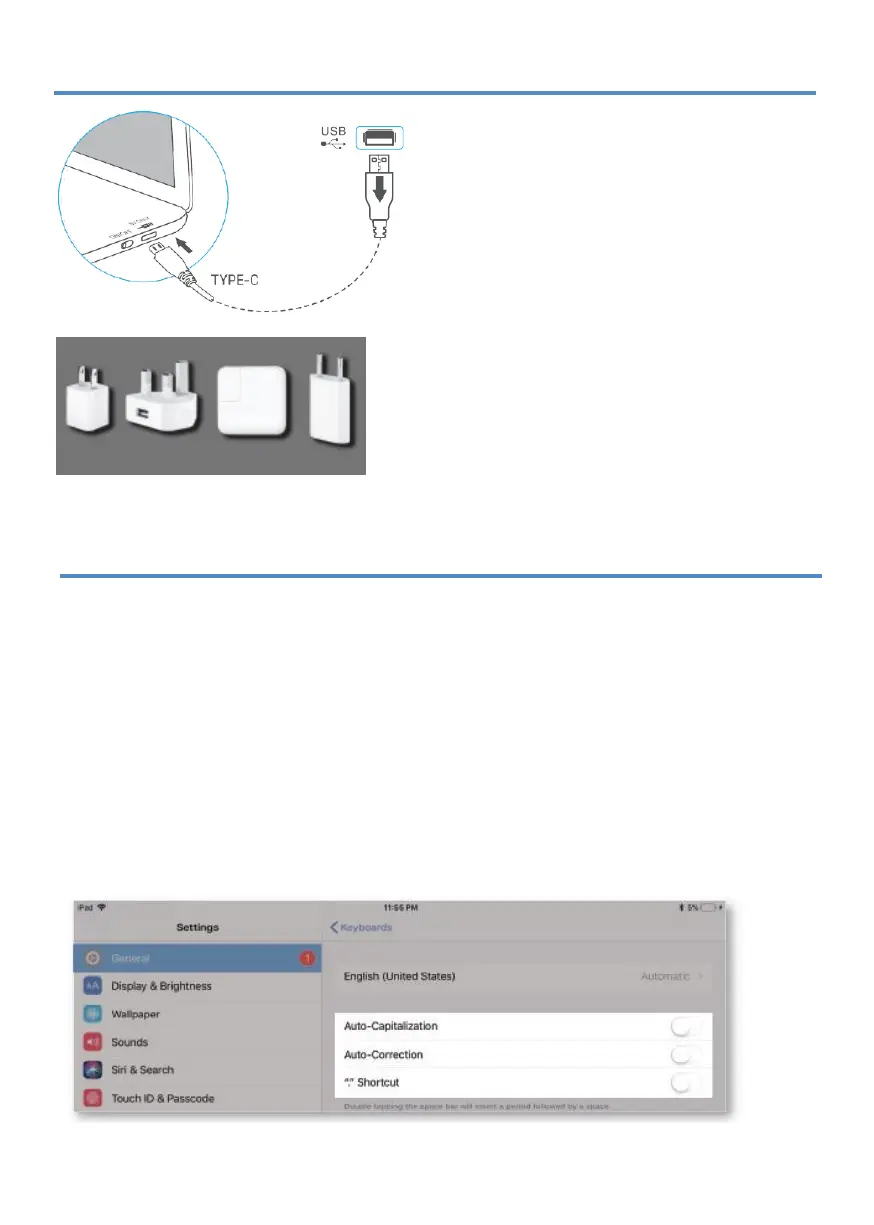
CHARGING
iPad adapters
TROUBLESHOOTING
1.
Switch on the keyboard (if battery light is
flashing, please charge the keyboard).
2. Plug the charging cable (included) into the
keyboard and power adapter (not included,
iPad or iPhone power adapter recommended);
a)
Battery indicator turns red when
keyboard is charging ;
b)
Battery indicator turns blue when
charging is complete .
If the keyboard is not working correctly, please check the following:
1.
The Bluetooth function on the iPad (or other Bluetooth devices) is enabled;
2.
The Bluetooth keyboard is within 33 feet;
3.
The Bluetooth keyboard is charged;
4.
Make sure the keyboard is turned on (the battery indicator is illuminated);
5.
Press the key 'Pair' and check the Bluetooth status;
6.
Make sure a keyboard has already paired via Bluetooth.
If
you have unwanted auto-correction or punctuation, please follow these steps:
1.
Open Settings app >General> Keyboard> Hardware Keyboard ;
2.
Toggle
OFF
Auto-Capitalization, Auto-Correction, and"." shortcut (please refer to the
picture below).


 To Next Page