Cleaning your
EFTPOS machine
Rebooting your EFTPOS machine
The first step to resolving a problem with your EFTPOS machine
is to reboot. You can do this by following these steps:
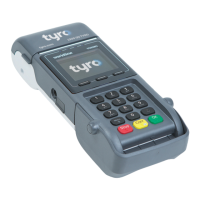
• Hold down the yellow ‘Corr’ key for approx. eight seconds
or until “Reboot Now” is displayed
• Release the key and allow the reboot to complete
• Allow two minutes for the machine to reboot – a completed
reboot can be confirmed when your Trading name is
displayed on the machine screen
Switching between WiFi and 3G/4G
You need an internet connection to process a transaction; off-line
transactions are not available.
If your WiFi is down, you can switch to 3G/4G which is supported via the
SIM in your EFTPOS machine. When your WiFi is restored, we recommend
that you switch back to WiFi as the primary connection method.
To switch between WiFi and 3G/4G follow the steps below:
• Press ‘Menu’
• Select ‘Network and Diagnostics’
• Select ‘3G/4G’ or ‘WiFi’
Troubleshooting
It’s important to regularly clean your EFTPOS machine to
avoid germs and maintain its hygiene. To do this:
• Use the same cleaning agents you would use to clean
a laptop or smartphone e.g. only a solution of 70%-75%
ethanol with water
• Do NOT use spray household cleaners or surface
disinfectants directly on your machine, and do not use
solvents like acetone or white spirits or isopropanol
• Apply the 70%-75% ethanol with water to a cloth, gently
rub the exterior of your EFTPOS machine, paying particular
attention to the keypad
• Clean the display by gently rubbing with an antistatic cloth
• Aim to clean your EFTPOS machine daily. If your machine
gets a significant amount of use, you should consider
cleaning it multiple times per day
Top tip: Keep a bottle of hand sanitiser near your EFTPOS
machine and encourage anyone who has to touch the
machine to sanitise their hands first.
1716
Cleaning your EFTPOS machine Tyro Mobile EFTPOS machine user guide


 To Next Page