USER GUIDE
Control Operation - Service 6
u-line.com
SAFETY • INSTALLATION & INTEGRATION • OPERATING INSTRUCTIONS • MAINTENANCE • SERVICE
Differentials are used to determine the maximum variation
from set point and have a range of 0 through 10. The
table below shows the effect of differentials on cooling
cycles with a set point of 45°.
Note: Air temperature does not reflect product
temperatures.
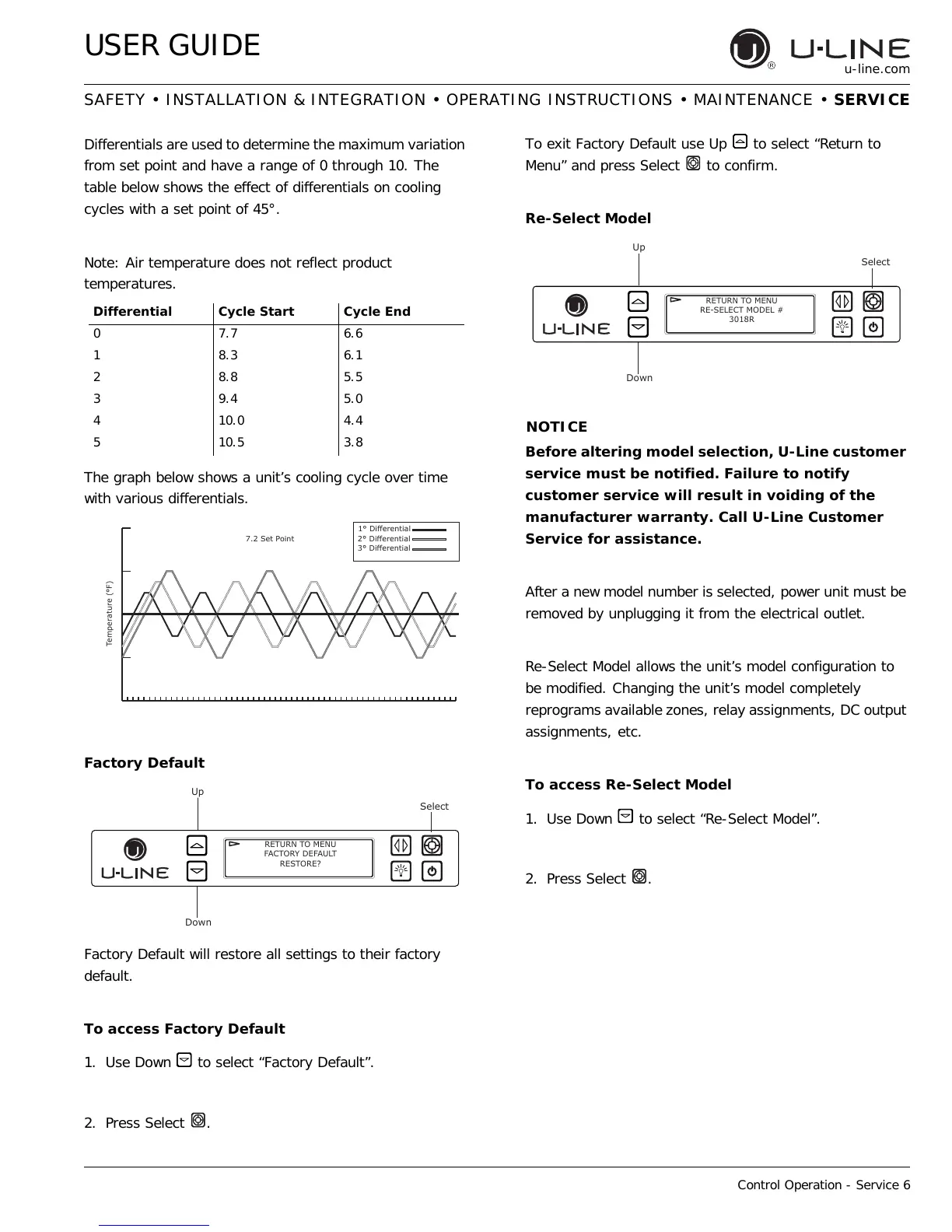
The graph below shows a unit’s cooling cycle over time
with various differentials.
Factory Default
Factory Default will restore all settings to their factory
default.
To access Factory Default
1. Use Down to select “Factory Default”.
2. Press Select .
To exit Factory Default use Up to select “Return to
Menu” and press Select to confirm.
Re-Select Model
Before altering model selection, U-Line customer
service must be notified. Failure to notify
customer service will result in voiding of the
manufacturer warranty. Call U-Line Customer
Service for assistance.
After a new model number is selected, power unit must be
removed by unplugging it from the electrical outlet.
Re-Select Model allows the unit’s model configuration to
be modified. Changing the unit’s model completely
reprograms available zones, relay assignments, DC output
assignments, etc.
To access Re-Select Model
1. Use Down to select “Re-Select Model”.
2. Press Select .
Differential Cycle Start Cycle End
07.76.6
18.36.1
28.85.5
39.45.0
410.04.4
510.53.8
p'LɞHUHQWLDO
p'LɞHUHQWLDO
p'LɞHUHQWLDO
6HW3RLQW
7HPSHUDWXUHp)
Up
Select
Down
RETURN TO MENU
FACTORY DEFAULT
RESTORE?
Up
Select
Down
RETURN TO MENU
RE-SELECT MODEL #
3018R


 To Next Page
 Loading...