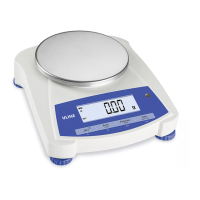
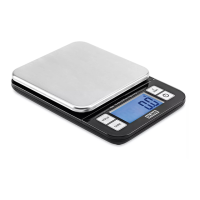
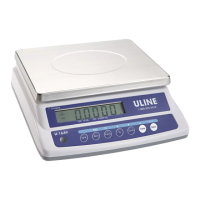
This document describes the Uline H-9884, H-9885, and H-9886 Balance Scales, providing an overview of their functions, technical specifications, usage, and maintenance.
Function Description
The Uline Balance Scales are precision instruments designed for accurate weighing, parts counting, and checkweighing applications. They are suitable for indoor use and offer various modes and units to accommodate different measurement needs. The scales feature a user-friendly interface with dedicated buttons for common operations and a comprehensive user menu for customizing settings.
Control Panel and Functions
The control panel includes several buttons for operation:
- Zero (①) / Yes:
- Short Press (when on): Sets the display to zero.
- Short Press (when off): Turns the scale on.
- Long Press (when on): Turns the scale off.
- Short Press (in Menu): Selects/accepts the displayed setting.
- Print / Units / No:
- Long Press: Toggles through active units.
- Short Press (in Menu): Toggles through available settings.
- Function / Mode / Back:
- Short Press: Selects function setting.
- Long Press: Selects active mode.
- Short Press (in Menu): Returns to previous settings.
- Tare / Menu-Cal / Exit:
- Short Press: Enters/clears a Tare value.
- Long Press: Enters user menu.
- Short Press (in Menu): Quickly exits user menu.
Important Technical Specifications
The Uline Balance Scales come in three models with varying capacities and readabilities:
| Model |
Capacity (g) |
Readability (g) |
Repeatability (Std. Dev) |
Linearity |
Span Calibration Mass (Not Included) |
Linearity Calibration Mass |
Stabilization Time(s) |
| H-9884 |
220 |
0.01 |
1d |
±2d |
200 |
100 g, 200 g |
1 |
| H-9885* |
2200 |
0.01 |
2d |
±5d |
1,000 |
1 kg, 2 kg |
2 |
| H-9886* |
2200 |
0.1 |
1d |
±2d |
2,000 |
1 kg, 2 kg |
1 |
*Also kg, lb, lb:oz convertible
General Specifications:
- Construction: ABS housing & stainless steel pan.
- Draftshield: No.
- Calibration: User-selectable external span or linearity calibration/Digital with external weight.
- Tare Range: Full capacity by subtraction.
- Weighing Unit: g, N, oz, ozt, dwt, ct, grain.
- Application Modes: Weighing, Parts Counting, Checkweighing.
- Power Requirement: AC adapter (included) or four C batteries (not included).
- Typical Battery Life: 270 hours (H-9884, H-9886), 200 hours (H-9885).
- Specified Temperature Range: 50°F to 104°F at 10% to 85% relative humidity, non-condensing.
- Storage Conditions: -4°F to 131°F at 10% to 90% relative humidity, non-condensing.
- Communication: RS232, USB or Ethernet (available as accessories).
- Display Type: Liquid Crystal Display (LCD) with backlight.
- Display Size: 0.78 in / 20 mm digits.
- Pan Size (W x D): 5.7 in / 145 mm diameter (H-9884), 7.5 x 5.7 in / 190 x 144 mm (H-9885, H-9886).
- Scale Dimensions (W x D x H): 8 x 9.1 x 2.8 in / 204 x 230 x 70 mm.
- Shipping Dimensions (W x D x H): 11.8 x 9.8 x 5.3 in / 300 x 250 x 134 mm.
- Net Weight: 2.2 lb / 1.0 kg (H-9884), 3.3 lb / 1.5 kg (H-9885, H-9886).
- Shipping Weight: 3.3 lb / 1.5 kg (H-9884), 4.4 lb / 2.0 kg (H-9885, H-9886).
Equipment Ratings:
- Pollution degree: 2.
- Installation category: II.
- Altitude: 2000m.
- Humidity: Maximum 80% for temperatures up to 88°F decreasing linearly to 50% at 104°F non-condensing.
- Electrical supply: Rated 12VDC 500mA for use with a certified/listed power adapter, or battery operated.
- Indoor use only.
- Temperature range: 50°F to 104°F.
- Main supply voltage fluctuations: Not to exceed ± 10% of the nominal supply voltage.
Usage Features
Safety:
- Always verify AC adapter input voltage and plug type compatibility.
- Position the instrument for easy AC adapter disconnection.
- Ensure the power cord does not pose a tripping hazard.
- Operate only under specified ambient conditions.
- For indoor use only; avoid hazardous, explosive, or wet environments.
- Use only approved accessories.
- Disconnect from power supply when cleaning.
- Service by authorized personnel only.
Transportation Lock:
Before initial use, rotate the pointer on the underside transportation lock to the unlocked position (Figure 1).
Location:
- Use on a firm, steady surface.
- Avoid locations with excessive air current, vibrations, heat sources, or rapid temperature changes.
- Adjust leveling feet until the level bubble is centered (Figure 2).
Connecting Power:
- Battery: Remove the battery cover and install four C batteries according to polarity indications (Figure 3).
- AC Adapter: Connect the AC adapter plug to the input jack (Figure 3) and then to the AC supply. The AC adapter powers the balance when battery power is not needed.
Calibration:
- Press and hold MENU-CAL until "MENU" is displayed, then release. "CAL" will show.
- Press YES to accept; "SPAN" will show. Press YES again to begin span calibration.
- "----" will blink while zero reading is stored. The display will show the calibration weight value. Place the specified weight on the pan. "--C--" will blink while the reading is stored.
- The scale will return to the previous application mode.
Weigh Mode:
- Press and hold MODE until "WEIGH" is displayed.
- (Optional) Place an empty container on the pan and press TARE.
- Add material to the pan; the display will show the weight.
Parts Counting Mode:
This mode counts items based on a reference count.
- Place an empty container on the pan and press TARE.
- Press and hold MODE until "COUNT" is displayed. "CLr.APU" (Clear Average Piece Weight) will then display.
- Press NO to use the stored APW, or YES to establish a new APW.
- If choosing NO, skip to step 6.
- If choosing YES, continue to step 4.
- FUNCTION can be pressed to view the current APW.
- To clear stored APW, press and hold MODE until "COUNT" is displayed, then press YES when "CLr.APU" is displayed.
- After pressing YES, the scale displays the stored sample size. Press NO or BACK to toggle choices (5, 10, 20, 50, or 100).
- Put the indicated number of pieces on the pan. Press YES to calculate the APW. The display will show the piece count.
- Add additional pieces until the desired count is reached.
Checkweigh Mode:
This mode sets low and high weight limits for portion control.
- Press and hold MODE until "CHECH" is displayed. "CLr.rEF" (Clear References) will then display.
- Press NO to use stored reference weight limits, or YES to establish new reference values (skip to step 5 if choosing NO).
- FUNCTION can be pressed to view low and high reference weight limits.
- To clear stored reference values, press and hold MODE until "CHECH" is displayed, then press YES when "CLr.rEF" is displayed.
- The balance displays "SET. Lo." Press YES to view the "Low" limit value. Press YES to accept or NO to edit. The stored value displays with the first digit highlighted (e.g., 000.000 kg). Repeatedly press NO until the desired number appears. Press YES to accept and highlight the next digit. Repeat until all digits are correct. Press YES to accept the "Low" limit value; "SET. HI" will be displayed.
- Repeat steps 1-3 to accept or edit the "High" value.
- Place sample material on the pan. The "Accept" indicator will show if the sample weight is within the acceptable range.
The user menu allows customization of scale settings. All modes except weighing must be activated in the user menu to be available.
- Press and hold MENU until "Menu" is displayed. The first sub-menu (.C.A.L.) will be shown.
- Press YES to enter the displayed sub-menu, or NO to advance to the next.
- Press YES to view the menu item setting, or NO to move to the next item. When viewing a setting, press YES to accept or NO to change it.
- When "End" is displayed, press YES to return to sub-menu selections, or NO to return to the first item in the current menu.
- Span [SPAN] (yes, no): Initiates a span calibration procedure (zero and span). Important for initial setup.
- Lin [LIN] (yes, no): Initiates a linearity calibration procedure (zero, mid-point, and span).
- Back Light [b.Light] (on, off, AUTO):
- "ON": Scale backlight is always on.
- "AUTO": Backlight turns on when a button is pressed or display weight changes.
- Auto Off [A-OFF] (on, off):
- "ON": Scale turns off automatically after five minutes of inactivity to save battery power.
- Filter [FILTER] (L1, L2, L3, L4): Sets the amount of signal filtering. L1 is Less/Faster, L4 is Greater/Slower.
- Auto Zero Tracking [AZT] (OFF, 0.5d, 1d, 3d, 5d, 8d, 10d): Sets automatic zero tracking functionality. The display maintains zero until a change of 0.5d, 1d, 3d, 5d, 8d, or 10d divisions per second is exceeded.
- Stable [STAB] (0.5d, 1d, 2d, 5d): Sets the amount the reading can vary while the stability symbol remains on.
- Stable Compensation [STAB.C] (on, off): Sets automatic stable tracking functionality. Set to "OFF" for dosing or filling applications.
This sub-menu activates modes for use with the MODE button. Weigh mode is always active.
- Parts Count [count] (on, off): Set to "ON" for the mode to be active.
- Check Weigh [Chech] (on, off): Set to "ON" for the mode to be active.
This sub-menu activates units for use with the UNITS button. Units in the menu must be turned on to be active. Available units and modes vary by model and local regulations.
Security Switch:
The Menu Lock switch (Figure 4) can limit changes to the user menu. It can be secured with paper seals, wire seals, or plastic ties. This switch may also set scale settings required by the approval agency.
Maintenance Features
- Cleaning: Clean the main housing with a damp cloth and mild detergent, if necessary.
- Warnings:
- Electric shock hazard: Disconnect the equipment from the power supply before cleaning.
- Attention: Do not use solvents, harsh chemicals, ammonia, or abrasive cleaning agents.
Troubleshooting
The manual provides a comprehensive troubleshooting guide for common operating issues, including:
- Cannot turn on: Verify connections and voltage.
- Poor accuracy: Perform calibration, move scale to a suitable location.
- Cannot calibrate: Move scale to a suitable location, use correct calibration weight.
- Cannot access mode/unit: Enter menu and enable mode/unit.
- Lo rEF: Increase reference weight.
- CEF Err: Shows error, exits mode or goes to CLr.APU.
- Err 3.0 CAL: See Calibration on page 3.
- EPP 4.4 FULL: Set Handshake on, see Interface User Manual.
- Err 8.1 LoAd: Clear pan; check shipping lock setting.
- Err 8.2 LoAd: Install pan; check shipping lock setting.
- Err 8.3 LoAd: Load exceeds scale maximum capacity.
- Err 8.4 LoAd: Reading below min. range; re-install pan.
- Err 8.6 999999: Result exceeds display capability.
- Err 9 dAtA, Err 13 MEM, Err 53 CSUM: Contact Uline Customer Service.
If troubleshooting does not resolve the problem, contact Uline Customer Service at 1-800-295-5510.



 To Next Page
 General