18
4.2.3 Programming the Cyclone IV FPGA
To program the Altera Cyclone IV FPGA - and have that program persist in memory after power
cycling the device - a *.jic programming file must be created in the Quartus II development
environment. However, to create a *.jic file, a compiled Quartus II design must first be produced.
How to develop and compile a Quartus II design file is covered extensively on Altera’s website
and in various resources on the web. Any working design ultimately gets compiled and results in
an SRAM Object File (.sof) in the design’s working directory.
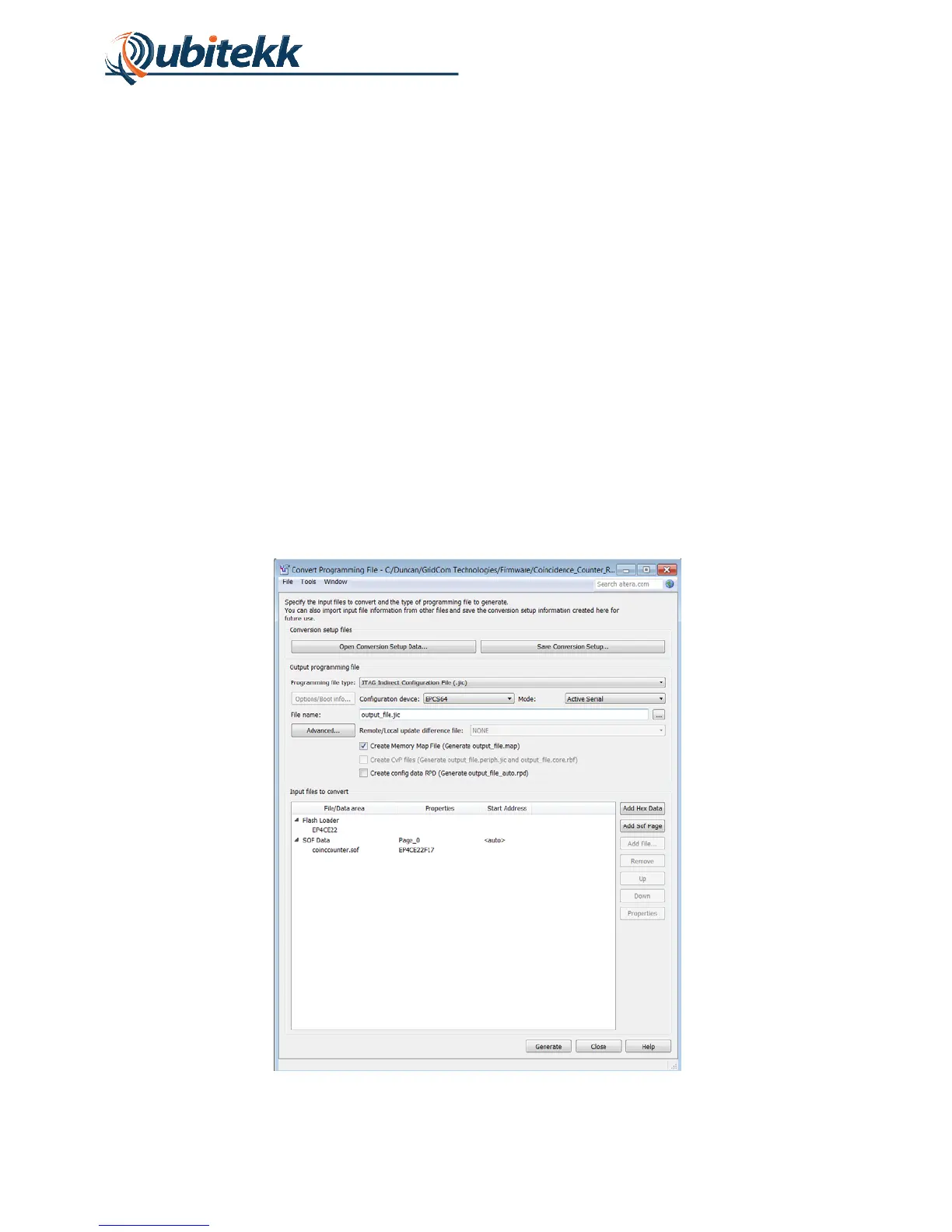
To create the *.jic file, the design’s *.sof file can be converted by selecting the menu item “File -
> Convert Programming Files…” in Quartus II. This will open the “Convert Programming File”
window which allows various parameters to be provided by the user to convert a .sof file to a .jic
file. In this window, the Programming File Type should be set to .jic and the configuration device
should be set to EPCS64. Select the “Flash Loader” in the “File/Data area” and click the “Add
Device” button to the right. The EP4CE22 device should be selected from the pop-up window.
Select the “SOF Data” in the “File/Data area” and click the “Add File” button to the right. The
recently compiled *.sof file for the design should be selected from the file dialog box.
When finished, the “Convert Programming File” window should look as shown in Figure 17.
Click the “Generate” button to convert the .sof file to a .jic file.
Figure 17. Convert Programming File window parameters.



 To Next Page