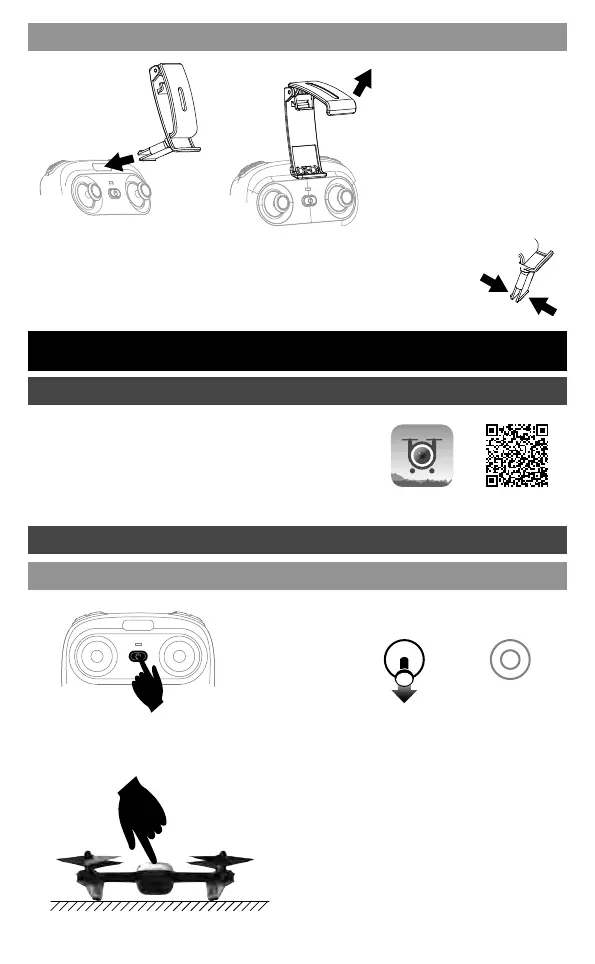
When take out the phone clip, you need to press the clip buckle behind
the phone clip , so that the buckle can be closed and removed easily.
① Take out the phone holder
and insert into the transmitter.
② Pull out upper lamp of the
holder and put the phone into
the holder, then release the
clamp, and the phone will be
fixed on the holder. Please
make sure that the button on
phone is not clamped.
Flight Operations
Mobile phone connect with Drone
Download and install APP: Flyingsee
This software is suitable for mobile phones in the
IOS and Android system. For detailed operation,
please check the system “HELP” of APP.
Mobile Phone Installation
Press down
① Turn on the prower on the transmitter, the
transmitter indicator light will flash quickly.
② Pull the left stick until bottom
and then release, the transmitter
power-LED will flash slowly, and
enter frequency pairing.
③Turn on power switch of drone, the indicator
light becomes from shiny to long bright which
indicating the drone is in the state of successful
opposite frequency.
It must be placed on the horizontal ground.
Transmitter connect with Drone
Frequency Pairing
04



 To Next Page