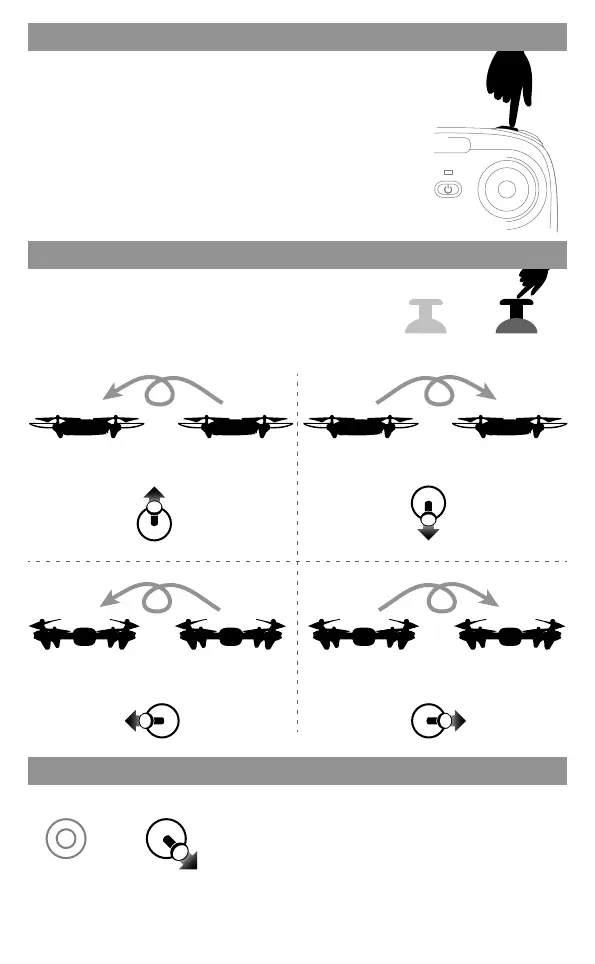
Press down
Low speed default
Speed Switch
Low speed: suitable for beginners to practice without wind.
High speed: suitable for professional operation in outdoor
wind resistance.
Press the “Speed Switching” button, the transmitter
will sound "didi" to enter the High Speed Mode "H".
Press again, the transmitter will sound "di" to enter
the Low Speed Mode "L".
Flips
During the flight, short press down the right stick in
the center button, and push the right stick
upward/downward/left/right, the drone will complete
a roll operation.
Roll backwardRoll forward
Front Rear Front Rear Front Rear Front Rear
Roll left
Left RightLeft Right Left RightLeft Right
Roll right
Tips: When the drone is fiercely impacted or crashed, it may cause the gyro can not recover and
cause difficult control, if so, you can re-pairing & re-calibrateand put the drone on the level surface.
After successful frequency alignment, the right stick is
pushed to the lower right corner by 45°, and the drone
LED turns to keep bright after quick flashing, indicating
that the gyroscope has been calibrated. Release the right
stick.
Drone calibration (When abnormal flying)
07



 To Next Page