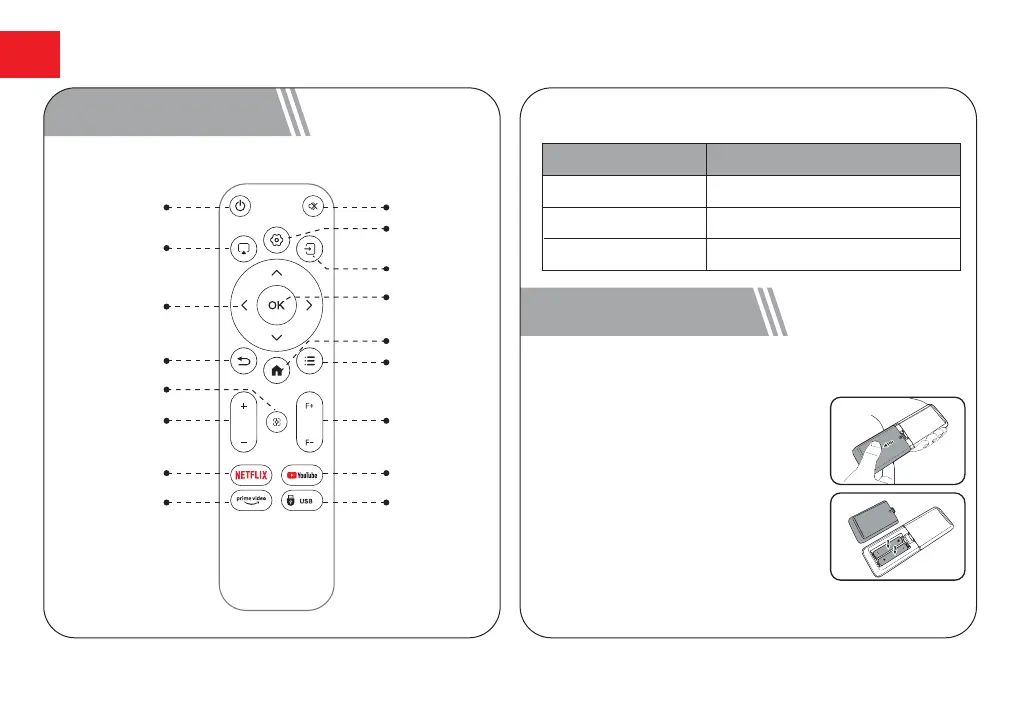
4 Remote Control
Power
Mute
Screen Sharing
Setup
Input Source
Navigation
Buttons
OK
Return
Home
Menu
Volume
Auto Focus
Focus
YoutubeNetflix
Prime Video USB
LED Indication
Steady Blue
Steady Red
Light Off
Powered On
Standby Mode
Powered Off
LED Status Description
5 Get Started
Prepare the Remote Control
●
Open the battery holder cover of
the remote control.
●
Install two AAA batteries. Make
sure to match the polarity (+/-)
indicated and put back the cover.
●
Please refer to the on-screen
instructions to pair the remote
control with the Apollo P50.
●
The distance between the remote
and the projector should not
exceed 10 m/33 ft.
EN
07



 To Next Page