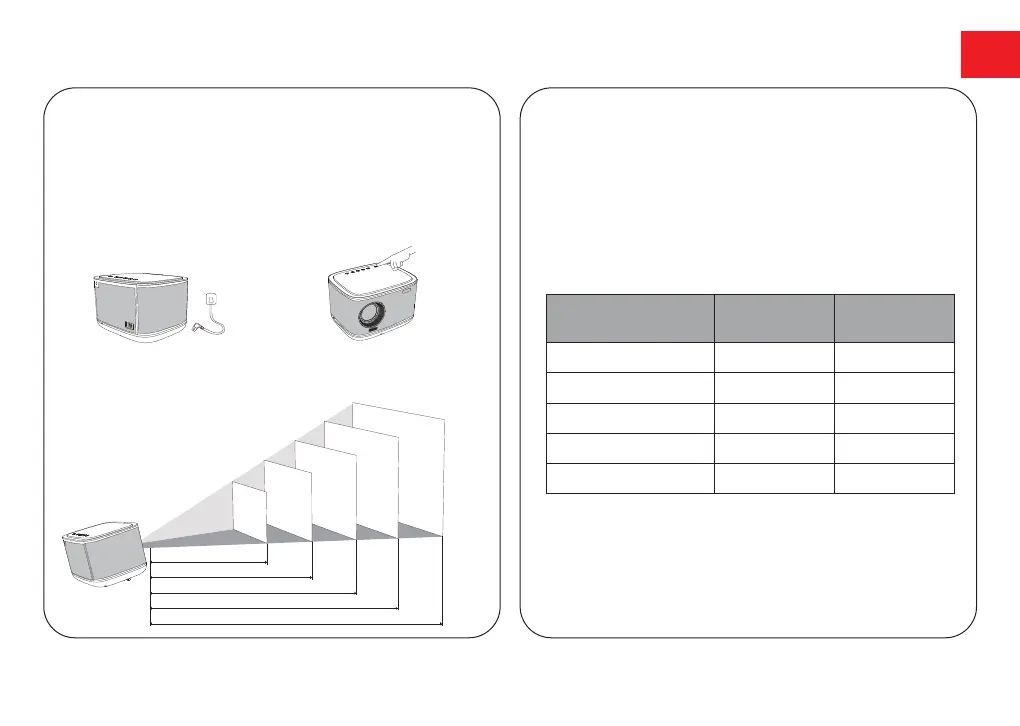
Power On/Off
Placement
●
Inserting the power plug using the provided power cord.
●
Press the power button or remote control power button
once to power on.
●
Press the power button or remote control power button
twice to power off.
Projection Distance and Projection Image Size
80
90
100
110
120
2.49
2.8
3.1
3.42
3.73
Projection Image
Size (inch)
Distance (m)
8.12
9.19
10.18
11.22
12.24
Distance (ft)
●
Place Apollo P50 on a stable, flat surface in front of
the projection surface.
●
Please adjust the distance between Apollo P50
Smart and the projection surface to get the desired
projection image.
Plug the power cord
into an outlet.
Press the power button
to turn on the projector.
EN
●
Notice: The projection image size refers to the
distance of the diagonal of the image size instead
of the length of the image size.
08
80
"
90
"
100
"
110
"
120
"
2.49
2.8
3.1
3.42
3.73



 To Next Page