“ ”: USB REPEAT
“ ”: SUB PAIR
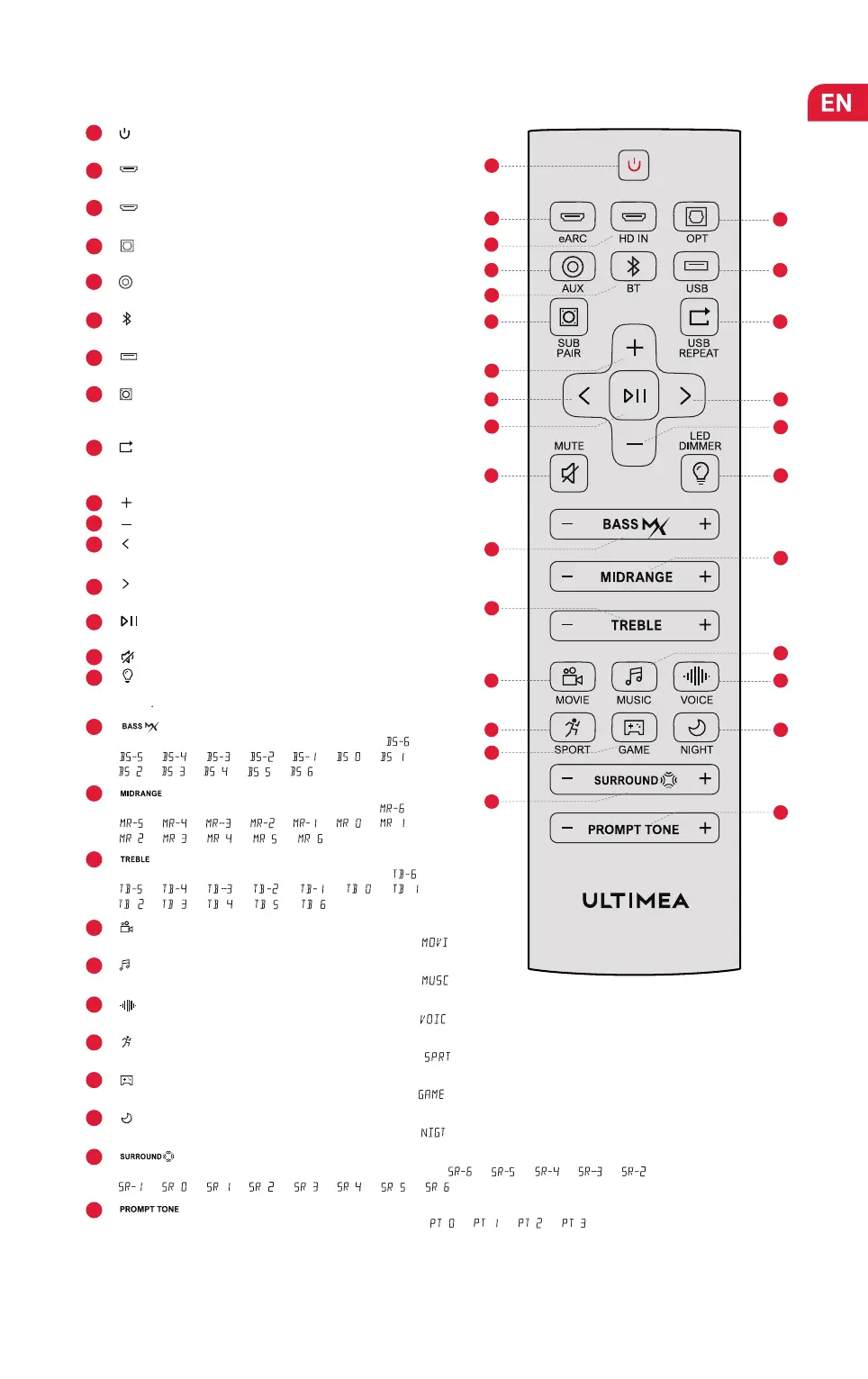
Remote Control
1
Press to power on / off.
“ ”
:
Power Button
3
“ ”
: HD IN
5
“ ”: AUX
“ ”
:
eARC
Press to switch to HDMI eARC channel.
2
6
Press to switch to AUX channel.
“ ”: BT
4
Press to switch to OPTICAL channel.
“ ”: OPT
Press to switch to BLUETOOTH channel.
7
“ ”: USB
Press to switch to USB channel.
Press to switch to HDMI IN channel.
8
For BT and USB mode only: Skip to next track.
“ ”: Next
9
For BT and USB mode only.
“ ”: Play / Pause
10
“ ”: MUTE
USB Mode: Press to switch between single loop playback and
list loop playback.
Press and hold the button for 3 seconds to put the Soundbar
in a state ready to pair with the subwoofer.
11
“ ”: Volume Up
14
“ ”: Previous
15
“ ”: Volume Down
13
12
For BT and USB mode only: Skip to previous track.
17
“ ”: BASSMAX
18
“ ”: MIDRANGE
19
“ ”: TREBLE
20
Press to switch to MOVIE mode, the display will show: “ ”.
“ ”: MOVIE
21
Press to switch to MUSIC mode, the display will show: “ ”.
“ ”: MUSIC
22
Press to switch to VOICE mode, the display will show: “ ”.
“ ”: VOICE
23
Press to switch to SPORT mode, the display will show: “ ”.
“ ”: SPORT
24
Press to switch to GAME mode, the display will show: “ ”.
“ ”: GAME
25
Press to switch to NIGHT mode, the display will show: “ ”.
“ ”: NIGHT
26
“ ”: SURROUND
27
“ ”: PROMPT TONE
Press to adjust display brightness in 5 levels. Press and hold
for 3s to turn off the LED display.
“ ”: LED DIMMER
16
Press to adjust bass level, the display will show: “ ”,
“ ”, “ ”, “ ”, “ ”, “ ”, “ ”, “ ”,
“ ”, “ ”, “ ”, “ ”, “ ”.
Press to adjust alto level, the display will show: “ ”,
“ ”, “ ”, “ ”, “ ”, “ ”, “ ”, “ ”,
“ ”, “ ”, “ ”, “ ”, “ ”.
Press to adjust treble level, the display will show: “ ”,
“ ”, “ ”, “ ”, “ ”, “ ”, “ ”, “ ”,
“ ”, “ ”, “ ”, “ ”, “ ”.
Press to adjust surround sound level, the display will show: “ ”, “ ”, “ ”, “ ”, “ ”,
“ ”, “ ”, “ ”, “ ”, “ ”, “ ”, “ ”, “ ”.
1
2
6
10
14
17
19
24
26
11
21
27
18
3
5
4
8
9
12
13
15
16
20
22
23
25
7
Press to adjust prompt tone level, the display will show: “ ”, “ ”, “ ”, “ ”.


 To Next Page
 Loading...