5 CONNECT TO TV VIA OPTICAL / AUX
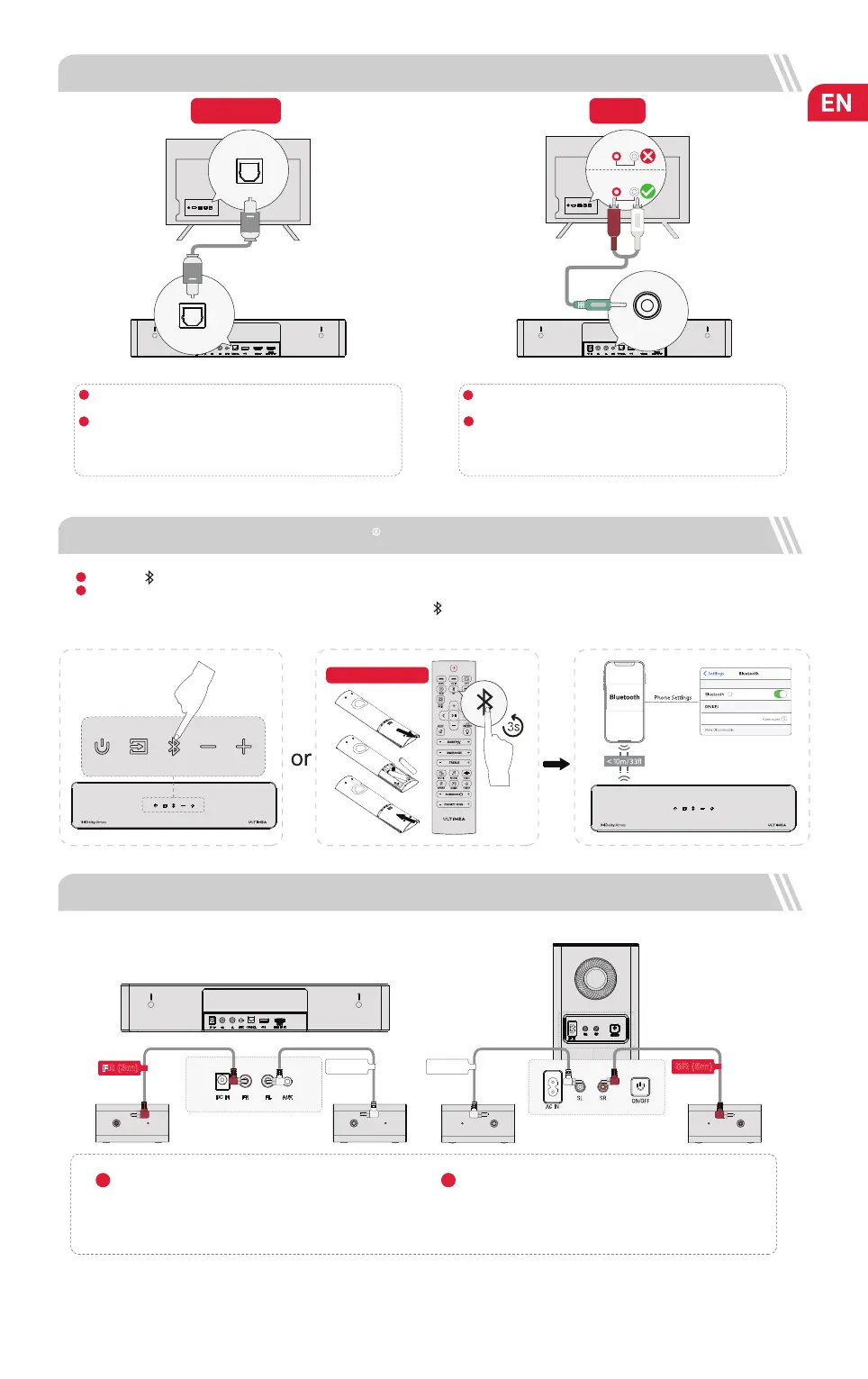
In Optical Mode: If there is no sound, try setting the TV audio output to PCM: TV Settings > Home > Settings > Sound > Digital Audio Output > PCM
OPTION 1: OPTICAL
Note: If audio is playing from the internal TV speakers, mute or
minimize the TV volume.
Note: Please remember to unplug the AUX cable from TV and
Soundbar when you want to switch other mode.
Make sure the optical plug is inserted correctly as it shows in the
picture. Do not insert the plug upside down and break the optical.
OPTICAL
DIGITAL AUDIO
OUT
OPTICAL
OPTICAL
OPTICAL
OPTION 2: AUX
Connect the 3.5mm to RCA audio cable to connect to your TV's
RCA AUDIO OUT port.
Make sure the color of the cables ends matches the color of the
TV ports.
AUX
AUX
AUDIO OUTPUT
R
L
AUDIO IN
R
L
1
2
1
2
Make sure the TV's port is OPTICAL OUT, connect both sides
of the cable to OPTICAL, for both the TV and the soundbar.
Note: If it’s already in the Bluetooth mode and connected, press and hold “ ” button for 3 seconds to disconnect the current
device and connect to new device manually on your mobile phone / PC / TV.
6 CONNECT TO BLUETOOTH
Press the “ ” button on the soundbar or remote control to enter Bluetooth pairing mode.
Open your phone’s Bluetooth settings, nd and select “Poseidon D80” to connect the soundbar.
Batteries not included
1
2
Poseidon D80
7 CONNECT TO SUBWOOFER AND SURROUND SPEAKERS
Note: After connecting the surround speakers in the manner described above, when facing the front of the soundbar, the two surround
satellite speakers on the right side will have red interfaces, while the two surround satellite speakers on the left side will have white
interfaces. Please ensure that they are positioned accordingly to ensure an optimal audio experience.
Use the Front Surround Cables (FL & FR) to connect the
soundbar and surround speakers, please pay attention to
match the same color interfaces on the surround speakers
with the corresponding ones on the soundbar and place the
surround speakers accordingly.
1
Use the Rear Surround Cables (SL & SR) to connect the
subwoofer and surround speakers, please pay attention to
match the same color interfaces on the surround speakers
with the corresponding ones on the subwoofer and place the
surround speakers accordingly.
2
FR (3m)
FL (3m)
SR (6m)
SL (6m)


 To Next Page
 Loading...