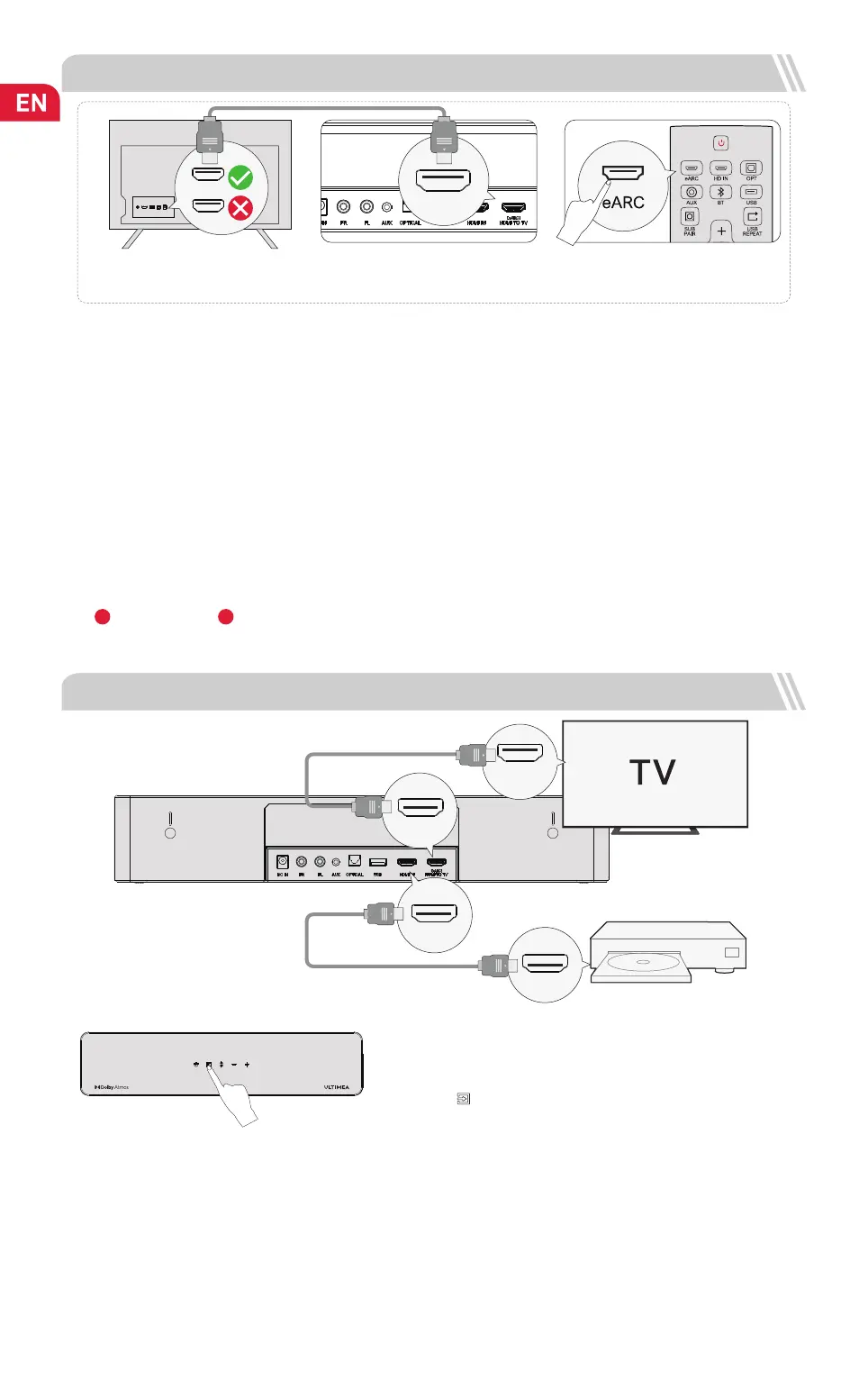
3 CONNECT TO TV VIA HDMI eARC / ARC
eARC/ARC
HDMI
Steps 1:
Connect one end of the HDMI cable to the
eARC / ARC port your TV.
Steps 2:
Then connect the other end to the eARC
port of the soundbar.
Steps 3:
Press “eARC” button on the remote
control to select “eARC” input.
eARC
4 CONNECT TO OTHER DEVICE VIA HDMI IN
Step 1: Connect the HDMI Cable to the HDMI OUT (eARC) port on the
Soundbar and the other end to the eARC / ARC port on the TV.
Step 2: Connect the HDMI cable to the HDMI OUT port on the other device
(Such as DVD or game consol) and the other end to HDMI IN port on the
Soundbar.
Step 3: Press " " button on Soundbar or Remote Control to switch to
HDMI IN channel.
Note: Your TV HDMI needs to support eARC to transmit the Dolby Atmos
audio format to your Soundbar.
Step 1
Step 2
Step 3
HDMI IN
(eARC / ARC)
HDMI OUT
HDMI IN
(eARC)
HDMI TO TV
Note: Please turn on the “CEC” function on your TV.
When eARC / ARC is connected, your TV remote control can control the soundbar and TV simultaneously:
Turn on / off Adjust the volume
Note:
Make sure your TV HDMI supports eARC, otherwise the Dolby Atmos audio signal cannot be transmitted.
Atmos
: If you are watching a movie in the Dolby Atmos format, please set the audio output on your TV to Pass Through:
TV Settings > Home > Settings > Sound > Digital Audio Output > Pass Through
DTS
: If you are watching a movie in the DTS format, please set the audio output on your TV to PCM:
TV Settings > Home > Settings > Sound > Digital Audio Output > PCM
What’s the difference between: HDMI IN, HDMI ARC, HDMI eARC?
HDMI IN is a standard HDMI input that allows you to connect devices to your TV or audio system. It supports audio and video signals, but it does not
support audio return channel (ARC) or enhanced audio return channel (eARC) functionality.
HDMI ARC is a special HDMI port that supports two-way communication between your TV and audio system. This means that audio can be sent from
your TV to your audio system, and audio system can send audio back to your TV.
HDMI eARC (Enhanced Audio Return Channel) is an updated version of HDMI ARC that supports higher quality audio formats such as Dolby Atmos
and DTS:X.
1
2


 To Next Page
 Loading...