TT/Sub
Hardware Description
- 8 -
- 9 -
21 3 4 5 6 7 8 9
Safety
Precautions
Before
You Begin
Connections
Guide of
Functions
Guide of
Main Menu
Troubleshooting
Specifications
Multi-Brand
IR Remote
Controller
3
Hardware
Descriptions
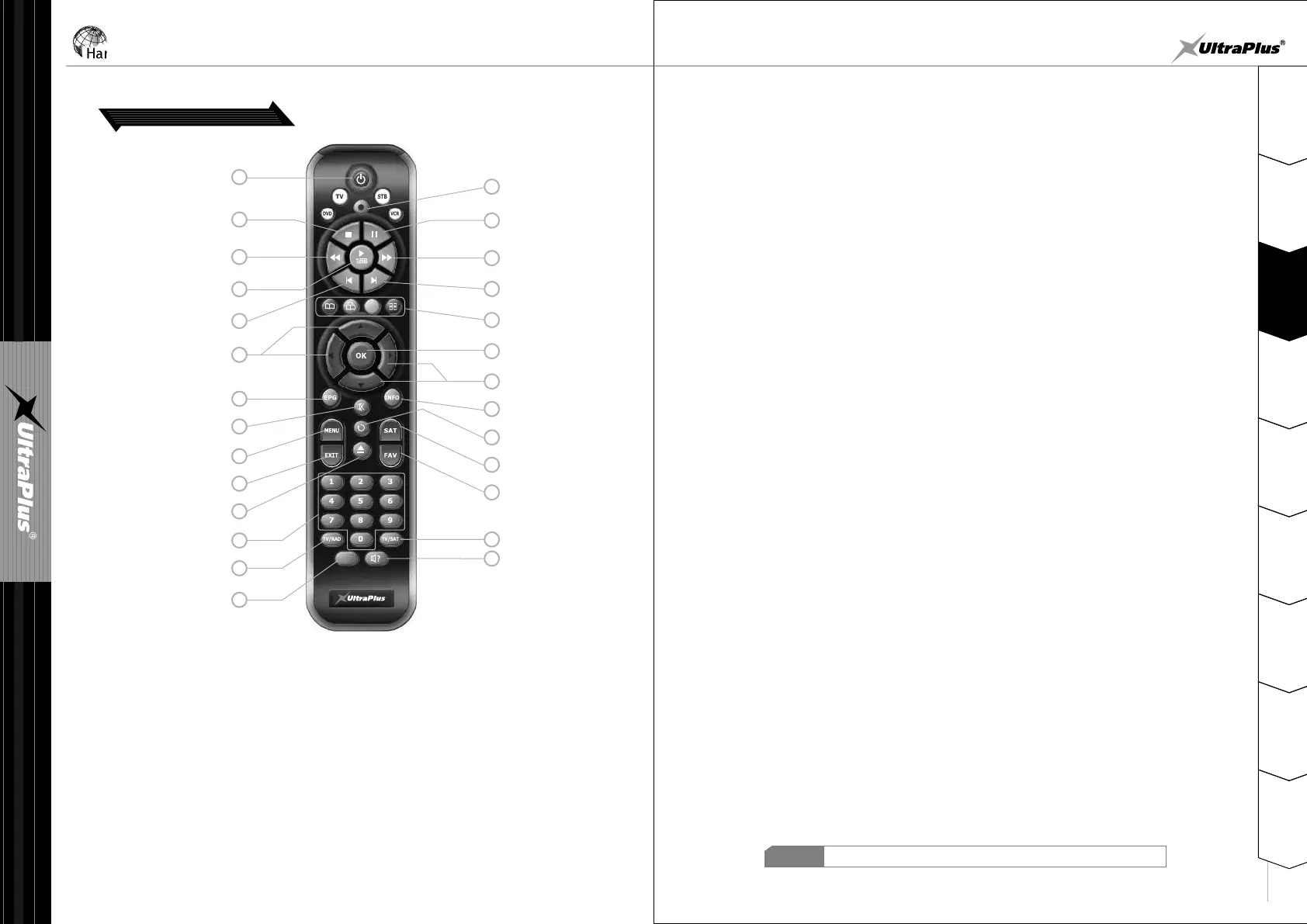
3. Remote Control Unit
POWER
PLAY/TIME SHIFT
PREV FILE
ARROW
NUMERIC Keys
MENU
TV/RADIO
RECORD
PAUSE
FAST FORWARD
OK
ARROW
FAV
TV/SAT
AUDIO
1. POWER : Turns the STB On/Off.
2. RECORD : To start recording.
3. STOP : To stop time shifting, play back or recording
4. PAUSE : This key is used to pause the video. Press once more to resume the video.
7. FAST FORWARD : Start fast forward or fast motion playback. Change the speed
of forward playback.
8. PREV FILE : To play the previous MP3 file in MP3 play mode.
9. NEXT FILE : To play the next MP3 file in MP3 play mode.
10. COLOR Keys : Used for special function in menu. RED key is used to add or delete the
current position as a bookmark. GREEN key is used to go to the next
bookmark position. BLUE key is used to display multiple pictures
11. ARROW : Moves the highlight bar for selecting options on the menus. And this key is
used to change services( ) or change audio volume( ).CH▲ / CH▼ VOL◀ / VOL▶
12. OK : Shows the service list in non-menu mode and select an item or confirm in menu mode.
13. EPG(Electronic Program Guide) : Show the TV/Radio program guide.
14. MUTE : Turns the sound On/Off.
15. INFO : Shows the information of the current program. If you press one more, detail
information box will be shown.
16. MENU : To enter the main menu or to exit from the menu.
17. RECALL : Moves to previous service.
18. SAT : To change the satellite groups.
NOTE
When inserting batteries, make sure that the polarity (+/-) is correct.
STOP
REWIND
NEXT FILE
COLOR Keys
EPG
MUTE
INFO
RECALL
SAT
EXIT
PLAY LIST
TELETEXT
/ SUBTITLE
5. REWIND : Rewind when the progress bar is displayed. Start reverse playback.
Change the speed of reverse playback.
6. PLAY/TIME SHIFT : Display the progress bar of time shifting or playback when
no progress bar is displayed. Start playback with normal speed.
Return to normal speed from trick mode.
19. EXIT : Return to the previous menu or Exit from pop-up window.
20. PLAY LIST : To display recorded service list.
21. FAV : To change the favorite groups.
22. NUMERIC Keys : Controls the numerical operation and service numbers directly.
23. TV/RADIO : Switches between TV and Radio.
24. TV/SAT : Toggles the TV output source between the satellite input and UHF/VHF
antenna input.
25. TELETEXT/SUBTITLE : To Show digital teletext or multilingual subtitle.
26. AUDIO : To show Audio Track or Sound Mode.
1
3
5
6
8
11
13
14
16
19
20
22
23
25
2
4
7
9
10
12
11
15
17
18
21
24
26


 To Next Page
 Loading...