73
The 1st line displays the latitude of the current location.
The 2nd line displays the longitude of the current location.
The 3rd line displays “OFF” (when a POI is not selected) or the name of the selected
POI.
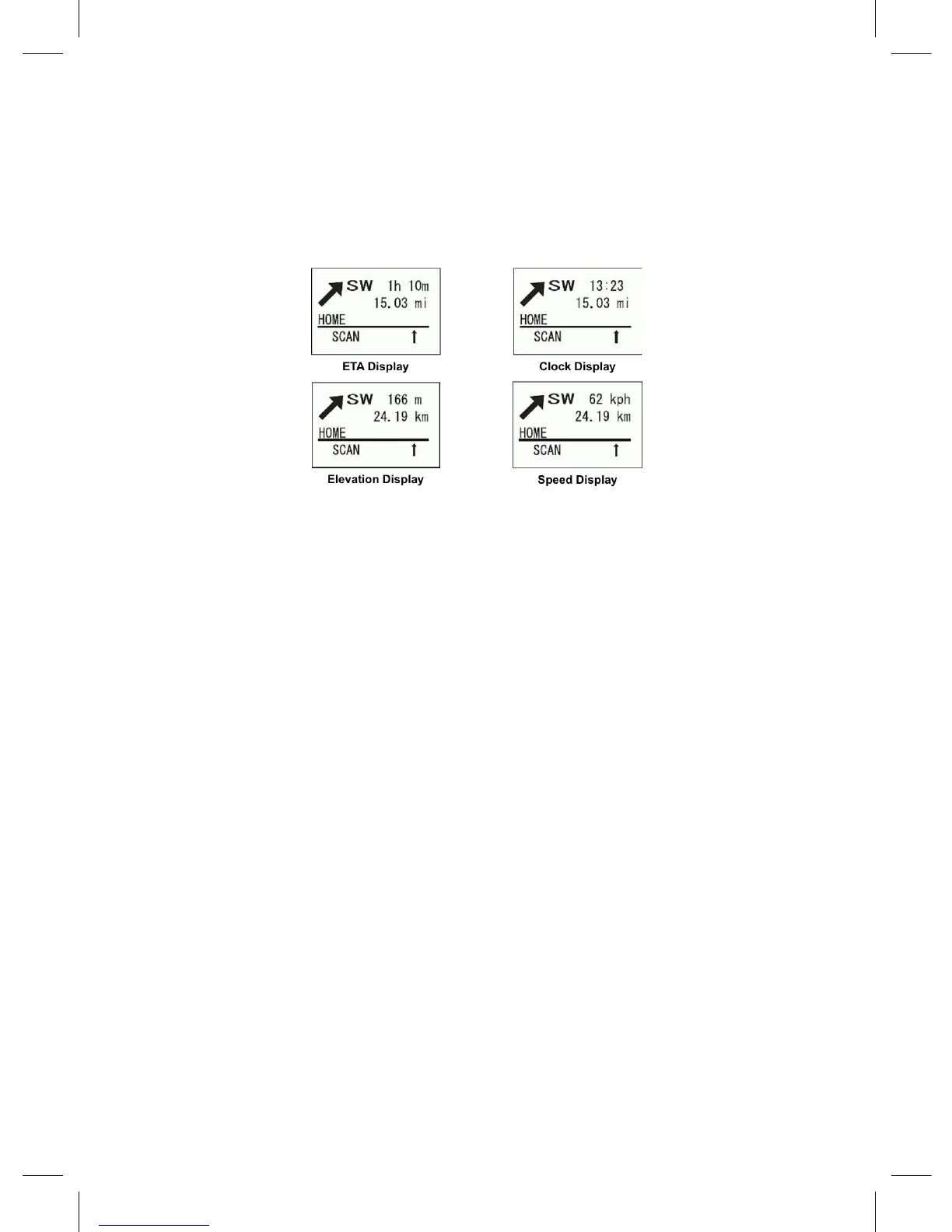
The large arrow shows the direction to the selected POI.
The left side of the 1st line displays the current direction of travel.
The 2nd line displays the distance to the selected POI.
The 3rd line displays the name of the selected POI.
The right side of the 1st line displays:
- The ETA (Estimated Time for Arrival) to the selected POI.
- The present time.
- The elevation of the current location.
- The current speed.
In GPS Display Mode
To Program the Current Location :
1. Press Func and then press and hold GPS for 2 seconds.
2. To Select a POI turn the scroll control.
3. To Toggle through the POI Display Modes press Func then 6(disp) (each
time).
Note: If no programmed location is displayed (‘OFF’ in the display), you will
only be able to toggle ‘Data Display’ and the (current) ‘Location Display’.
To Temporarily Lock Out an Alert press L/O or turn Func. The scanner automatically
unlocks the locked out location when it moves 4 miles or more from the alert point.
Quickly pressing L/O press twice permanently locks out the alert and it will not be
activated again if you should go near that alert point.




 To Next Page